1. TikTok Shop
  2. Computers & Office Equipment
  3. Network Components
  4. KVM Switches
  5. AV Access iDock C10 Dual Monitor KVM Switch Docking Station for Laptop & Desktop, EDID & Full-Featured USB-C, 60W Charging & 1Gb Ethernet for Laptop
AV Access iDock C10 Dual Monitor KVM Switch Docking Station for Laptop & Desktop, EDID & Full-Featured USB-C, 60W Charging & 1Gb Ethernet for Laptop
4
4 global reviews
5
3
4
0
3
0
2
0
1
1
Sort by
Recommended
Filter by
All
Displaying 4 of 4 reviews
Reset filters
U**p
·
Verified purchase
US
Took me a minute to figure out the inputs using laptop equipment with my hub and desktop. After realizing the connections and getting the applicable cords, so happy with the easy of use. No longer needing to keep manually switching my displays.
Item:
Default
2024-12-11
B**l
·
Verified purchase
US
Amazing for that work life balance, great customer support, and worth the price. Material: Metal Quality of work: Excellent, no scuffs, scrapes or burs.
Item:
Default
2023-11-25
J**y (**)
·
Verified purchase
US
Works great! Nice to have a USB-C version so you only need one cord. I do wish both inputs were usb-c, but maybe next version.
Item:
Default
2023-11-11
About this product
Details
Warranty TypeManufacturer Warrenty
Dangerous Goods Or Hazardous MaterialsNo
Contains Batteries Or Cells?None
Product description
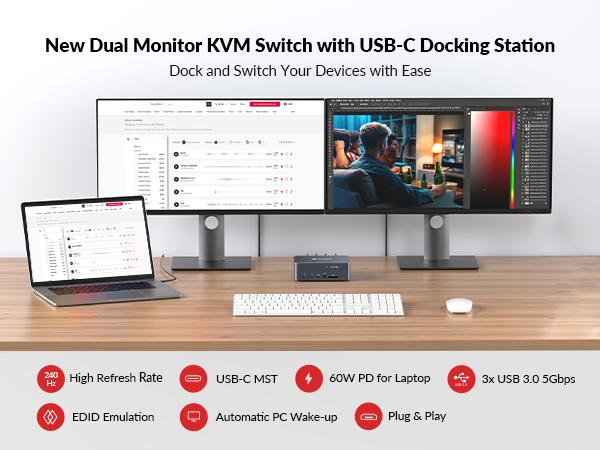
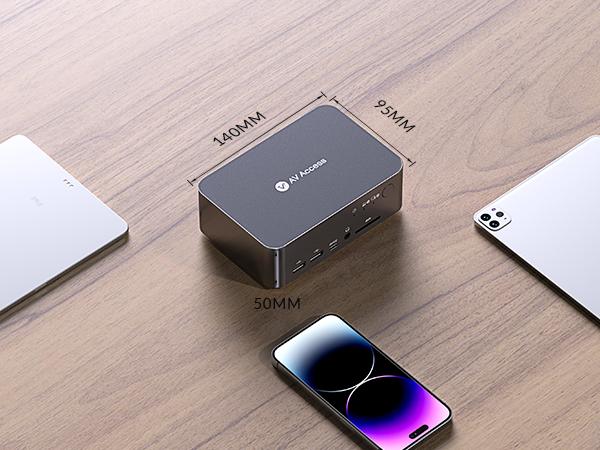
● Docking Station with Switch: Your two computers can share this 12-in-1 docking station with abundant peripheral ports like 3x USB 3.0, 2x USB 2.0, 1x USB-C, 1x SD card, 1x Toslink out, 1x 3.5mm headset, and two HDMI outputs. Build a powerful workstation at home with ease.
● New Dual Monitor Design: Built with 1x USB-C (MST) input port for laptop, and 1x integrated HDMI + DisplayPort + USB-B input port for desktop computer. Switch easily between your workstation and gaming PC, and view two monitors at the same time.
● Ultra-High Refresh Rate: HDMI 2.0, DisplayPort 1.2 & DisplayPort 1.4a (USB-C) compliant. Supports up to 4K@60Hz 4:4:4. Also supports high refresh rates like 1080P@240Hz/165Hz/144Hz/120Hz, and 2560×1440@144Hz/120Hz, ensuring wonderful gaming experiences.
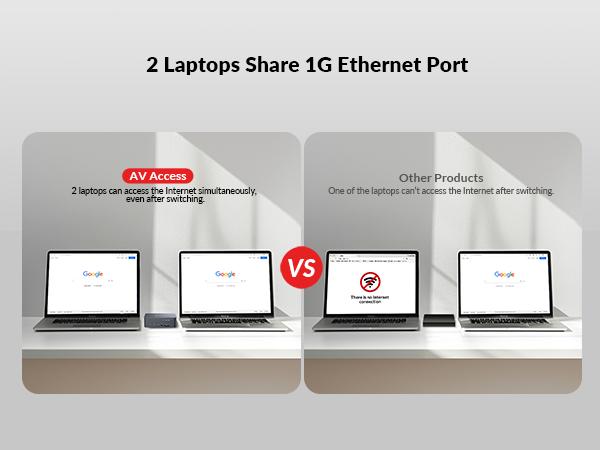
● Full-Featured USB-C: With the 20Gbp/s USB-C port, you can input dual 4K UHD videos and transmit a large amount of data with up to 5Gbp/s. Also, you can charge your laptop with up to 60W simultaneously. Besides, the adjacent LAN port can provide Internet access for your laptop.
● Super Fast Switching: With the automatic PC wake-up function and EDID simulation, it only takes you 2-3 seconds to switch between your PC sources. Just press the front control button to switch effortlessly.
● Important Notes: The latest Mac computer with an ARM processor can only support DP SST mode, so two duplicate contents will be displayed. For the extended display mode on two screens, please make sure to use a USB-C laptop that supports DP alt mode and DP MST mode. If you encounter any problems while using the product, please contact us via support@avaccess.com.
AV Access iDock C10 Dual Monitor KVM Switch Docking Station for Laptop & Desktop, EDID & Full-Featured USB-C, 60W Charging & 1Gb Ethernet for LaptopAV Access iDock C10 Dual Monitor KVM Switch Docking Station for Laptop & Desktop, EDID & Full-Featured USB-C, 60W Charging & 1Gb Ethernet for LaptopAV Access iDock C10 Dual Monitor KVM Switch Docking Station for Laptop & Desktop, EDID & Full-Featured USB-C, 60W Charging & 1Gb Ethernet for LaptopAV Access iDock C10 Dual Monitor KVM Switch Docking Station for Laptop & Desktop, EDID & Full-Featured USB-C, 60W Charging & 1Gb Ethernet for LaptopAV Access iDock C10 Dual Monitor KVM Switch Docking Station for Laptop & Desktop, EDID & Full-Featured USB-C, 60W Charging & 1Gb Ethernet for LaptopAV Access iDock C10 Dual Monitor KVM Switch Docking Station for Laptop & Desktop, EDID & Full-Featured USB-C, 60W Charging & 1Gb Ethernet for LaptopAV Access iDock C10 Dual Monitor KVM Switch Docking Station for Laptop & Desktop, EDID & Full-Featured USB-C, 60W Charging & 1Gb Ethernet for LaptopAV Access iDock C10 Dual Monitor KVM Switch Docking Station for Laptop & Desktop, EDID & Full-Featured USB-C, 60W Charging & 1Gb Ethernet for LaptopAV Access iDock C10 Dual Monitor KVM Switch Docking Station for Laptop & Desktop, EDID & Full-Featured USB-C, 60W Charging & 1Gb Ethernet for LaptopAV Access iDock C10 Dual Monitor KVM Switch Docking Station for Laptop & Desktop, EDID & Full-Featured USB-C, 60W Charging & 1Gb Ethernet for LaptopAV Access iDock C10 Dual Monitor KVM Switch Docking Station for Laptop & Desktop, EDID & Full-Featured USB-C, 60W Charging & 1Gb Ethernet for Laptop
In the Box
·1x Dual Monitor KVM Switch with Docking Station
·1x Power Adapter (20V/6A)
·1x USB-C to USB-C cable (USB 3.2 Gen 2, 1m)
·1x USB-A to USB-B cable (USB 3.0, 1.5m)
·1x HDMI 2.0 cable (1.5m)
·1x DisplayPort 1.2a cable (1.5m)
·1x User Manual
View more
Video
Videos for this product
Tired of Wi-Fi dropouts on your MacBook? iDock C10 has got your back! Stay connected with a stable wired network through this versatile docking station. #dualmonitors #workstation #desksetup #dockingstation #kvmswitch #laptop #techtok #macbookair #fyp
AV Access
594
Effortlessly switch between your work laptop and personal PC while keeping your monitors, keyboard, and mouse connected.  Simplify your workflow and get more done!   #kvmdock #dualmonitors #dualmonitorkvmswitch #dockingstation #wfhsetup #tiktokshopshortvideosprint
AV Access
366
2x1 dual monitor KVM switch + 12-in-1 docking station: a must if you have a laptop and a PC. #extendedscreen #dualmonitors #homeoffice #dockingstation #kvmswitch #laptop #techtok #macbook #fyp
AV Access
251
Connect USB devices to your MacBook Air easily! And switch them between MacBook Air and PC with ease! #workflow #usbdevice #dockingstation #kvmswitch #dualmonitors  #macbookair #fyp #laptop #pc #dualmonitorkvmswitch #kvmdock
AV Access
184
Upgrade ur workspace with iDock C10: dual monitor KVM Switch + docking station!  #kvmdock #dualmonitors #homeoffice #kvmdock #dockingstation #kvmswitch #techtok #macbookair #fyp
AV Access
67
One setup, two powerhouses. This KVM dock lets you seamlessly switch between your coding PC and work laptop with a single click.  #codinghsetup #dualmonitor #kvmdock #dualmonitorkvmswitch #wfhsetup #dockingstation #tech #laptop #codingpc
AV Access
63
Bringing my work laptop home used to be a hassle, but the #idock KVM docking station changed everything! 🎮💻 1️⃣ Easily connect your laptop to your existing setup 2️⃣ Seamlessly swap between work and gaming 3️⃣ Use dual 4K monitors and all your peripherals with one cable Upgrade your #homeoffice setup with iDock C10!  #kvmdockingstation  #kvmswitch  #dualmonitor #dualmonitorkvmswitch #kvmdock   #laptopdockingstation #dealsforyoudays
AV Access
16
Level Up Ur DUAL MONITOR Desksetup in Minutes: Unboxing & Easy Setup of this KVM Swicth Docking Station   #unboxing #dualpc #dualmonitors #workstation #kvmswitch #dockingstation #laptop #macbookair #fyp #avaccess
AV Access
11
2x1 dual monitor KVM switch + 12-in-1 docking station: a must if you have a laptop and a PC. #extendedscreen #dualmonitors #homeoffice #dockingstation #kvmswitch #laptop #techtok #macbook #fyp
AV Access
8
This dual system setup maximizes your design workflow! Render and Edit smoothly with this KVM dock and dual monitor setup.  #desinger #dualmonitors #extendedscreen #kvmswitch #dualmonitorkvmswitch #dockingstation #wfhsetup #macbook
AV Access
5
Who says you can't have it all? This #kvmdock is my secret weapon for balancing work deadlines and #eurocup matches. #eurocup2024 #idockc10 #wfhsetup #kvmswitch  #dockingstation #laptopdockingstation #dualmonitor #dualpc #dealsforyoudays
AV Access
2
Multitask like a pro with a KVM switch docking station. #kvmdock #homeoffice #workstation #dockingstation #kvmswitch #dualmonitors #fyp #techtok #dualmonitorkvmswitch
AV Access
2
Euro Cup AND work deadlines? This #kvmdock iDock C10 lets me switch between projects and catch all the games! #idock #kvmdockingstation #kvmswitch #dualpc #laptopdockingstation #dualmonitorkvmswitch  #usbcdockingstation #euro2024 #dealsforyoudays
AV Access
1
Hit the button and easily toggle between gaming and work. #kvmdock #gamingsetup #dockingstation #kvmswitch #dualmonitors #usbhub #techtok #fyp
AV Access
1
Explore more from AV Access
You may also like
POE To USB Converter - 48V DC POE Input
Free shipping
Dell D6000S Universal Docking Station
Free shipping