Results for "bootable linux pendrive"
A bootable Linux pendrive is a USB flash drive that has been configured to start a Linux operating system when the computer boots from it. This allows users to run Linux without installing it on their hard drive.


Newegg, Inc.

4.5
247 sold
-37%$18.42$29.27


Newegg, Inc.
5.0
10 sold
-17%$37.94$45.53

Newegg, Inc.
4.8
40 sold
-23%$22.22$28.72

4.5
213 sold
-43%$15.44$27.10


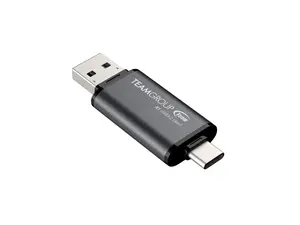
Newegg, Inc.
4.7
38 sold
-12%$16.25$18.42


Related Searches
Related Categories
Introduction
Creating a bootable Linux pendrive is a simple yet powerful way to carry a Linux operating system with you wherever you go. Whether you're troubleshooting a computer, testing out a new Linux distribution, or simply want to use Linux on a different machine, a bootable Linux pendrive is the perfect solution. With a bootable Linux pendrive, you can boot into a fully functional Linux environment without making any changes to the host computer's operating system.
Here are some key benefits of using a bootable Linux pendrive:
It's important to ensure that you back up any important data on your USB drive before proceeding, as creating a bootable drive will erase existing data. Once completed, you can easily boot from the pendrive by selecting it as the boot device in your computer's BIOS or UEFI settings. Enjoy the freedom and versatility that comes with having a bootable Linux pendrive at your fingertips!
Here are some key benefits of using a bootable Linux pendrive:
- Portability: Easily transport your Linux OS on a small USB drive.
- Flexibility: Test out different Linux distributions without installation.
- Recovery Tool: Use it for system recovery or troubleshooting.
- Secure Browsing: Browse the internet on a secure operating system.
It's important to ensure that you back up any important data on your USB drive before proceeding, as creating a bootable drive will erase existing data. Once completed, you can easily boot from the pendrive by selecting it as the boot device in your computer's BIOS or UEFI settings. Enjoy the freedom and versatility that comes with having a bootable Linux pendrive at your fingertips!