Results for "how to put airpods in discovery mode"
Discovery mode for AirPods allows them to be paired with a new device by making them discoverable via Bluetooth.

![2 Pairs AirPods 4 Ear Tips Cover Designed for AirPods 4, [Fit in The Case] Anti Slip Silicone Cover, Anti Scratches, Installation Guide (1 Pair of Each) (Dark Grey & White)](https://p16-oec-general-useast5.ttcdn-us.com/tos-useast5-i-omjb5zjo8w-tx/0509bc2c274a4071babeb636c49dbb6b~tplv-fhlh96nyum-crop-webp:300:300.webp?dr=12190&t=555f072d&ps=933b5bde&shp=8dbd94bf&shcp=a6e80448&idc=useast5&from=2378011839 "2 Pairs AirPods 4 Ear Tips Cover Designed for AirPods 4, [Fit in The Case] Anti Slip Silicone Cover, Anti Scratches, Installation Guide (1 Pair of Each) (Dark Grey & White)")
![2 Pairs AirPods 4 Ear Tips Cover Designed for AirPods 4, [Fit in The Case] Anti Slip Silicone Cover, Anti Scratches, Installation Guide (1 Pair of Each) (Dark Grey & White)](https://p16-oec-general-useast5.ttcdn-us.com/tos-useast5-i-omjb5zjo8w-tx/8b2b40bf3d804503a2704a034b23afd7~tplv-fhlh96nyum-crop-webp:300:300.webp?dr=12190&t=555f072d&ps=933b5bde&shp=8dbd94bf&shcp=a6e80448&idc=useast5&from=2378011839 "2 Pairs AirPods 4 Ear Tips Cover Designed for AirPods 4, [Fit in The Case] Anti Slip Silicone Cover, Anti Scratches, Installation Guide (1 Pair of Each) (Dark Grey & White)")



![[Tpy 2B123] Red Apple Green Apple Apply Apple AirPods 4th Generation Apple Wireless Bluetooth Headset Cover AirPods Personality Advanced Sense Accessories](https://p16-oec-general-useast5.ttcdn-us.com/tos-useast5-i-omjb5zjo8w-tx/67a08dd29ba34191a776343931e03df7~tplv-fhlh96nyum-crop-webp:300:300.webp?dr=12190&t=555f072d&ps=933b5bde&shp=8dbd94bf&shcp=a6e80448&idc=useast5&from=2378011839 "[Tpy 2B123] Red Apple Green Apple Apply Apple AirPods 4th Generation Apple Wireless Bluetooth Headset Cover AirPods Personality Advanced Sense Accessories")


![[3 Pairs] Replacement Ear Tips for Airpods Pro and Airpods Pro 2nd Generation with Noise Reduction Hole,Silicone Ear Tips for Airpods Pro with Portable Storage Box and Fit in The Charging Case(Medium)](https://p16-oec-general-useast5.ttcdn-us.com/tos-useast5-i-omjb5zjo8w-tx/ebbf7ce775c944d689de812eb47d2cd3~tplv-fhlh96nyum-crop-webp:300:300.webp?dr=12190&t=555f072d&ps=933b5bde&shp=8dbd94bf&shcp=a6e80448&idc=useast5&from=2378011839 "[3 Pairs] Replacement Ear Tips for Airpods Pro and Airpods Pro 2nd Generation with Noise Reduction Hole,Silicone Ear Tips for Airpods Pro with Portable Storage Box and Fit in The Charging Case(Medium)")


Related Searches
Related Categories
Introduction
If you're looking to connect your AirPods to a new device, knowing how to put AirPods in discovery mode is essential. This process makes your AirPods visible to other Bluetooth devices, allowing for seamless pairing. To start, ensure that your AirPods are charged and in their case. Follow these simple steps to enter discovery mode:
1. Open the lid of the AirPods case without removing the AirPods.
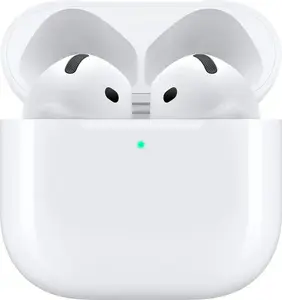
2. Press and hold the setup button on the back of the case until the status light starts flashing white. This indicates that your AirPods are now in discovery mode.
3. On your device, go to the Bluetooth settings and look for your AirPods in the list of available devices.
4. Select your AirPods to complete the pairing process.
Important Tips:
1. Open the lid of the AirPods case without removing the AirPods.
2. Press and hold the setup button on the back of the case until the status light starts flashing white. This indicates that your AirPods are now in discovery mode.
3. On your device, go to the Bluetooth settings and look for your AirPods in the list of available devices.
4. Select your AirPods to complete the pairing process.
Important Tips:
- Ensure your device's Bluetooth is .
- If your AirPods do not appear, try resetting them by holding the setup button until the light flashes amber, then white again.