Results for "how to program tpms sensors"
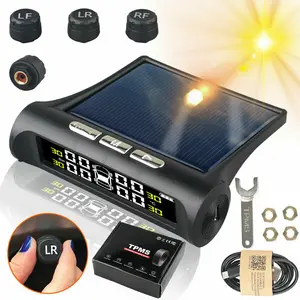
TPMS sensors, or Tire Pressure Monitoring System sensors, are devices that monitor the air pressure inside pneumatic tires. They provide real-time data to help ensure optimal tire pressure, enhancing safety and fuel efficiency.


![[ONLY for GM & Ford] VXDAS Super GL50448 2-in-1 TPMS Relearn Reset Tool for Ford & GM | Tire Sensor Activation for F150, Buick, Cadillac, Chevrolet, GMC, Lincoln, Mazda](https://p19-oec-general-useast5.ttcdn-us.com/tos-useast5-i-omjb5zjo8w-tx/1eabc0d5b53544ae909a9b0b07880a9b~tplv-fhlh96nyum-crop-webp:300:300.webp?dr=12190&t=555f072d&ps=933b5bde&shp=8dbd94bf&shcp=a6e80448&idc=useast5&from=2378011839 "[ONLY for GM & Ford] VXDAS Super GL50448 2-in-1 TPMS Relearn Reset Tool for Ford & GM | Tire Sensor Activation for F150, Buick, Cadillac, Chevrolet, GMC, Lincoln, Mazda")


![[GM Only] VXDAS EL-50448 TPMS Relearn Tool for Chevy/GMC/Buick/Cadillac | Tire Sensor Reset | Year-End Sale 2025](https://p16-oec-general-useast5.ttcdn-us.com/tos-useast5-i-omjb5zjo8w-tx/f62e3e69d76b4a02ab3ea5d53c24069e~tplv-fhlh96nyum-crop-webp:300:300.webp?dr=12190&t=555f072d&ps=933b5bde&shp=8dbd94bf&shcp=a6e80448&idc=useast5&from=2378011839 "[GM Only] VXDAS EL-50448 TPMS Relearn Tool for Chevy/GMC/Buick/Cadillac | Tire Sensor Reset | Year-End Sale 2025")


![[Only for GM]VXDAS TPA01 2-in-1 TPMS Relearn Tool & Digital Tire Pressure Gauge |150 PSI Reset Tool for GM Chevy Buick GMC Cadillac Opel | Tire Sensor Activation & Pressure Monitor](https://p16-oec-general-useast5.ttcdn-us.com/tos-useast5-i-omjb5zjo8w-tx/480b4a414f8947c9944a79d0cb818b0f~tplv-fhlh96nyum-crop-webp:300:300.webp?dr=12190&t=555f072d&ps=933b5bde&shp=8dbd94bf&shcp=a6e80448&idc=useast5&from=2378011839 "[Only for GM]VXDAS TPA01 2-in-1 TPMS Relearn Tool & Digital Tire Pressure Gauge |150 PSI Reset Tool for GM Chevy Buick GMC Cadillac Opel | Tire Sensor Activation & Pressure Monitor")

![[Ford/GM Group Only ] VXDAS Super GL50448 2-in-1 TPMS Relearn Tool for Ford & GM | Tire Sensor Reset & Activation with Model Switch Buick/Cadillac/Chevrolet/GMC/Lincoln/Mazda](https://p16-oec-general-useast5.ttcdn-us.com/tos-useast5-i-omjb5zjo8w-tx/571803d00fdb476c9d5dd5b03301233e~tplv-fhlh96nyum-crop-webp:300:300.webp?dr=12190&t=555f072d&ps=933b5bde&shp=8dbd94bf&shcp=a6e80448&idc=useast5&from=2378011839 "[Ford/GM Group Only ] VXDAS Super GL50448 2-in-1 TPMS Relearn Tool for Ford & GM | Tire Sensor Reset & Activation with Model Switch Buick/Cadillac/Chevrolet/GMC/Lincoln/Mazda")


![[Only Ford/GM] VXDAS Super GL50448 2-in-1 TPMS Relearn Tool for GM & Ford Green Edition Tire Sensor Reset Tool | One-Switch Activation for Chevy, Buick, GMC, Ford, Lincoln, Mazda](https://p19-oec-general-useast5.ttcdn-us.com/tos-useast5-i-omjb5zjo8w-tx/44962a41a3aa4ac3b60696ff64b92d4c~tplv-fhlh96nyum-crop-webp:300:300.webp?dr=12190&t=555f072d&ps=933b5bde&shp=8dbd94bf&shcp=a6e80448&idc=useast5&from=2378011839 "[Only Ford/GM] VXDAS Super GL50448 2-in-1 TPMS Relearn Tool for GM & Ford Green Edition Tire Sensor Reset Tool | One-Switch Activation for Chevy, Buick, GMC, Ford, Lincoln, Mazda")

![[For GM&Ford]VXDAS Super GL50448 2-in-1 TPMS Relearn Tool for GM & Ford |Green Edition Tire Sensor Reset Tool | One-Switch Activation for F150, Silverado, Sierra, Buick, Lincoln](https://p16-oec-general-useast5.ttcdn-us.com/tos-useast5-i-omjb5zjo8w-tx/15ba7f5e1e6347a39f993efa7742a7d3~tplv-fhlh96nyum-crop-webp:300:300.webp?dr=12190&t=555f072d&ps=933b5bde&shp=8dbd94bf&shcp=a6e80448&idc=useast5&from=2378011839 "[For GM&Ford]VXDAS Super GL50448 2-in-1 TPMS Relearn Tool for GM & Ford |Green Edition Tire Sensor Reset Tool | One-Switch Activation for F150, Silverado, Sierra, Buick, Lincoln")

![[For GM]VXDAS EL-50448 TPMS Reset Tool Professional Tire Sensor Relearn & Activation Tool for Chevy, Buick, GMC & Cadillac Series 2006-2026](https://p16-oec-general-useast5.ttcdn-us.com/tos-useast5-i-omjb5zjo8w-tx/8b8c7f444a2b4b8aadd34f0acfdcdf6d~tplv-fhlh96nyum-crop-webp:300:300.webp?dr=12190&t=555f072d&ps=933b5bde&shp=8dbd94bf&shcp=a6e80448&idc=useast5&from=2378011839 "[For GM]VXDAS EL-50448 TPMS Reset Tool Professional Tire Sensor Relearn & Activation Tool for Chevy, Buick, GMC & Cadillac Series 2006-2026")


VEVOR Store

3.0
6 sold
$211.60

Related Searches
Related Categories
Introduction
Programming TPMS sensors is an essential task for maintaining your vehicle's tire health. Tire Pressure Monitoring Systems (TPMS) are designed to alert drivers wre pressure is too low, which can lead to safety hazards and decreased fuel efficiency. Understanding how to program these sensors is crucial for any vehicle owner, especially those who frequently change tires or perform maintenance.
Here’s a step-by-step guide to help you program TPMS sensors effectively:
Regularly checking and programming your TPMS sensors can prevent issues related to tire pressure, ensuring a safer driving experience. Always refer to your vehicle's manual for specific instructions, as procedures may vary by model. Remember, maintaining proper tire pressure is not just about compliance; it’s about ensuring your safety on the road. Trust the process and keep your tires in check for a smoother ride.
Here’s a step-by-step guide to help you program TPMS sensors effectively:
- 1. **Gather Necessary Tools**: You'll need a TPMS tool, which is essential for programming.
- 2. **Access the Vehicle's OBD-II Port**: This is usually located under the dashboard. Connect your TPMS tool to this port.
- 3. **Select the Vehicle Make and Model**: Follow the prompts on the TPMS tool to choose your vehicle's make and model.
- 4. **Program the Sensors**: Follow the instructions provided by the TPMS tool to program each sensor. This usually involves activating the sensors one by one.
- 5. **Test the System**: After programming, ensure that the TPMS warning light on your dashboard goes off, indicating that the system is functioning correctly.
Regularly checking and programming your TPMS sensors can prevent issues related to tire pressure, ensuring a safer driving experience. Always refer to your vehicle's manual for specific instructions, as procedures may vary by model. Remember, maintaining proper tire pressure is not just about compliance; it’s about ensuring your safety on the road. Trust the process and keep your tires in check for a smoother ride.