- TikTok Shop
- Phones & Electronics
- Gaming & Consoles
- Console Accessories
- Cockpit Simulator 737X Stand, Desktop Mounting Stand for MCP and EFIS Panels, Stable Modular Cockpit Support


About this product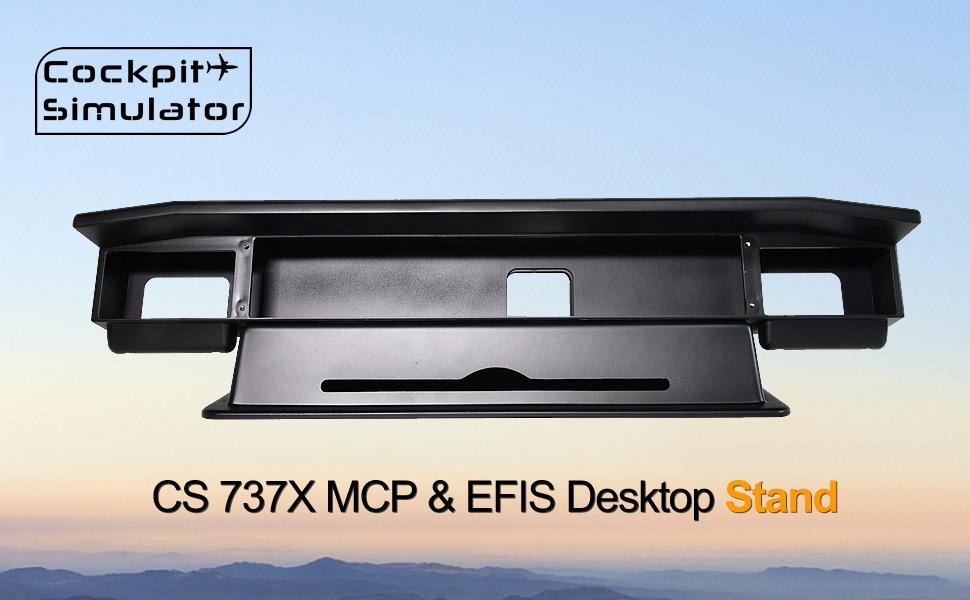



Product description
·1. Dedicated 737X Mounting Solution Designed specifically for Cockpit Simulator 737X MCP and EFIS panels, providing proper viewing angle and ergonomic positioning
·2. Stable Desktop Structure Engineered to reduce movement during operation, ensuring stability and control precision during intensive flight simulation sessions
·3. Modular & Expandable Design Supports single or multiple cockpit modules, allowing flexible expansion and reconfiguration as your cockpit setup evolves
·4. Durable Construction Built with rigid structural materials and reinforced joints to maintain long-term stability and structural integrity
·5. Clean & Professional Cockpit Layout Helps organize cockpit components into a unified, professional layout, improving immersion and operational efficiency
·* Desktop stand is not sold separately, only with the purchase of MCP or EFIS in our shop, otherwise we will have to cancel your order.
·Product Description
·* Desktop stand is not sold separately, only with the purchase of MCP or EFIS in our shop, otherwise we will have to cancel your order.
Product Description
* Desktop stand is not sold separately, only with the purchase of MCP or EFIS in our shop, otherwise we will have to cancel your order.
Package Contents
1x Desktop stand
4x Screws for MCP mounting
4x Screws for EFIS fixing
Dimensions and Weight
Product dimensions (W x D x H):723 x 187 x 183 mm
Package dimensions (W x D x H):800 x 250 x 250 mm
Product weight:4.0 kg
Package weight:5.0 kg
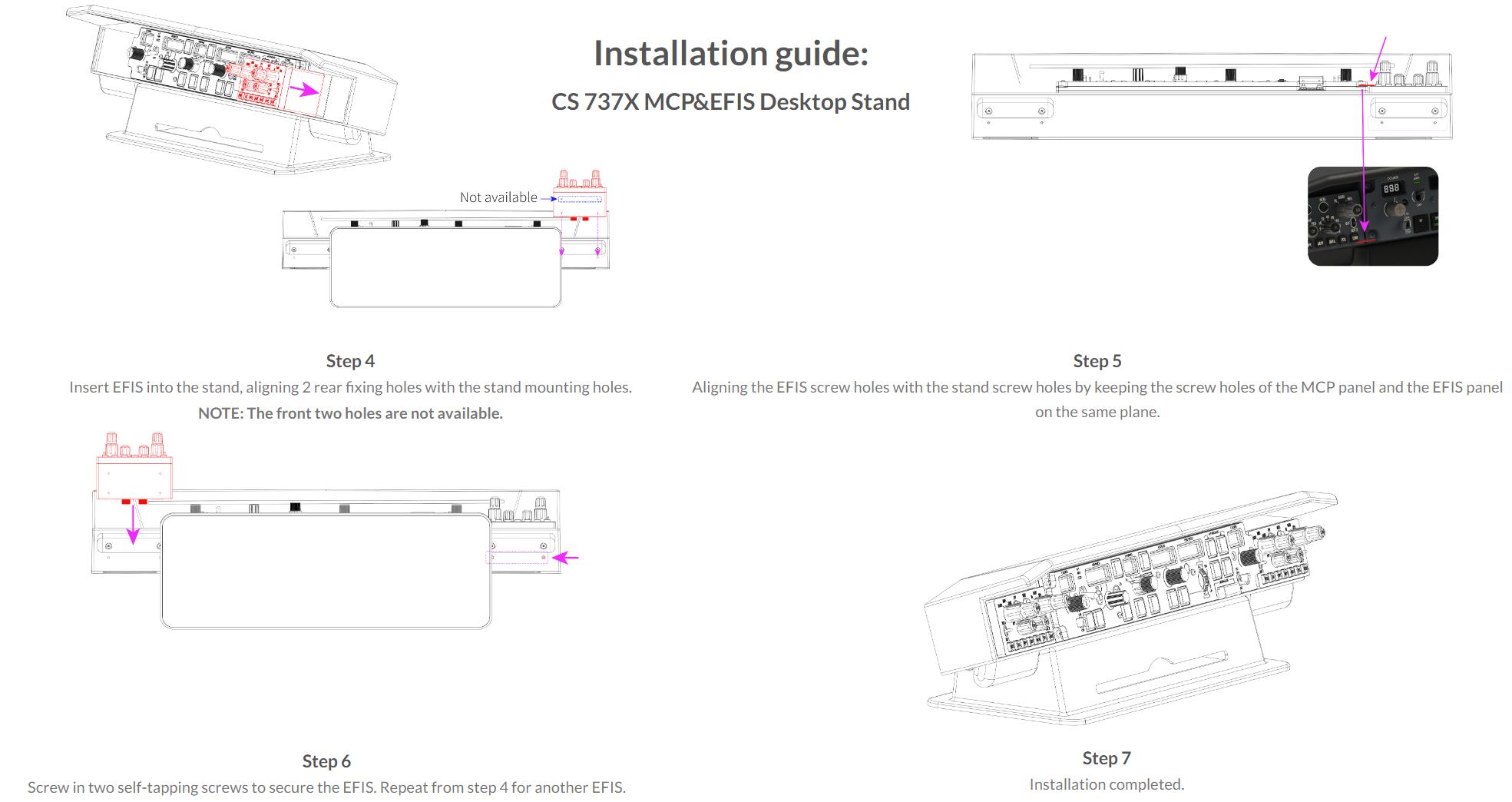
Installation guide: CS 737X MCP&EFIS Desktop Stand
Step 1 Insert the 4 gray screws into the MCP fixing holes at the same time.
Step 2 Align the 4 gray screws with the screw holes of the stand, and twist each screw 2 to 3 turns. Do not tighten individually.
Step 3 Pay attention to leaving a gap between the screw and the panel. Overtightening will cause the panel to peel off the paint.
Step 4 Insert EFIS into the stand, aligning 2 rear fixing holes with the stand mounting holes.
NOTE: The front two holes are not available.
Step 5 Aligning the EFIS screw holes with the stand screw holes by keeping the screw holes of the MCP panel and the EFIS panel on the same plane.
Step 6 Screw in two self-tapping screws to secure the EFIS. Repeat from step 4 for another EFIS.
Step 7 Installation completed.
About Cockpit Simulator
The members of Cockpit Simulator come from all over the world, and the core designers have work experience in professional avionics companies, full flight simulator companies, aircraft maintenance engineering companies, and well-known software companies. At the same time, we are also flight simulation enthusiasts.
We are dedicated to making the most realistic simulation equipment for flight simulation enthusiasts. The feature of our products is infinitely closer to the functionality and feel of a real aircraft and at a low price.
We will complete each module of the cockpit step by step, so that every flight simulation enthusiast can build a flight simulator at home.
View more
$345.00
Free shipping
Cockpit Simulator 737X Stand, Desktop Mounting Stand for MCP and EFIS Panels, Stable Modular Cockpit Support
0 sold
Specification:Default
Default
Quantity:
Coupon center
Log in to check your coupons
View and claim any available offers once you're logged in.
Shipping & returns
Shipping & delivery
Many items qualify for free shipping or become eligible once the order threshold is met.
Returns made easy
Most items are eligible for free returns within 30 days of delivery for a refund. Some items, including ingestibles, hygiene products, and pre-owned goods, are non-returnable. Final sale items cannot be returned or replaced. Please log in to view this item's specific return policy.
About this shop

CockpitSim
Visit
Explore more from CockpitSim


You may also like














Sweetcrispy Official
4.6
9.9K sold
-60%$61.72$154.35
Sweetcrispy Official
4.8
6.1K sold
-40%$69.72$116.23
Sweetcrispy Official
4.6
21.7K sold
-54%$22.17$48.60
Sweetcrispy Official
4.5
9.2K sold
-45%$49.85$91.42
Sweetcrispy Official
4.7
27.8K sold
-62%$23.72$62.92
Xtra Direct
4.9
12.5K sold
-49%$380.52$739.00
Sweetcrispy Official
4.7
4.9K sold
-46%$51.03$94.98
Sweetcrispy Official
4.8
27.0K sold
-52%$25.34$52.83


Sweetcrispy Official
4.6
2.3K sold
-58%$35.91$84.53
ARZOPA TECH
4.6
9.0K sold
-33%$11.86$17.80
Sweetcrispy Official
4.4
4.7K sold
-51%$87.84$178.10
Sweetcrispy Official
4.2
1.9K sold
-36%$37.97$59.36
Sweetcrispy Official
4.3
1.6K sold
-69%$61.27$196.54
Sweetcrispy Official
4.2
1.1K sold
-54%$37.97$83.11
Sweetcrispy Official
4.8
1.5K sold
-46%$51.03$94.98
Sweetcrispy Official
4.6
770 sold
-39%$51.03$83.11
Sweetcrispy Official
4.7
7.1K sold
-63%$43.08$116.49


Sweetcrispy Official
4.6
2.0K sold
-64%$58.23$163.09
Sweetcrispy Official
4.3
400 sold
-44%$58.23$104.84
Sweetcrispy Official
4.3
425 sold
-56%$97.84$221.34
Sweetcrispy Official
4.6
402 sold
-86%$32.60$232.99
