Results for "xbox flight simulator controls"
Xbox Flight Simulator controls refer to the various input methods and configurations that players can use to operate aircraft within the Xbox Flight Simulator game. These controls can include gamepads, flight sticks, and keyboard settings tailored for an immersive flight experience.


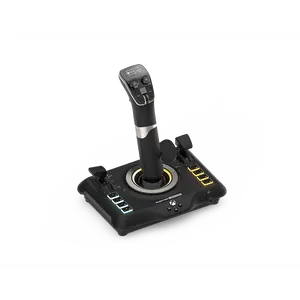
![PC Accessory: Flight - Control System - Thrustmaster T-Flight HOTAS One - Microsoft Flight Edition - White [GAMES ACCESSORIES] Xbox Series X , Controller, PC Games](https://p16-oec-general-useast5.ttcdn-us.com/tos-useast5-i-omjb5zjo8w-tx/68d1320e8d8e4069aa5a3b0d7cd909f8~tplv-fhlh96nyum-crop-webp:300:287.webp?dr=12190&t=555f072d&ps=933b5bde&shp=8dbd94bf&shcp=a6e80448&idc=useast5&from=2378011839 "PC Accessory: Flight - Control System - Thrustmaster T-Flight HOTAS One - Microsoft Flight Edition - White [GAMES ACCESSORIES] Xbox Series X , Controller, PC Games")




Turtle Beach Gaming

4.5
53 sold
$139.99
Related Searches
Introduction
If you're diving into the world of Xbox Flight Simulator, understanding the controls is crucial for a smooth flight experience. The game offers a range of control options, allowing players to choose what suits them best. Whether you're using a standard Xbox controller or a specialized flight stick, mastering the controls can enhance your gameplay significantly.
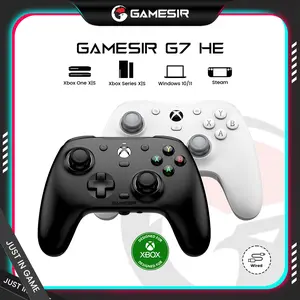
The Xbox controller provides a straightforward layout, where the left joystick controls your aircraft's movement, while the right joystick is used for camera angles and fine-tuning your flight path. Additionally, buttons are mapped for essential functions like throttle control, landing gear, and .
For those seeking a more autc experience, investing in flight simulation accessories can be a game-changer. Flight sticks and yokes offer precision and tactile feedback, mimicking real-life aircraft controls. Many of these devices come with customizable buttons, allowing you to tailor your setup to your flying style.
Don't forget to explore the game’s settings menu, where you can adjust sensitivity and dead zones to suit your preferences. With the right controls, you can navigate through stunning landscapes and perform complex maneuvers with ease.
Remember, practice makes perfect! The more you familiarize yourself with the Xbox Flight Simulator controls, the more enjoyable your flying experience will be.
The Xbox controller provides a straightforward layout, where the left joystick controls your aircraft's movement, while the right joystick is used for camera angles and fine-tuning your flight path. Additionally, buttons are mapped for essential functions like throttle control, landing gear, and .
For those seeking a more autc experience, investing in flight simulation accessories can be a game-changer. Flight sticks and yokes offer precision and tactile feedback, mimicking real-life aircraft controls. Many of these devices come with customizable buttons, allowing you to tailor your setup to your flying style.
Don't forget to explore the game’s settings menu, where you can adjust sensitivity and dead zones to suit your preferences. With the right controls, you can navigate through stunning landscapes and perform complex maneuvers with ease.
Remember, practice makes perfect! The more you familiarize yourself with the Xbox Flight Simulator controls, the more enjoyable your flying experience will be.