Results for "how to install a carplay screen on a car"
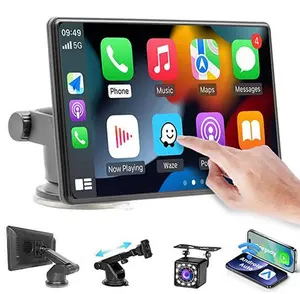
Installing a CarPlay screen in your vehicle allows you to seamlessly integrate your iPhone with your car's infotainment system, providing access to apps, navigation, and music.


4.2
157 sold
-51%$41.59$85.20


Related Searches
Related Categories
Introduction
Installing a CarPlay screen in your car can transform your driving experience by providing easy access to your favorite apps and features. CarPlay allows you to connect your iPhone to your car's display, enabling you to use navigation, listen to music, and make calls hands-free. To install a CarPlay screen, you'll first need to ensure your vehicle is compatible with the system. Here are some steps to guide you through the installation process:
- Choose the Right Screen: Select a CarPlay-compatible screen that fits your vehicle's dashboard.
- Gather Tools: Ensure you have the necessary tools, including a screwdriver, wire connectors, and a wiring harness.
- Disconnect the Battery: For safety, disconnect the car battery before starting the installation.
- Remove the Existing Stereo: Carefully take out the old stereo unit from the dashboard.
- Connect the Wiring: Follow the instructions provided with your CarPlay screen to connect the wiring harness correctly.
- Mount the New Screen: Securely install the new CarPlay screen in the dashboard.
- Reconnect the Battery: Once everything is connected, reconnect the battery and test the system.