- TikTok Shop
- Automotive & Motorcycle
- Car Electronics
- Car Video Players
- 【SpringGlowUp】LAMTTO 8-Inch CarPlay Screen for Vehicles — Suction Cup Mount and Magnetic Holder Install on the Air Vent Without Blocking the Driving View. Portrait Mode for Shorts Viewing and Landscape Mode for Movie Playback


4.7
28 global reviews
5
23
4
2
3
2
2
1
1
0
Photos from reviews

🇺**🏼

R**o

i**3
Sort by
Recommended
Filter by
All
Displaying 28 of 28 reviews
Reset filters
🇺**🏼
·
Verified purchase
US
This is my second CarPlay, by far the best one yet. Being able to rotate is a great option.
Item:
Default2025-11-20
R**o
·
Verified purchase
US
Bueno 👍 estoy satisfecho no se que más puedo decir
Item:
Default2025-05-07
i**3
·
Verified purchase
US
Дуже дякую класний планшет , тепер ліпше їздити
Якість роботи: Чудова
Item:
Default2025-05-05

W**n
·
Verified purchase
US
Great product and works perfectly in the semi for all my Apple car play needs
Item:
Default2025-11-24
M**s
·
Verified purchase
US
Pero la de camera y me llego el no camara traders🥺
Item:
Default2025-10-28

M**o
·
Verified purchase
US
Loving the screen display as it's perfect for android auto. Connects shortly after starting vehicle and was able to connect to Bluetooth audio in the vehicle. Works as intended.
Item:
Default2025-09-19

J**n F**o
·
Verified purchase
US
Look like a great screen I want to put it in an infinity. The. Screen fit nowhere and even the vent clips were too short to hold it. I had to return it. That was no issue
Item:
Default2025-09-13

A**e
·
Verified purchase
US
Awesome product. Don’t waste your money on a complete radio change just to get wireless CarPlay. Mine works thru my radios aux and sounds awesome.
Item:
Default2025-08-10

L**m
·
Verified purchase
US
The ac mount does not fit on any of my cars. The bracket does not work. The device itself is good but I have to hold it or lay it in the seat. I asked for replacement brackets and never received them.
Item:
Default2025-05-28

M**K
·
Verified purchase
US
Fonctionne très bien! Facile à installer et à utiliser
Item:
Default2025-03-28

a**5
·
Verified purchase
US
Very good product. The instructions for installation are not very good
Item:
Default2025-02-16

t**r
·
Verified purchase
US
It’s actually perfect! I see a million of these on TikTok shop, and none of them had what I wanted (which was the tilt screen) - also to add, there is NO lag! 10/10 shipping was suuuuper fast too!
Item:
Default2024-12-28

C**z
·
Verified purchase
US
Jus what I needed.. large gps screen while music playing on my radio
Item:
Default2024-12-04

h**9
·
Verified purchase
US
Better than expected, worth every penny!
Item:
Default2025-09-10

m**o
·
Verified purchase
US
Figure Netflix is hard to get and pause screen
Item:
Default2025-08-15

E**s L**z
·
Verified purchase
US
Un producto de muy buena calidad
Item:
Default2025-05-27

x**8
·
Verified purchase
US
Great product
Item:
Default2025-08-17

J**n
·
Verified purchase
US
Item:
Default2026-02-15

t**l
·
Verified purchase
US
Item:
Default2026-01-18

m**8
·
Verified purchase
US
Item:
Default2025-09-11
About this product




Product description
Pre-Purchase Information:
1. Ensure your car has a cigarette lighter before purchasing to ensure proper operation of this product.
2. Follow the instructions for the first connection.
3. Due to wireless signal transmission, there may be a delay of several seconds due to signal quality, distance, connected device, and device performance.
4. Avoid exposure to high temperatures.
5. If you have any after-sales questions, please contact us immediately. We will respond within 24 hours.
Product Features:
Portrait/Landscape: Flexible adjustment between portrait and landscape modes allows for flexible adaptation to different content display needs, ensuring a consistently comfortable in-car viewing experience.
Super Strong Magnetic Vent Mount: Zero blind spots. Featuring a super strong magnetic design, it securely attaches to the air vent, ensuring optimal screen positioning and eliminating blind spots. This ensures unobstructed vision even when cornering, ensuring a safer driving experience.
Mirroring: Smart projection allows you to easily project your phone's screen onto the car's screen, automatically optimizing the image for magnification. The horizontal and vertical projection ratios are perfectly balanced, providing a more immersive viewing experience. Compatible with a variety of vehicle models.
Wireless Automobility System Connectivity: Supports CarPlay and Android Auto. Automatically connects when the car is started, eliminating the need for manual connection.
Voice Control: Navigation, music, calls, and other common functions can be controlled by voice. With simple authorization, you can completely free your hands for a safe and intelligent experience.
Tip: (Hi, Siri is activated on the phone; follow the instructions for the first connection.)
How to connect:
CarPlay (iOS only)
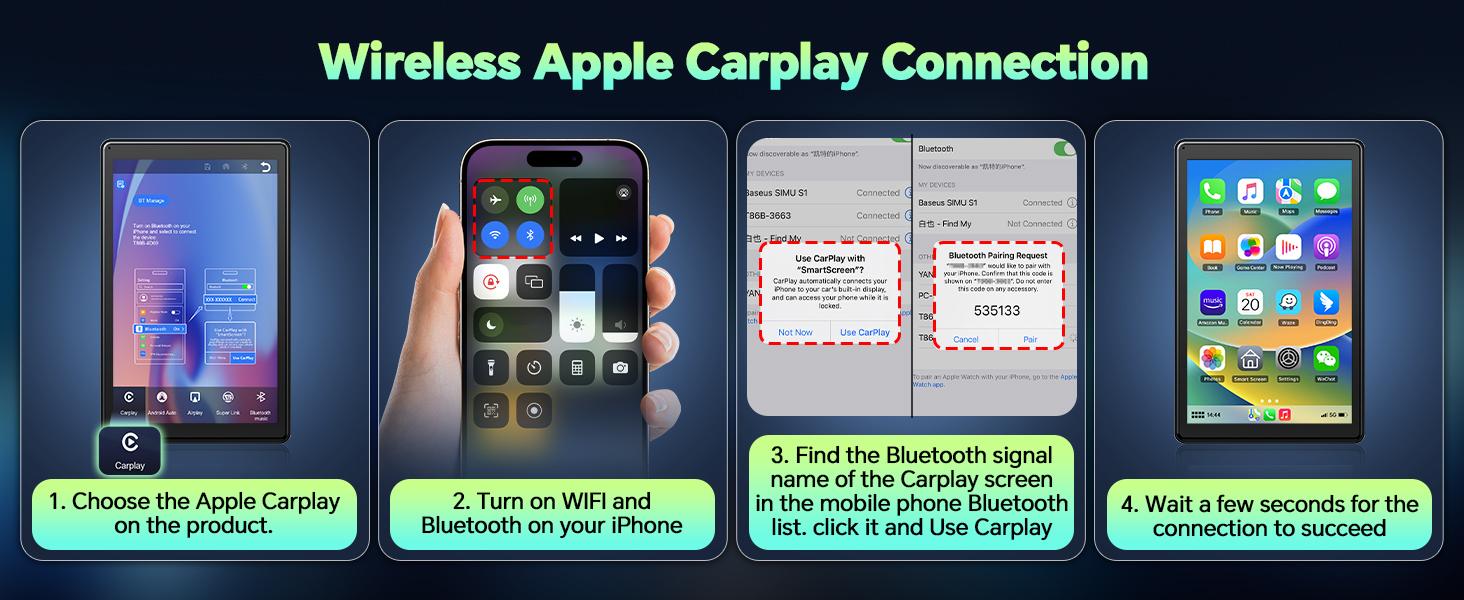
Open CarPlay on your device → Clear the device's BT name → Open the iPhone's BT/Wi-Fi device → Find the corresponding BT name and pair → CarPlay will be displayed after pairing is complete.
TIP: For the first time, turn on both BT and Wi-Fi on your phone. For the next time, just turn on BT.
Android Auto
Open Android Auto on your device → Clear the device's BT name → Turn on the Android phone's BT/Wi-Fi switch → Find the corresponding BT name and pair → The Android Auto interface will be displayed after pairing is complete.
TIP: For the first time, turn on both BT and Wi-Fi on your phone. For the next time, just turn on BT.
Super Link
FAQ:
Q: Is this product compatible with most car models?
A: Yes, it is compatible with 99% of all car models. The voltage requirement is 12V-24V and requires a cigarette lighter. It is especially suitable for older models or those without a central control screen.
Q: Is this product difficult to install?
A: It is not. No original car parts need to be removed. Simply follow the instructions.
Q. Does this device have a long battery life?
A. Simply plug the device into the connector according to the instructions and start your car. It's ready to use. There's no need to charge the device.
What's in the box?
View more
-70%$59.99$199.99
Free shipping
【SpringGlowUp】LAMTTO 8-Inch CarPlay Screen for Vehicles — Suction Cup Mount and Magnetic Holder Install on the Air Vent Without Blocking the Driving View. Portrait Mode for Shorts Viewing and Landscape Mode for Movie Playback
4.7(28)
289 sold
Specification:Default
Default
Quantity:
Buy now
Coupon center
Log in to check your coupons
View and claim any available offers once you're logged in.
Shipping & returns
Shipping & delivery
Many items qualify for free shipping or become eligible once the order threshold is met.
Returns made easy
Most items are eligible for free returns within 30 days of delivery for a refund. Some items, including ingestibles, hygiene products, and pre-owned goods, are non-returnable. Final sale items cannot be returned or replaced.
About this shop

LAMTTO Carplay
4.3
28.4K Sold
2.6K+ Followers
96%24h response rate
97%Ships within 2 days
79%Positive feedback
Visit
Shop review


Videos for this product
Creator earns commission

𝙄𝙍𝙊𝙉 𝙈𝙄𝙆𝙀 𝙎𝙃𝘼𝙍𝙋
2.0K
Creator earns commission
𝙄𝙍𝙊𝙉 𝙈𝙄𝙆𝙀 𝙎𝙃𝘼𝙍𝙋
793
Creator earns commission

𝙲𝚑𝚊𝚛𝚒𝚜
605
Creator earns commission

imen_official
264
Creator earns commission
𝙄𝙍𝙊𝙉 𝙈𝙄𝙆𝙀 𝙎𝙃𝘼𝙍𝙋
250
Creator earns commission

Finn
245
Creator earns commission

Maggie Norzow
243
Creator earns commission
𝙄𝙍𝙊𝙉 𝙈𝙄𝙆𝙀 𝙎𝙃𝘼𝙍𝙋
247
Creator earns commission

Tee Daddy 🥰 (L)🏳️🌈
178
Creator earns commission

Nabi Roshan official
153
Creator earns commission

UTECHPIA
126
Creator earns commission

buddebabe5
107
Creator earns commission

since89_
94
Creator earns commission

annjay_Rai
54
Creator earns commission

GrantsDealz
51
Creator earns commission

MommaWhitt | SAHM to 9
42
Creator earns commission
buddebabe5
40
Creator earns commission

leonel Mora
35
Creator earns commission

VICKY JARQUIN
34
Creator earns commission
buddebabe5
33
Explore more from LAMTTO Carplay


You may also like


People also searched for