- TikTok Shop
- Phones & Electronics
- Cameras & Photography
- Security Cameras & Systems
- X8 A Wireless Doorbell Camera, Rechargeable Smart Visual Doorbell, Modern Home Security Doorbell with Night Vision, Safety Intercom for Privacy, Alarm, Sensor,waterproof


4.2
480 global reviews
5
334
4
51
3
24
2
14
1
57
Photos from reviews


All Things Women

Hair by Fabby

Hair by Fabby

Hair by Fabby


red 💋cash lips$$

red 💋cash lips$$
Sort by
Recommended
Filter by
All
Displaying 480 of 480 reviews
Reset filters

H**r b** F**y
·
Verified purchase
US
I tried everything it doesn’t turned on or off when I just got it out of the box it works but now nothing spent two days in charge still doesn’t budge


Item:
Default2025-08-29
r** 💋**h l**$
·
Verified purchase
US
I will be returning this item!!.. It doesn't stay on!! I have to constantly reconnect it every time I turn it on!!! I plugged it for ten hours into the wall.And it's still saying needs to be charged!! I am very upset, very dissatisfied, and I will be returning this item I am not happy!!!


Item:
Default2025-11-18
J**l
·
Verified purchase
US
Very bad seller be-careful with him the take my money and never receive product I’m case the close case I’m lose my money every on be careful scam seller bad bad scam

Item:
Default2026-02-13

m**5
·
Verified purchase
US
Garbage waste of time and money
Don't connect at all! Do better going to the dollar store getting that fake security cam.

Item:
Default2026-01-09

C**e c**s 0**️
·
Verified purchase
US
I requested requested refund long before shipping i found better now they trying to refuse giving me my money back I said don't ship week later they sent i DON'T purchase!!!!

Item:
Default2026-01-08
A** T**s W**n
·
Verified purchase
US
Picture is not very clear when looking at who is at the door. But set up was easy.

Item:
Default2025-12-31

T**y
·
Verified purchase
US
Bought and paid for X8 A got a X6. No way to talk to seller. They expect me to pay shipping back. Time to call Pay Pal. Buyer beware.

Item:
Default2025-12-29

s**a
·
Verified purchase
US
It keeps disconnecting but when it rings it reconconts. Still learning how it works will review again.

Item:
Default2025-12-01

K**n R**z
·
Verified purchase
US
Everything is good. The only thing is I do not have charger. and also, I do not know if he has TF

Item:
Default2025-11-15

M**a B**r
·
Verified purchase
US
Me gusta por q puedes mirar cuando te tomara quién es pero la mantengo conectada la pantalla ya q se me descarga con facilidad no sé si funcione así

Item:
Default2025-09-14

M**e ** l**
·
Verified purchase
US
It works great yes just what i wanted.
System performance: 👍 Great

Item:
Default2025-08-20

B**e
·
Verified purchase
US
This device doesn't work most of the tim

Item:
Default2026-02-10

h**8
·
Verified purchase
US
Love it. Saves time and effort getting up.

Item:
Default2026-01-18

D**s M**o
·
Verified purchase
US
Very good quality, best purchase I've made

Item:
Default2025-11-13

P**d B**h
·
Verified purchase
US
Can't get into site to watch video directions

Item:
Default2025-11-13
S**y
·
Verified purchase
US


Item:
Default2025-12-08

1**_ ** h**e ** h**d
·
Verified purchase
US
I received it today it works

Item:
Default2025-12-04

V**n
·
Verified purchase
US


Item:
Default2026-02-10

q**t
·
Verified purchase
US


Item:
Default2026-02-01

7**r
·
Verified purchase
US
Great gift

Item:
Default2025-12-31
About this product



Product description
X8 is a doorbell that doesn't require the use of a mobile phone; it is not a surveillance camera.The resolution of the product is 480P.
When someone rings the doorbell, a notification sound will be heard and the screen will turn on. If the doorbell is not pressed for a while (about 15-20 seconds), it will stop working and the screen will go dark. When someone presses the doorbell again, the device will respond again. The device will not remain in an on state all the time; it will only be turned on when in use. Additionally, when the doorbell is fully charged, it can be used for about half a month regularly.
【Easy to Install & Work】
Installing your wirelessvideo doorbel no subscription is hassle-free.Connect the doorbell and monitor.NO set-up. NO subscription, NO monthlyfee, NO WiFi orequired. JustBack to topmount the doo.nywhere you prefer.No need to use a mobile phone, no apps required.
【Regarding batteries and charging 】
Powered by rechargeable 1000mAh polymerbattery.
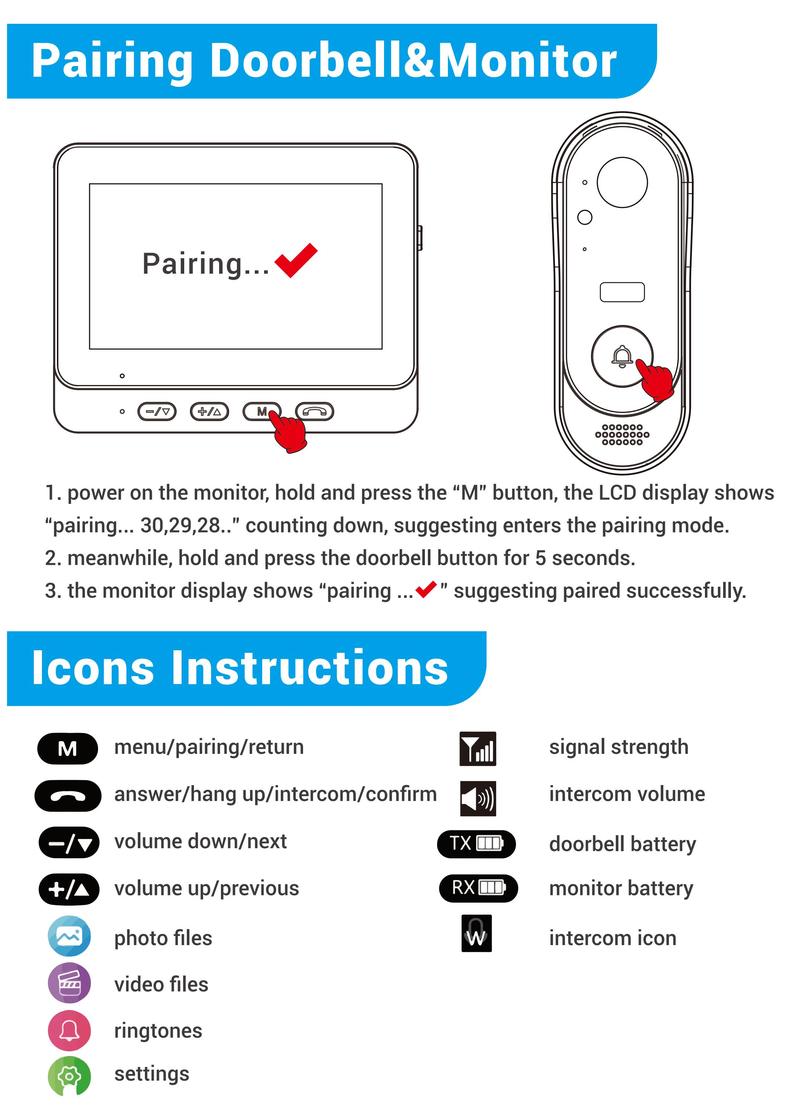
【Pairing Doorbell&Monitor】1.power on the monitor,hold and press the "M"button,the LCD display shows"pairing..30,29,28.."counting down,suggesting enters the pairing mode.2.meanwhile,hold and press the doorbell button for 5 seconds.3.the monitor display shows "pairing ...√"suggesting paired successfully.
【Regarding the use of the microphone】
You need to hold down the button to make a one-way call. When a visitor rings the doorbell, the indoor screen displays the image and emits a notification sound. At this point, you can hear the visitor speaking. If you need an intercom, you need to press the "phone" button and keep it pressed to speak externally, so that the visitor can hear you.
【Regarding the use of the speaker】
How to adjust the volume of the speaker? You can directly increase or decrease the volume by pressing the "+" or "-" buttons while the device is charging.
【Instructions on the Use of Taking Photos and Recording Videos】
Photos:when someone press the doorbell,the camera will automatically capturethe photo and save it in monitor device.(maximum 50 images)after 50 images,it will automatically delete the first image and save the latest one.
Video recording:This function requires inserting the SD card,when someone pressthe doorbell,the monitor will automatically open the video recording.cycle coverage,and save the latest video.
【Regarding the use of distance】
Working distance:1.Wide Open Spaces without Interference.Maximal Range about 50 meters(100%).2.Wooden Door or Brick Wall.Maximal Range about 30 meters(70%).3.Metal Door or Metal Surface Material.Maximal Range about 20 meters(30%).
【4.3"|PS Screen & Automatic Capture or Video Recording 】The door bel camera automaticalysnapshots or records when a visitor presses thebutton and save it on the TF card (not included)You can view them on the 4.3" large screen clearly.
【Weather Resistant for indoor Outdoor】 lP65waterproof design, work stable in rainy, cloudy, coldand snow day.
【Regarding product settings and usage】
View more
-23%$4?$5?
Free shipping
X8 A Wireless Doorbell Camera, Rechargeable Smart Visual Doorbell, Modern Home Security Doorbell with Night Vision, Safety Intercom for Privacy, Alarm, Sensor,waterproof
4.3(480)
4.7K sold
Specification:Please select
Default
Quantity:
Buy now
Coupon center
Log in to check your coupons
View and claim any available offers once you're logged in.
Shipping & returns
Shipping & delivery
Many items qualify for free shipping or become eligible once the order threshold is met.
Returns made easy
Most items are eligible for free returns within 30 days of delivery for a refund. Some items, including ingestibles, hygiene products, and pre-owned goods, are non-returnable. Final sale items cannot be returned or replaced.
About this shop

EXNUOR
4.2
10.0K Sold
3.7K+ Followers
98%24h response rate
69%Ships within 2 days
80%Positive feedback
Visit
Shop review


Videos for this product

EXNUOR
5.2K
EXNUOR
2.7K

myrtlefergusoncee9
2.0K
EXNUOR
1.7K
EXNUOR
1.5K
EXNUOR
1.5K
myrtlefergusoncee9
1.5K
myrtlefergusoncee9
1.4K
EXNUOR
1.1K
EXNUOR
1.0K
EXNUOR
977
EXNUOR
972
EXNUOR
972
EXNUOR
787
EXNUOR
659
EXNUOR
606
EXNUOR
472
EXNUOR
437

roderickwilson6ffc
478
myrtlefergusoncee9
461
Explore more from EXNUOR


You may also like


![[New Deal] 1080P Video Doorbell Camera Wireless, Cloud Storage, Live View, 2-Way Talk, Night Vision, Included Ring Chime, 2.4Ghz WiFi Only, Indoor Surveillance, Real-Time Alert (Black)](https://p16-oec-general-useast5.ttcdn-us.com/tos-useast5-i-omjb5zjo8w-tx/a0d4866669a84f46b9d43528b7de3dd4~tplv-fhlh96nyum-crop-webp:274:300.webp?dr=12190&t=555f072d&ps=933b5bde&shp=8dbd94bf&shcp=607f11de&idc=useast5&from=2378011839 "[New Deal] 1080P Video Doorbell Camera Wireless, Cloud Storage, Live View, 2-Way Talk, Night Vision, Included Ring Chime, 2.4Ghz WiFi Only, Indoor Surveillance, Real-Time Alert (Black)")

![[New Deal] Video Doorbell Camera Wireless with Chime Ringer, Battery Powered, Smart AI Human Detection, 2.4G WiFi, 2-Way Audio, Night Vision, Cloud Storage,](https://p16-oec-general-useast5.ttcdn-us.com/tos-useast5-i-omjb5zjo8w-tx/b6102597a6ca4a1a8efc893c16c0cb7a~tplv-fhlh96nyum-crop-webp:300:300.webp?dr=12190&t=555f072d&ps=933b5bde&shp=8dbd94bf&shcp=607f11de&idc=useast5&from=2378011839 "[New Deal] Video Doorbell Camera Wireless with Chime Ringer, Battery Powered, Smart AI Human Detection, 2.4G WiFi, 2-Way Audio, Night Vision, Cloud Storage,")

GEARit Official
3.7
30 sold
-20%$48.00$59.99

![[New Deal] Smart Video Doorbell Camera Wireless, AI Human Detection and Instant Alerts, Night Vision, 2-Way Audio, Battery Powered](https://p16-oec-general-useast5.ttcdn-us.com/tos-useast5-i-omjb5zjo8w-tx/ddaaf35e60274205a0a32755b80ec347~tplv-fhlh96nyum-crop-webp:300:300.webp?dr=12190&t=555f072d&ps=933b5bde&shp=8dbd94bf&shcp=607f11de&idc=useast5&from=2378011839 "[New Deal] Smart Video Doorbell Camera Wireless, AI Human Detection and Instant Alerts, Night Vision, 2-Way Audio, Battery Powered")


People also searched for