- TikTok Shop
- Computers & Office Equipment
- Data Storage & Software
- Hard Disk Enclosures & Docking Stations
- USB-C Triple Display Docking Station With Charging Support for MacBook Pro & Windows Type C Systems (2 HDMI, DP, 7 USB Ports, 60W PD), MacOS Mirror Mode Only, Space Grey


About this product
Product description
·Compatibility - TOTU docking station is compatible with the latest laptops with USB C 3.1 GEN 2 port. Please make sure that your laptop’s Type C port supports DisplayPort and Power Delivery. TOTU docking station is incompatible with the USB-A to USB-C adapter.
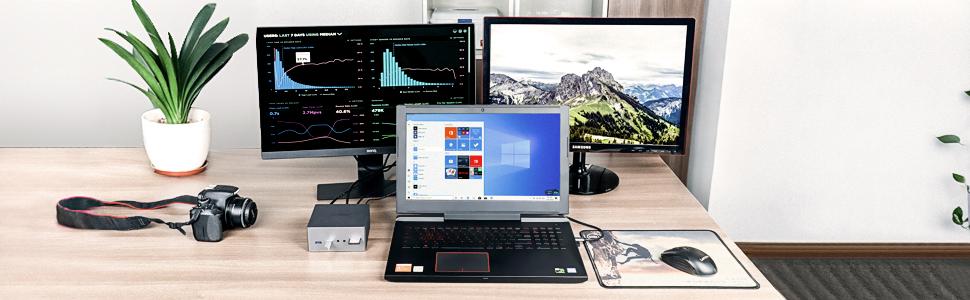
·Triple Display Flexibility - Break through the limitations of a notebook PC by extending up to three external monitors simultaneously through dual HDMI, DP. Support single (HDMI/DP) monitor (HDMI+DP) up to 4K@30Hz, or triple monitor up to 1080P@60Hz. Note: Mac OS laptops will ONLY extend to ONE monitor. The others will be mirrored.
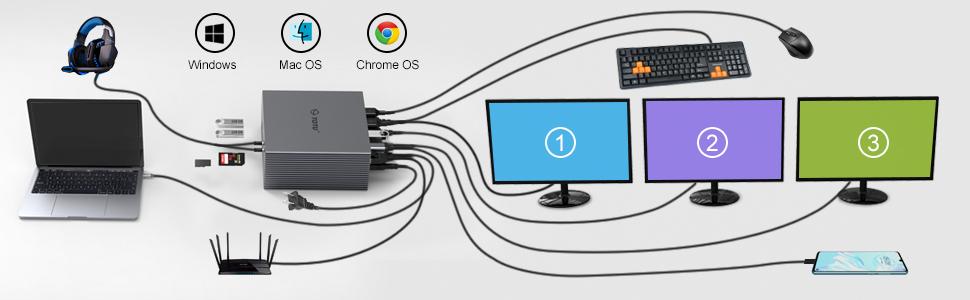
·Ultimate Efficiency - Tons of Ports, including dual 4K HDMI, DisplayPort, Ethernet, 3 USB 3.0, 2 USB 2.0, USB-C 3.0 for USB-C device expanding and charging, SD&TF card reader, 3.5 mm Audio, Mic, 60W Power input for the docking station, USB-C port with power delivery to host with the equipped 3.3ft long USB-C to USB-C cable. Having everything available for a working and entertaining environment.
·Easy Setup - Plug-and-play design enables you to have everything plugged in and docked with one plug. Simply plug in the TOTU docking station connect cable to charge your device and access external monitors & keyboard & mouse and more. Instantly transforms your laptop/tablet into a desktop PC and saves wire clutter on your desk. TOTU Dock is built to boost your productivity.
·Package Includes - TOTU Triple Display Docking Station 60W(20V 3A)DC Power Adapter(power delivery enables you to power and charge a supported system without the need for a traditional proprietary OEM charger), USB-C to USB-C cable, user manual. TOTU offers 100% money back for quality problem within 30 days and a 12-month warranty if the product doesn’t meet your satisfaction.
·usb c docking station
·The TOTU Docking Station with two of USB 3.1(USB 3.1 Gen2 Type-C)'s most exciting new features: support for Alternate Modes and Power Delivery. Alternate Modes allow certain non-USB data and protocols (such as host video) to be sent over a USB-C cable, while Power Delivery enables you to power the supported system without the need for a traditional proprietary OEM charger.
·Two HDMI and a DP port for connecting three external monitors and support for resolutions up to 4K 30Hz.For better user experience, Please use HDMI2.0 or above.
·An RJ-45 Gigabit Ethernet network port (also supports 10/100/1000 Ethernet)
·External headphone output jack and a microphone line-in.
·Three USB 3.0 ports for accessories (such as an external hard drive etc)
·Two USB 2.0 ports (great for legacy devices such as keyboards, mouse and printers)
·60W DC adapter (20V, 3A) which powers both docking station and the connected host.
·One USB-C port to connect the host system with the equipped USB-C to USB-C cable.
·One USB-C 3.0 port on the docking station for USB-C peripheral connectivity and power delivery, does not support the Alt mode video.
·SD and Micro TF card slot can be used on the hub simultaneously.
·Use HDMI2.0 or above cables for optimum performance.
·The Display outputs on the dock can each support a single display up to 3840x2160@30Hz. But only when using a single Display output .
·Only Windows system support the Multi Stream Transport,There will be only 3 screen output because of the chip bandwidth limit including the host display.
·Mirror Mode Supported Resolution: Each display Maximum resolution is 3840x2160@30Hz. 2560x1600, 1920x1080 (1080P) and lower resolutions will display at 60Hz.
·Extend Mode Supported Resolution: Each display will be limited to a maximum resolution of 1080P. And one of the displays cannot be displayed full screen.
·macOS currently only support Mirror Display.All the external display will only mirror instead of extend
·When using three video output ports simultaneously, connecting or disconnecting any one of the video output will disconnect the remaining two video connections and reconnect for 5 seconds.
·Mirror Mode Supported Resolutions:
·Maximum resolution is 3840x2160@30Hz. 2560x1600, 1920x1080 (1080P) and lower resolutions will display at 60Hz.
·USB-C compatibility information is more complicated due to its versatility. USB 3.1 Gen2 Type-C generally support Alt Mode output functionality, but support for Power Delivery/charging on these ports is system-specific.
·Specific compatibility list will be updated online as we test more systems internally, and we welcome compatibility reports from all the users as well.When attached to a fully compatible USB-C, the TOTU Docking Station supports Windows, macOS, ChromeOS
·Some of the systems which currently support Alt Mode, PD : Dell XPS 13" 9350/9360/9370, Dell XPS 15 9550/9560, Dell Precision 5520, HP Spectre x360 13" ("Kaby Lake" version ), Lenovo Yoga 720 13" & Yoga 920, Microsoft Surface Book 2.
·MacBook(2015/2016/ 2017/2018/2019) MacBook Pro( 2016 / 2017/2018/2019) iMac/iMac Pro(21. 5 in & 27 in)
·HP Elitebook 840 G5 HP Zbook,Dell 8930
·Partially Compatible Devices (Supporting Alt Mode or PD, but not all):
·Many current USB-C systems which do support Alt Mode video output do not support charging via USB-C. Systems such as this will output video from the dock, but will still need their proprietary OEM chargers.
·Nexus 6P NOT Charging
·Samsung TabPro S NOT Charging
·Asus ZenBook3/Transformer3 Pro NOT Charging
·Dell XPS 13/15 9365/9560 and Precision 5510/7510 NOT Charging
·Huawei Matebook 2016 NOT Charging
·HP Envy/Spectre NOT Charging NOT Alt Mode
·Note: All laptop types listed herein are typical types only.
·The TOTU Docking Station relies on new functionality of the USB 3.1 Gen2 Type-C and as such is incompatible with USB 3.0/2.0 Type-A systems.
·Most smartphones and tablets with USB-C ports do not support Alternate Mode video output, and some do not support USB Power Delivery. Please consult your device documentation or contact device manufacturer to confirm compatibility with these technologies.
·macOS 10. 13. 6. The DP port will not be displayed when it is connected to the macOS 10. 13. 6 separately. please update to the latest system as needed. If DP and HDMI are used simultaneously, the macOS 10. 13. 6 is supported.
·The Lenovo Yoga 900 and 910 are not compatible (the 910 can support video, or charging, but not both)
·Most Android phones and tablets currently do not support Alt Mode video output
·USB-A to USB-C Adapter do not support
·iPad Pro Surface go Surface Pro 7
·HP Pavilion Nintendo Switch Asus K570ZD-ES55
·Apple USB SuperDrive
·ROG Zephyrus S GX701
·All MSI laptop
View more
-50%$5*$1**Unlock price
From $* shipping on this order
USB-C Triple Display Docking Station With Charging Support for MacBook Pro & Windows Type C Systems (2 HDMI, DP, 7 USB Ports, 60W PD), MacOS Mirror Mode Only, Space Grey
1 sold
Specification:Default
Default
Quantity:
Buy now
Coupon center
Log in to check your coupons
View and claim any available offers once you're logged in.
Shipping & returns
Shipping & delivery
Many items qualify for free shipping or become eligible once the order threshold is met.
Returns made easy
Most items are eligible for free returns within 30 days of delivery for a refund. Some items, including ingestibles, hygiene products, and pre-owned goods, are non-returnable. Final sale items cannot be returned or replaced.
About this shop

ChillEasy Living
4.4
407 Sold
100+ Followers
84%24h response rate
65%Ships within 2 days
91%Positive feedback
Visit
Shop review


Explore more from ChillEasy Living


