- TikTok Shop
- Automotive & Motorcycle
- Car Repair Tools
- Code Readers & Scanners
- LAUNCH OBD2 Scanner CR529 Code Reader Check Engine Light for All OBDII Car After 1996 Full OBD2 Functions Mode 8, I/M Readiness DTC Lookup Lifetime Free Update Scan Tool


4.9
22 global reviews
5
19
4
3
3
0
2
0
1
0
Photos from reviews


H**r
Sort by
Recommended
Filter by
All
Displaying 22 of 22 reviews
Reset filters
H**r
·
Verified purchase
US
I love my Rita now when I go to the mechanic I can find out what's wrong before I go size color and style is awesome definitely will recommend anyone that's looking to know what the check engine light is saying on their car
Item:
Default2024-07-30

M**9
·
Verified purchase
US
This launch Scanner is great! It comes very useful for checking if your car will pass smog or if there is a check engine light on. I really like the IM readiness button on the scanner for quick access. I highly recommend this scanner!
Item:
Default2024-06-02
J**z
·
Verified purchase
US
Very good product I recommend it to the family and friends
Item:
Default2025-06-02
J**H
·
Verified purchase
US
Muy bueno me ayudo a diagnosticar
Muy rápido el problema de mi carro
Item:
Default2025-05-05

w**E
·
Verified purchase
US
Worked super well. Clears codes, reads codes and honestly way more than I expected. 10/10
Item:
Default2025-03-25
B**7
·
Verified purchase
US
This my 2nd Launch scan tool I own. Its a fantastic company and the products they offer are superior to the other top brands. This scan tool is portable, simple to get out and begin running a scan on your vehicle. Pull current and past DTC's and clear them. Test IM readiness and DL updates
Item:
Default2024-05-07

p**k **
·
Verified purchase
US
I own a few launch scanners and they never disappoint! I like having them on hand to keep in kids cars ect, and I can always rely on launch for ease of use and detailed information besides a 17yr old kid saying my cars making a Crkckanenrjianwndjhr noise lol. Highly recommend!
Item:
Default2024-04-30

C**s
·
Verified purchase
US
Quick, easy, and basic unit. Fast start up, nice screen, easy to view and find data, custom item selection. Great for the at home diy'er, service writer, and seasoned technical alike for quick easy code retrieval and data view!
Item:
Default2024-04-28

D**k
·
Verified purchase
US
Easy to use and does what it needs to do
Item:
Default2025-10-29

M**l L**e
·
Verified purchase
US
Scanner works great I like it so far!!!!
Item:
Default2024-12-17

D**n
·
Verified purchase
US
It works well and you can clear codes
Item:
Default2025-06-28

s**o
·
Verified purchase
US
Es muy práctico y fácil
De utilizar
Item:
Default2025-03-15

🇨**🇸
·
Verified purchase
US
Buen equipo cumple sus expectativas
Item:
Default2024-05-17

C**S G**N 6**
·
Verified purchase
US
Just got we'll see
Item:
Default2026-02-05

M**s
·
Verified purchase
US
Good
Item:
Default2026-03-02

J**n J**n
·
Verified purchase
US
It worked
Item:
Default2025-08-01

s**9
·
Verified purchase
US
Good
Item:
Default2025-03-24

K** f**z
·
Verified purchase
US
Item:
Default2026-02-05

K**a
·
Verified purchase
US
Item:
Default2026-01-14
About this product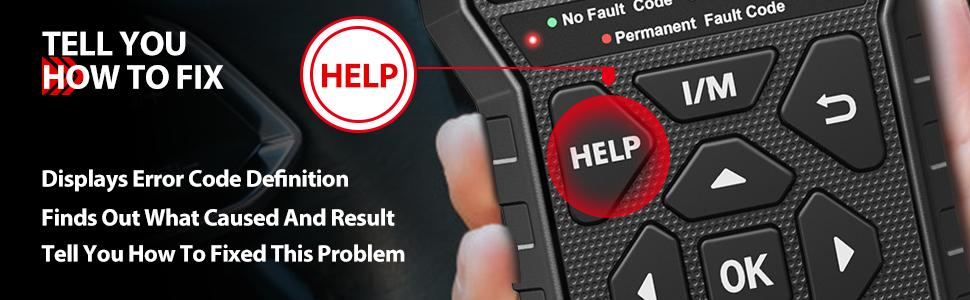


Product description
2024 NEWEST VERSION OBD2 SCANNER - New LOOK, LESS EFFORT, SAME GOAL
·THE thoughtful HELP button guides you with diagnostic tips and repair solutions related to the current error codes. Save the hassle to search online.
·Patent I/M button offers quick access to the I/M Readiness status.
Advanced Upgraded Functions:
Add-on Practical Features:
When to upgrade it?
·If you encounter any problem while using CR529 or it doesn’t work smoothly, you can update it. Don’t have to upgrade before using it.
·Please close the anti-virus software on your PC when updating the device.
The OBD2 scanner almost does the same job as some fancy tools at service centers do, with the support of all 10 OBD2 service modes
Complete OBDII Functions:
HELP Shortcut: Comfortably help you to resolve most basic issues in a second with tips
LED Indicator: Quick and easy way to identify your vehicle’s status visually, via its Green, Yellow and Red LED light
Stay Up To Date with Modern Vehicles
·Unlike cheaper scan tools in the same obd2 scanner, this LAUNCH obd2 code reader does not have issues with J1850 and CAN systems.
·It is compatible with the following protocols: KWP2000, ISO9141, J1850 VPW, J1850 PWM and CAN.
·That means LAUNCH CR529 will work on most 1996 and newer cars, regardless of make and model sold in the US, Europe, and Asia, provided the car has the 16-pin OBD2 port.
See How Your Car React
Want to watch what the sensors are reporting to ensure everything is reading inputs? Or want to make sure if any adjustments are needed to get the car running in normal condition? Now LAUNCH CR529’s Live Data screen comes in handy:
Who Is the Tool Built For?
Ideally, LAUNCH CR529 is a useful choice for all car owners to quickly check and fix some common car issues, without asking help from a technician, or spending loads of money. For any car mechanics of a garage or a vehicle repair shop, it will also be an intelligent and meaningful decision to buy, as they can use this scan tool to offer quick support for customers.
Easy Steps to Enjoy Free Lifetime Update
This obd2 scanner is backed by the LAUNCH promise for free lifetime updates to keep the software current.
·The upgrade process is straightforward and can be easily done via USB cable.
·Visit LAUNCH. Download and install the update tool (Windows XP, 7, 8, & 10).
·Connect the scanner to the computer via the USB cable.
·Register the scanner using its serial number.
·Fill in the required information and click [upgrade].
*Note: make sure the internet connection is strong and stable while updating.
NOTICE:
·By clearing trouble codes you also clear the readiness. the vehicle must be driven through a complete drive cycle with no trouble codes in memory. The amount of time needed for reset vary by vehicle.
·Do not erase the codes before repairs or services have been performed. Codes will again display if the underlining fault causing the code is not addressed.
If you have any question while using our CR529 OBD2 scanner, please test the scanner as the following suggestion:
·Please check your vehicle whether to support OBD2 protocols and has a standard 16 pin data connector. You can check whether the compliance label under the hood has OBD certification.
·Please check the vehicle wiring and fuse for short circuit.
·Please try to connect the scanner to another vehicle to check whether the communication error happens again.
View more
-15%$3*$4*Unlock price
Free shipping
LAUNCH OBD2 Scanner CR529 Code Reader Check Engine Light for All OBDII Car After 1996 Full OBD2 Functions Mode 8, I/M Readiness DTC Lookup Lifetime Free Update Scan Tool
4.9(22)
288 sold
Specification:Default
Default
Quantity:
Coupon center
Log in to check your coupons
View and claim any available offers once you're logged in.
Shipping & returns
Shipping & delivery
Many items qualify for free shipping or become eligible once the order threshold is met.
Returns made easy
Most items are eligible for free returns within 30 days of delivery for a refund. Some items, including ingestibles, hygiene products, and pre-owned goods, are non-returnable. Final sale items cannot be returned or replaced. Please log in to view this item's specific return policy.
About this shop

AutoLink
4.6
5324 Sold
14.0K+ Followers
99%24h response rate
64%Ships within 2 days
90%Positive feedback
Visit
Shop review


Videos for this product
Creator earns commission

Alex The Car Doctor
8.2K
Paid partnership

RastaBuilds
4.0K
Creator earns commission

JWillis13
1.3K
Creator earns commission

Saif🇺🇸
1.2K
Creator earns commission

VNV
389
Creator earns commission

Manifested_This
304

Saldana Auto Repair
220
Creator earns commission

Lee
200
Creator earns commission

El Mejor Mecánico
144
Creator earns commission

Jerry Aintloud
126
Creator earns commission

Leo
121
Creator earns commission

Infinitecustoms
106
Creator earns commission

Em🎀
100

luke
94
Creator earns commission

Notirapida vip
85

Checko 100
83
Explore more from AutoLink


You may also like



NOCO
4.8
14.1K sold
$369.95
NOCO
4.6
10.8K sold
$99.95
NOCO
4.8
4.9K sold
$199.95


NOCO
4.8
3.0K sold
$124.95
NOCO
4.7
4.7K sold
$299.95


People also searched for