- TikTok Shop
- Phones & Electronics
- Audio & Video
- Microphones
- KUKIHO K6 wireless lavalier microphone is suitable for all mobile phones Type-C and ios, plug and play noise reduction wireless microphone


4.4
75 global reviews
5
58
4
4
3
6
2
0
1
7
Photos from reviews

S**n

S**n

S**n


P**o


M**y

M**y


🇨**O E** M**🇲

🇨**O E** M**🇲

🇨**O E** M**🇲

🇨**O E** M**🇲


F**5


P**T _**p **
Sort by
Recommended
Filter by
All
Displaying 75 of 75 reviews
Reset filters
S**n
·
Verified purchase
US
Es un producto para los nuevos emprendedores, nuevos creadores de contenido, para empezar muy bueno y muy barato y muy buen micrófono recomendado 100%
Item:
Default2025-05-14
P**o
·
Verified purchase
US
Estoy encantado con este producto
Item:
Default2025-04-10
M**y
·
Verified purchase
US
Me encantaron son increíbles el alcance calidad precio me dejan muy satisfecha altamente recomendable
Item:
Default2025-03-04
🇨**O E** M**🇲
·
Verified purchase
US
Perfecto
Item:
Default2025-03-13
m**d
·
Verified purchase
US
Dos not work, one microphone does not charge and would not connect I’m returning it for a refund

Item:
Default2025-07-20
F**5
·
Verified purchase
US
NOISE CANCELATION IS GIVING ME ISSUES AND IT SAYS IT HAS 3 SETTINGS. HAVEN'T BEEN ABLE TO FIGURE OUT THE SETTINGS.
Item:
Default2025-06-26

E**a
·
Verified purchase
US
Me arrepiento haberlos comprado son malos ..no se les puede controlar el ruido como otros ya que estos solo traen.boton de encendido además los compre a 29 dolares y ahora aparecen a 5 dolares ..me siento estafado

Item:
Default2025-04-11

@**y
·
Verified purchase
US
El producto está estéticamente genial pero no elimina el ruido no es para mi

Item:
Default2025-04-05
P**T _**p **
·
Verified purchase
US
Excelente me an servido mucho y si funcionan muy bien
Item:
Default2025-04-01

M**y M**
·
Verified purchase
US
Están muy prácticos. Muy elegantes. Se escucha fuerte. Se aleja uno y se sigue escuchando. Para mí 10 de 10. Recomendables.

Item:
Default2025-03-16

L**e D**y ** T** **
·
Verified purchase
US
It doesn’t cut out all the ambient noise, like construction work, but it cuts out most of it. Good sound.
Item:
Default2025-02-27

J**e J**s
·
Verified purchase
US
El producto fue entragado q tiempo y me gusta el productolo recomiendo a muchas personas

Item:
Default2025-02-23

y**1
·
Verified purchase
US
Buen audios cómodos


Item:
Default2025-04-14

L**👑
·
Verified purchase
US
Bello funciona a la perfecto se escuchan muy bien

Item:
Default2025-04-10

J**a M**a
·
Verified purchase
US
Perfecto, súper bueno
Item:
Default2025-09-16
A**P
·
Verified purchase
US
Están súper chidos gracias
Item:
Default2025-08-10

𝚃**y M**s ** **
·
Verified purchase
US
Muy buena calidad
Item:
Default2025-10-03

4**h
·
Verified purchase
US
Yea did its job
Item:
Default2025-09-10

t**y
·
Verified purchase
US
Me encantó lo recomiendo muchísimo la diferencia es de un 100%
Item:
Default2026-01-03
About this product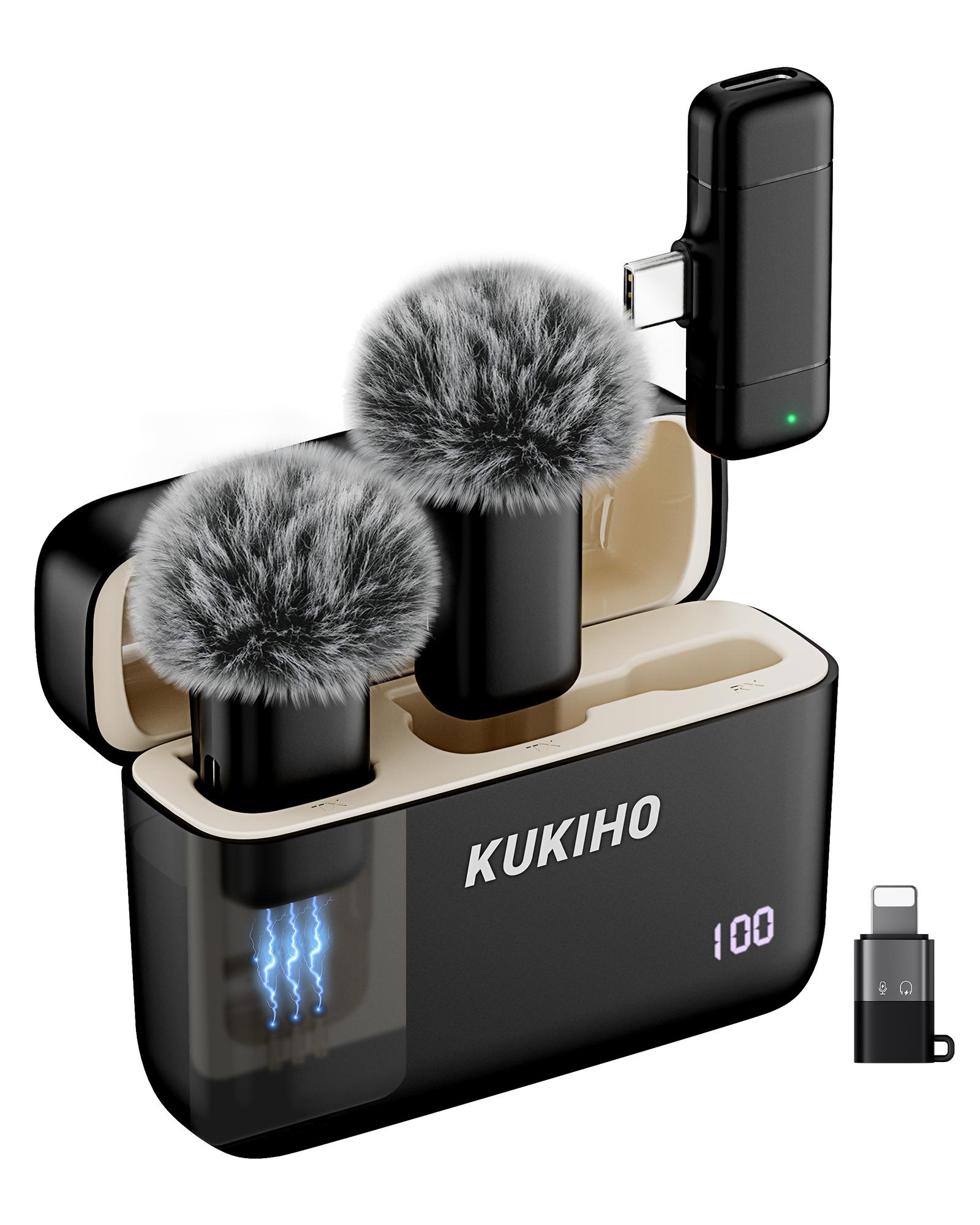


Product description
KUKIHO K6 Wireless Lavalier Microphone, your perfect companion for all your audio needs. This versatile microphone is designed to work seamlessly with your phone, making it a practical addition to your collection.
Key Features:
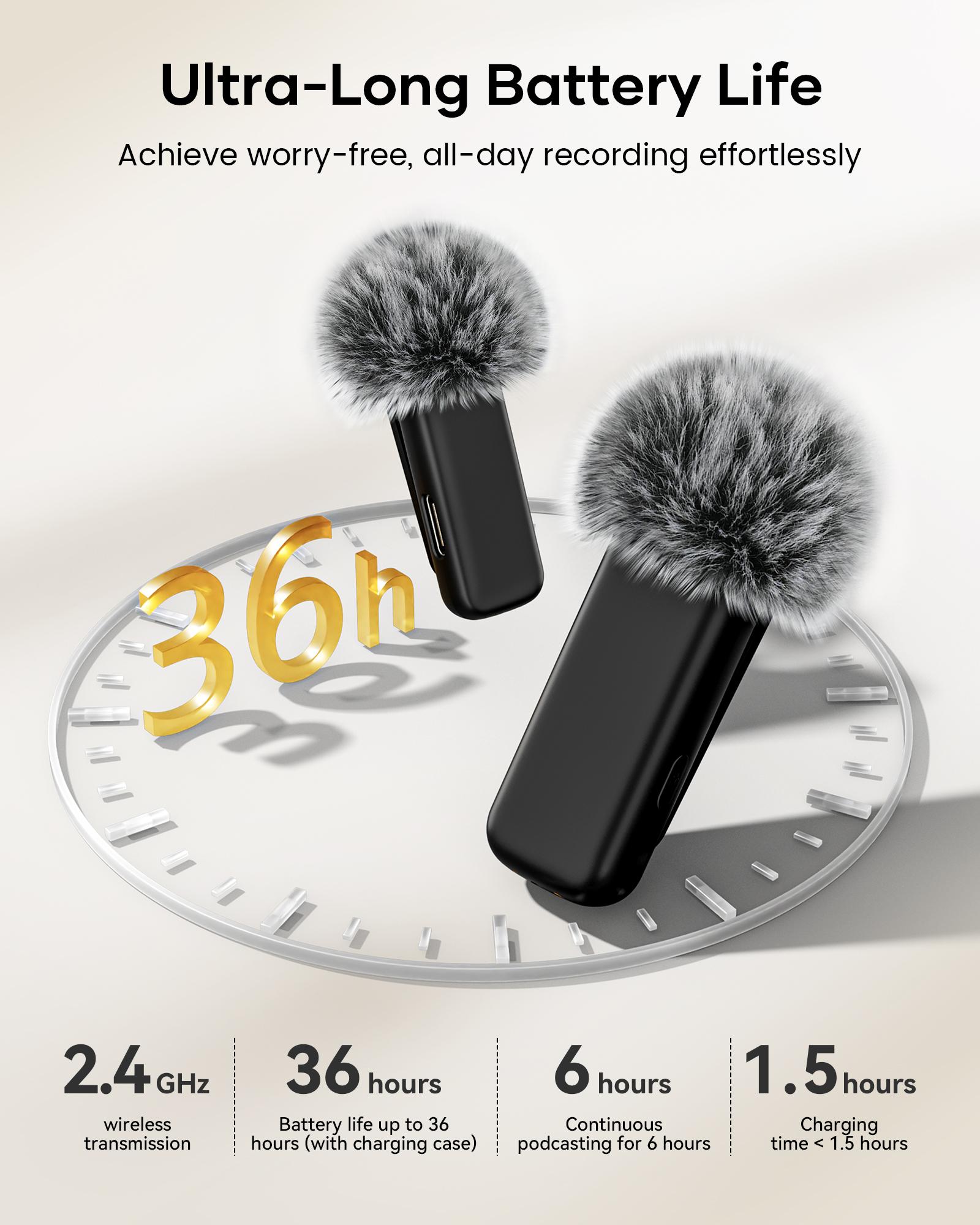
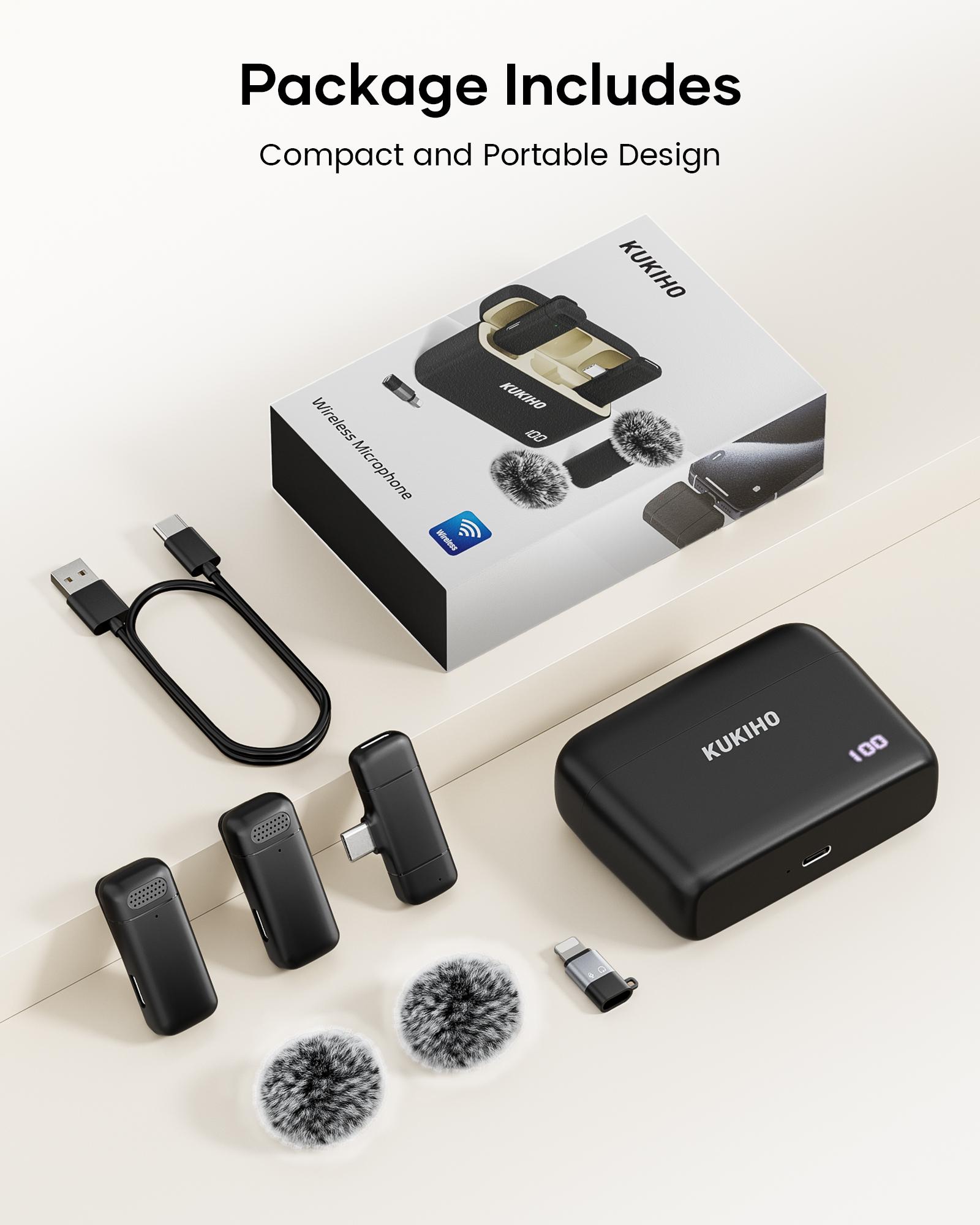
Packing list: Charging compartment*1, Type-C Receiver *1, Microphone *2, Windproof ball*2 Apple Adapter (Rechargeable) *1, Manual *1, Charging Wire *1, Color Box *1
Packing box size: 8.2*3.3*12.1cm
Single set weight: 135 G
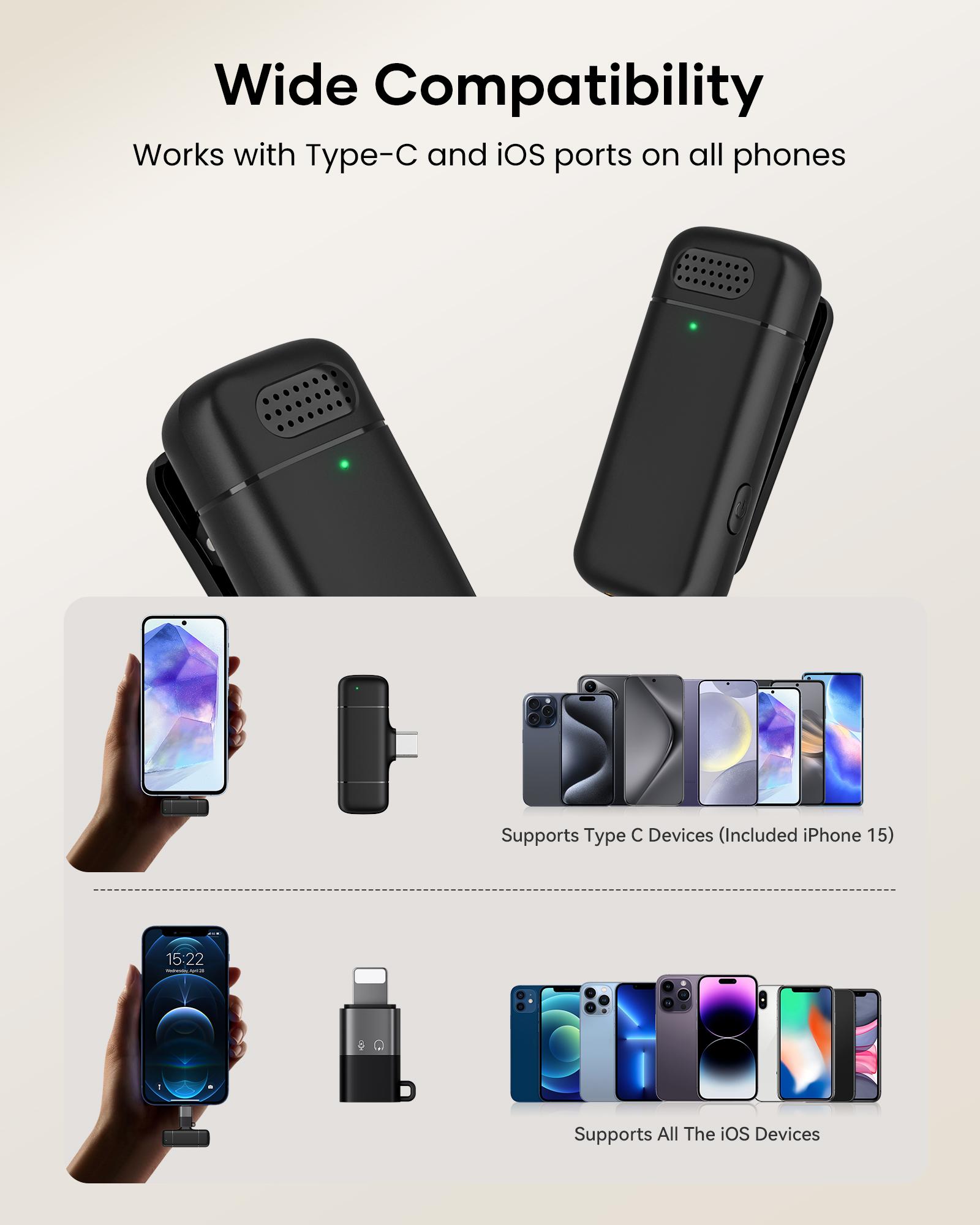
·Type-C/IOS Compatibility: Easily connect to your phone via Type-C / IOS ports, ensuring compatibility with a wide range of devices.
·Plug and Play: The microphone comes with a plug and play feature, allowing for quick setup and use without the need for additional software installation.
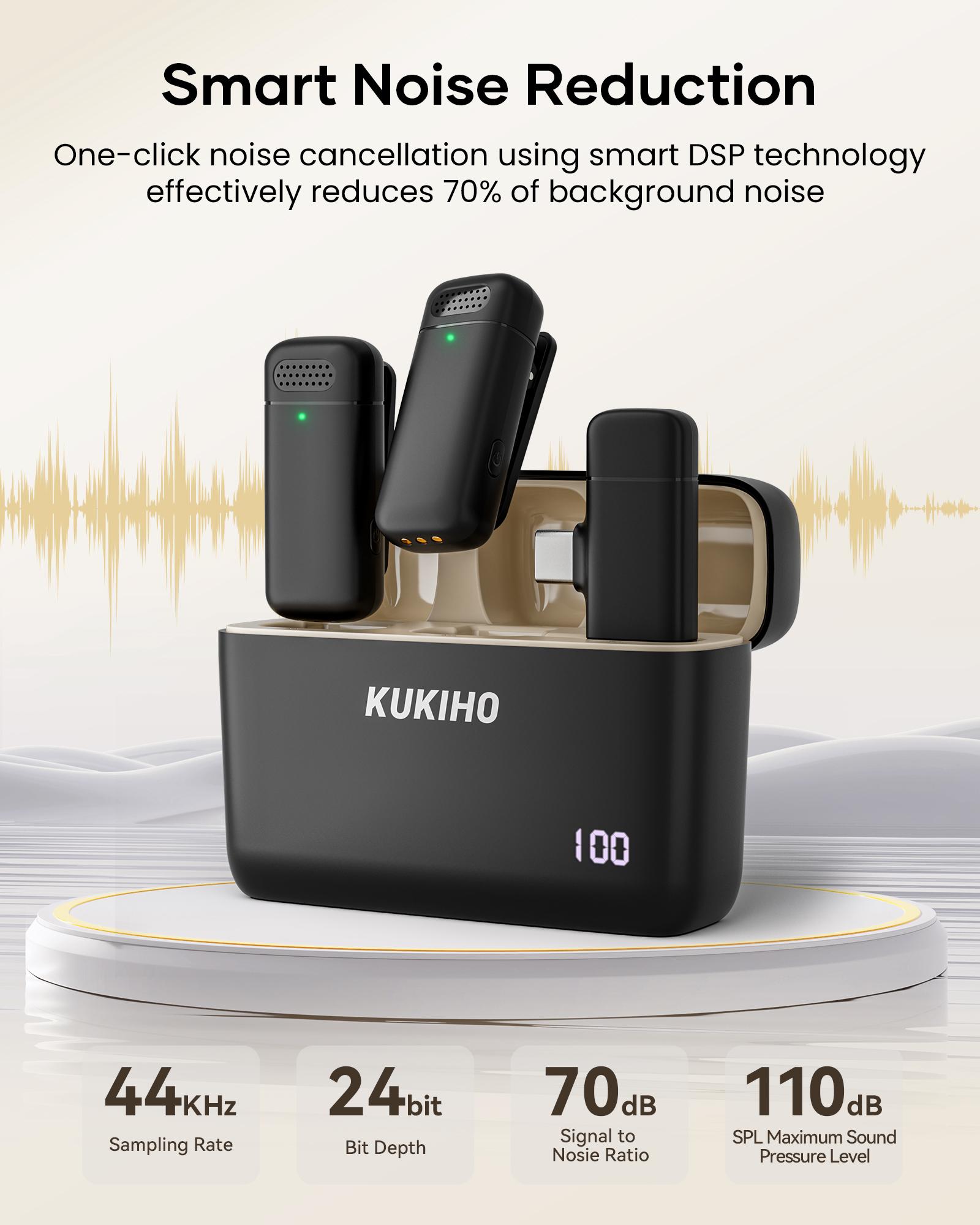
·Noise Reduction: Intelligent DSP technology to minimize background noise, ensuring clear audio quality during recording.
·Versatile Use: Ideal for video recording, interviews, podcasts, vlogs, YouTube, TikTok, and more.
Enhance your audio experience with the KUKIHO K6 Wireless Lavalier Microphone, combining functionality with ease of use.
Operating Instructions:
Power on: Press and hold the microphone power button for 3 seconds to power on, flashing red and green alternately.
Shut down: Press and hold the microphone power button for 3 seconds to turn off all lights.
Not connected: The microphone flashes red and green alternately, and the receiver light flashes red.
Connected: the microphone is always green and the red light is off (default three-level noise reduction mode), the receiver's red light is always on
Noise reduction mode: Click the button to cycle through, up to 3 levels, in sequence (microphone light: level 1: green light flashes 1 time, level 2: green light flashes 2 times, level 3: green light flashes 3 times)
Reverb mode: Click the button three times to switch the reverb. It is not enabled by default and needs to be turned on manually. Click the button three times again to exit the reverb (the green light of the microphone is off, the red light flashes once, and then the green light is always on)
Mute: Double-click the switch button to mute the MIC, double-click again to restore the radio state (the green light of the microphone flashes, and the red light is off)
Charging: The red light of the microphone is always on, the green light is off; when the battery is full, the light is off
Low battery: The red light of the microphone flashes once every 10 seconds and the green light goes off.
View more
$59.98
From $4.04 shipping on this order
KUKIHO K6 wireless lavalier microphone is suitable for all mobile phones Type-C and ios, plug and play noise reduction wireless microphone
4.4(75)
686 sold
Specification:Default
Default
Quantity:
Buy now
Coupon center
Log in to check your coupons
View and claim any available offers once you're logged in.
Shipping & returns
Shipping & delivery
Many items qualify for free shipping or become eligible once the order threshold is met.
Returns made easy
Most items are eligible for free returns within 30 days of delivery for a refund. Some items, including ingestibles, hygiene products, and pre-owned goods, are non-returnable. Final sale items cannot be returned or replaced.
About this shop

Cyber Mac

Gold Star Seller
4.7
98.3K Sold
5.5K+ Followers
99%24h response rate
82%Ships within 2 days
91%Positive feedback
Visit
Shop review


4.7
5.3K sold
-16%$41.99$49.99
4.7
69.6K sold
-20%$39.99$49.99


Videos for this product
Creator earns commission

streamsniperrr13
7.9K
Creator earns commission

lilah.nyc2
2.6K
Creator earns commission

EFRAIN HECHOS 2:38
2.4K
Creator earns commission

mariapilaralucaslopez3
1.7K
Creator earns commission

♡>ïč♡brendyz_alvarado🦋😍
1.6K
Creator earns commission
EFRAIN HECHOS 2:38
1.4K
Creator earns commission

Lily Leyva
333

Cyber Mac
275
Creator earns commission

El_Aleks
247
Creator earns commission

Shoutout
233
Creator earns commission
EFRAIN HECHOS 2:38
225
Creator earns commission

Dayangonzalezz
212
Creator earns commission

D’noel Lifestyle
194
Creator earns commission

✿ Liz ✿
142
Creator earns commission

Fancy Hillbilly
138
Creator earns commission

Mi primo de la USA
127
Creator earns commission

Sugarlee
126
Creator earns commission

Sam Vlog📸📹
118
Creator earns commission

gloria.la.chapina
118
Explore more from Cyber Mac

4.7
69.6K sold
-20%$39.99$49.99


4.7
5.3K sold
-16%$41.99$49.99

You may also like

People also searched for