- TikTok Shop
- Pet Supplies
- Fish & Aquatic Supplies
- Lighting
- hygger Advanced Remote Control Aquarium Light Customizable Full Spectrum Fish Tank LED with DIY, Default & Weather Mode Freshwater Planted Tank


4.5
4 global reviews
5
2
4
2
3
0
2
0
1
0
Photos from reviews

S**r
Sort by
Recommended
Filter by
All
Displaying 4 of 4 reviews
Reset filters

u**9
·
Verified purchase
US
I love these lights. They are affordable and grow plants. I have six lights programmed to 1 remote. That convenient. I highly recommend these lights. I wish they sold a 72" for my 125gal aquarium.
Item:
42W for 36~42inch Tank2025-10-05
S**r
·
Verified purchase
US
Great product with amazing lighting just a little confusing with the programming.
Item:
24W for 18~24inch Tank2025-03-01

o**2
·
Verified purchase
US
Item:
58W for 48~54inch Tank2025-10-27

D**
·
Verified purchase
US
Item:
30W for 24~30inch Tank2025-02-19
About this product





Product description
1. Timer Mode of Daylight & Moonlight
How to Turn on Day & Moon Light Default Program?
·Just press the CLOCK button to set the local current time after being out of the box.
·If the DIY mode is running, it needs to turn off DIY mode, and it will enter the DAY & MOON Light mode.
How to Program Custome DAY & MOON Light Mode?
·Press and hold the TIMER button for 3 seconds until "DAY-L ON" blinks—then press the UP/DOWN button to set turn on time—Press TIMER button again to save.
·Press the WRGB button to set light color and brightness—Press TIMER button again to save.
·Press the UP/DOWN button to set turn-off time—Press TIMER button again to save.
·Repeat the above operation to finish "MOON-L" mode.
Note
1、Day & Moon Light mode divides into 2 light time phases, If you need to turn off moon mode, you need to set the brightness of moon mode to "0".
2、The light will slowly ramp up/down over 15 minutes when the light turn on/off.
2. Completely Manual
·Setting single color
·Adjust brightness level
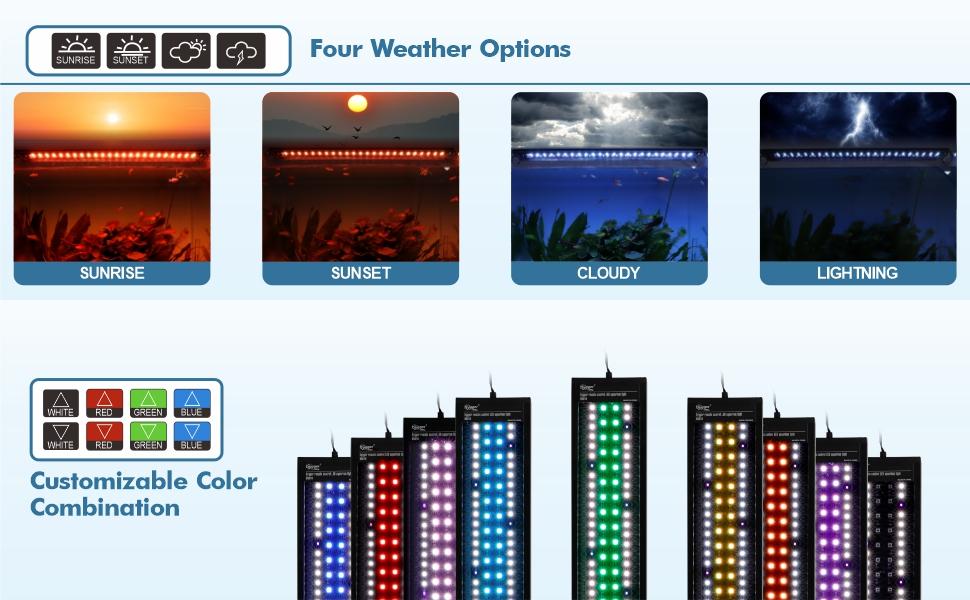
·Weather fuction
·Easy to custom own color and brightness by changing the mix of red/green/blue/white light
3. DIY Mode
How to Turn On DIY Default Program?
·Press and hold the DIY button—the screen will display OFF— then press the UP or DOWN button to select ON to activate DIY mode.
·Press the DIY button again to save, ready to run.
·Simulates 24 hours a day of light changes, a gradient orange sunrise, full bright noon, afternoon, sunset, and moonlight from bright blue to dark blue, and automatically turns off.
How to Program Customize DIY Mode?
·Press and hold the DIY button to activate the DIY mode.
·Press the DIY button again to enter the setting—the screen will display L1 —then press the UP/DOWN button to set the L1 stage at the start and end time—press the DIY button again to save the setting.
·Press the WRGB button to set L1stage the color and brightness——press the DIY button again to save.
·Repeat the above operation finish timer of L2/L3/L4/L5/L6/L7.
·L8 is off by default and cannot be set.
Tip:
·In DIY mode divide the day into 8 light time phase, If you need to turn off one of these phase, you need to set its brightness to "0".
·Each phase will spend 15 minutes fading into the next phase.
More Detail
Power-off Memory Function
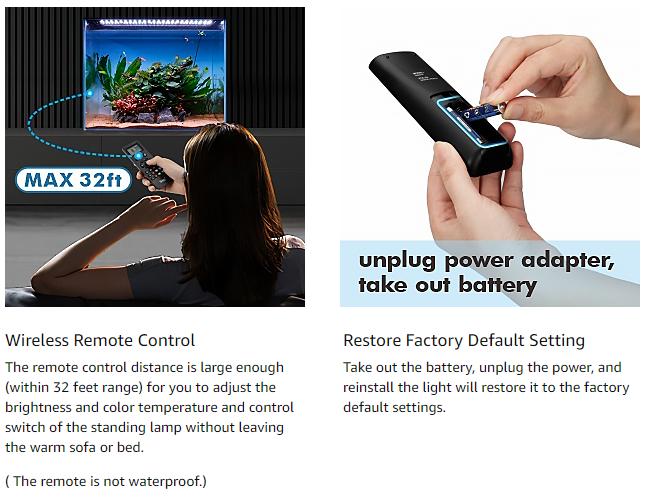
The light fixture turns on at 100% full spectrum after the power supply resume, then the light will revert back to the last mode setting within an hour, with no need to reset.
🌟 Encountered an Issue? Let Us Help!
Dear Valued Customer,
Thank you for choosing our product! If you’re not completely satisfied, **please contact us first before leaving a negative review—we’re here to make it right!
💡 Here’s how we can help:
✅ Return/Refund: Select "No longer want" as the reason for quick processing.
✅ Message us: Click "Contact Seller"—we respond within **24 hours**!
✅ 2-Year Warranty: Free replacement or refund for any quality issues.
🙏 A Small Favor:
Negative reviews impact our store’s ability to serve you. Please give us a chance to fix any problems—we truly appreciate it!
💌 Your satisfaction is our priority!
---
Short Version:
⚠️ Customer Support Notice:
Not happy? **Message us first!** Select **"No longer want"** for returns. 2-year warranty included—thank you! 💖
View more
-20%$4*$5*Unlock price
Free shipping
hygger Advanced Remote Control Aquarium Light Customizable Full Spectrum Fish Tank LED with DIY, Default & Weather Mode Freshwater Planted Tank
4.5(4)
23 sold
Size:18W for 12~18inchTank
18W for 12~18inchTank
24W for 18~24inch Tank
30W for 24~30inch Tank
36W for 30~36inch Tank
42W for 36~42inch Tank
58W for 48~54inch Tank
Quantity:
Buy now
Coupon center
Log in to check your coupons
View and claim any available offers once you're logged in.
Shipping & returns
Shipping & delivery
Many items qualify for free shipping or become eligible once the order threshold is met.
Returns made easy
Most items are eligible for free returns within 30 days of delivery for a refund. Some items, including ingestibles, hygiene products, and pre-owned goods, are non-returnable. Final sale items cannot be returned or replaced.
About this shop

hygger
4.2
45.8K Sold
266.8K+ Followers
99%24h response rate
86%Ships within 2 days
78%Positive feedback
Visit
Shop review


Videos for this product
Creator earns commission

Anthonyl
346
Creator earns commission

aquaticswithjosh
100
Creator earns commission
aquaticswithjosh
86
Creator earns commission
aquaticswithjosh
77
Creator earns commission
aquaticswithjosh
73
Creator earns commission
aquaticswithjosh
61
Creator earns commission
aquaticswithjosh
60
Creator earns commission
aquaticswithjosh
56

Hygger For Fish
51
Creator earns commission
aquaticswithjosh
41
Creator earns commission
aquaticswithjosh
36
Creator earns commission
aquaticswithjosh
32
Creator earns commission
aquaticswithjosh
29
Creator earns commission
aquaticswithjosh
24
Hygger For Fish
23
Creator earns commission
aquaticswithjosh
22
Creator earns commission
aquaticswithjosh
21
Hygger For Fish
17
Creator earns commission
aquaticswithjosh
15
Explore more from hygger


You may also like


4.5
114 sold
-10%$15.75$17.50


People also searched for