- TikTok Shop
- Phones & Electronics
- Education Devices
- Writing Tablets
- XPPen Artist 15.6 Pro V2 15.4-Inch Graphics Drawing Tablet 16384 Levels X3 Pro Stylus 60° Tilt Red Dial Full-lamination Anti-glare Flim


4.7
121 global reviews
5
104
4
6
3
4
2
1
1
6
Photos from reviews

S**3

S**3

p**g

p**g

E**k

🎰Charlie🎱

🎰Charlie🎱

🎰Charlie🎱

🎰Charlie🎱

🎰Charlie🎱


celtuv1

celtuv1
Sort by
Recommended
Filter by
All
Displaying 121 of 121 reviews
Reset filters

🎰**🎱
·
Verified purchase
US
I really have been enjoying using this it makes alot of my school art work easier an I just love it overall but I am sad because the screen came with a few mini cracks but besides that I love it.


Item:
Default2025-12-11
C**i
·
Verified purchase
US
It's a really good product, it came with everything it said it included yada yada fs have to look at YouTube videos on how to set it up but it's pretty easy. You got to play around with the settings to find your comfortable preferences but all in all this is amazing for the price >:)


Item:
Default2025-11-25
p**g
·
Verified purchase
US
I really love this tablet
one of the things that I really appreciated that unlike the iPad I was previously working on the screen doesn’t seem to mess with my glasses at all
And the pen comes with lot of replacement nibs, which is really nice


Item:
Default2026-01-03
S**3
·
Verified purchase
US
It came with everything I need and works like a charm, but I will need to get a new stand for it because the one it comes with is too flimsy. Overall, it's a great buy!


Item:
Default2025-12-12

c**1
·
Verified purchase
US
This drawing tablet is pretty good, the texture is nice, pen sensitivity is really nice compared to my previous device (an iPad), the only reason why I give this product a less than 5 star review is due to how this tablet changes the colors of my drawings it looks way more red than it actually is.


Item:
Default2025-11-30

J**u
·
Verified purchase
US
I’m so happy this came home safe. It took me a while to set it up, but I can’t wait to get started with my drawings,W purchase.


Item:
Default2025-11-20

R**a
·
Verified purchase
US
It has been working great, it's also pretty light and works well when playing games too. Also great for drawing.


Item:
Default2025-11-20

H**3
·
Verified purchase
US
I have loved it I did a comparison art between my IPad and The tablet
The purple and colored in is on the tablet
The yellow is on the IPad


Item:
Default2025-08-13

M** S**e
·
Verified purchase
US
My 18 year old daughter loved her gift. She is an art major in college.
Item:
Default2026-01-12

d**s
·
Verified purchase
US
Love it! Works perfect and draws so smoothly ❤️ Get this for your artist friends stat!

Item:
Default2025-12-24
E**k
·
Verified purchase
US
It's actually super pretty, and great performance, I think this is way better than the pro one
Quality of work: amazing!

Item:
Default2025-12-22
D**i
·
Verified purchase
US
It worked perfectly for a day but suddenly the screen got this green streak, I cannot get rid of it and i do not know what to do.

Item:
Default2025-12-20

c**_
·
Verified purchase
US
The package itself is huge!!! I will say it is definitely worth the money!!!

Item:
Default2025-12-12

Y**i
·
Verified purchase
US
OMG THATS AWESOME !!! ITS TO BIG !!!
The only thing is that it doesn't come with a cover, but otherwise it's incredible.

Item:
Default2025-12-11

Y**r
·
Verified purchase
US
I got it and the directions was hard to understand

Item:
Default2025-12-07
♡**♡
·
Verified purchase
US
I love it! It took a little bit to set up but that’s the price I personally pay for having a dual monitor set up. Very easy to use and great quality!

Item:
Default2025-12-04
🍉**🍉
·
Verified purchase
US
I like the texture of the pen, it also looks nice, better compared with my ipad

Item:
Default2025-09-26

C**♡ |**n A**|
·
Verified purchase
US
Its amazing, screen is huge! bigger than I thought it would be!

Item:
Default2025-09-12
L**z
·
Verified purchase
US
I bought it for my sister and she loves it.

Item:
Default2025-12-21

a**n :**
·
Verified purchase
US
I forgot how to draw
Item:
Default2025-12-22
About this product




Product description
Artist 15.6 Pro V2 Drawing Display
(The item is not stand-alone,and need to be connected to a computer to work.)
Description:
Building on the classic design of the Red Dial quick keys, the Artist 15.6 Pro V2 has been upgraded to be compatible with the X3 Pro Smart Chip Stylus. As the world's first stylus to offer 16K pressure levels sensitivity, it closely replicates the feeling of drawing on paper, enabling you to transform your concepts into true works of art.
Features:
1. 15.4-Inch Display
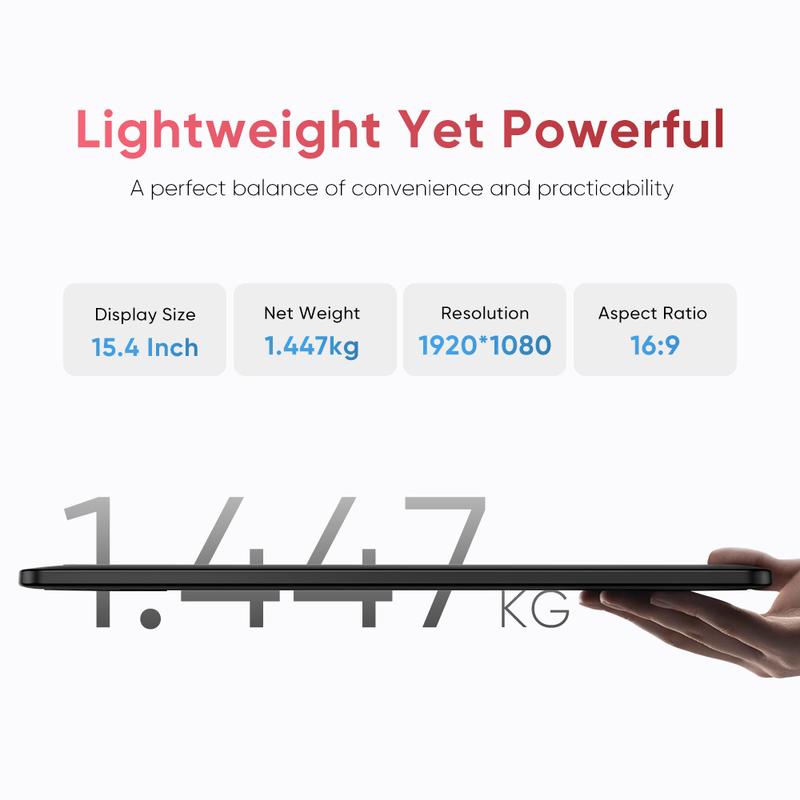
Weighing only 1.4 kg, this 15.4-inch device is convenient enough for you to create at any place. Its resolution is specifically crafted to deliver an engaging drawing experience tailored to your needs!
2. Red Dial Quick Keys
This drawing display boasts the sleek Red Dial quick keys and 8 customizable shortcut keys for unparalleled convenience, allowing for fast and easy creation whether on your tabletop or in other locations.
3. Full-lamination and Anti-glare Flim
Reduce the space between the pen nib and the display, minimizing reflections for uninterrupted creative expression.
4. 99% sRGB, 96% Adobe RGB, 96% Display P3
The drawing display accurately captures the beauty of natural colors, boasting a 99% sRGB color gamut coverage and a brightness of 250 cd/m². A brightness adjustment button allows for easy modifications in different environments, enhancing the visual appeal of your artwork and ensuring it aligns perfectly with your creative ideas.
5. Upgraded X3 Pro Smart Chip
The X3 Pro Smart Chip Stylus is powered by the X3 Pro Smart Chip, allowing users to create smooth, accurate, and fine strokes effortlessly. The felt nibs deliver a genuine pen-on-paper experience. Being equipped with two shortcut keys and a digital eraser, the stylus enhances its functionality for drawing and provides a comfortable silicone grip.
6. Full-featured USB-C Cable & 3-in-1 USB-C Cable, Foldable Stand included
no need for adapter, connect directly to your computer.
7. Convenient and Effective for Both Hands
If you're left-handed, there's no need to be concerned. You can adjust the drawing display in the driver settings and customize shortcut keys to suit your dominant hand.
Specification:
Product Name: Artist 15.6 Pro V2 Drawing Display
Product Model: MD160FH
Color: Black
Dimensions: 442.91 x 279.91 x 12.9 mm
Work Area: 340.99 x 191.81 mm
Net Weight: 1.447 kg (Stand Not Included)
Display Resolution: 1920*1080
Color Gamut Coverage Ratio (typical): 99% sRGB, 96% Adobe RGB, 96% Display P3
Display Color: 16.7 Million
Full Lamination: Yes
Viewing Angle: 178°
Brightness (typical): 250 cd/㎡
Stylus: X3 Pro Smart Chip Stylus
Pressure Levels: 16384
Tilt: 60°
Initial Activation Force: 3g
Accuracy: ±0.4 mm (center)
Reading Height: 10mm (center)
Resolution: 5080LPI
Report Rate: ≥200RPS
Port: USB-C
Power Input: 5V⎓2A
Compatibility:Windows 7 (or later), macOS 10.13 (or later), Android (USB3.1 DP1.2), ChromeOS 88 (or later), Linux
Package Included:
1 x X3 Pro Smart Chip Stylus
1 x X3 Pro Stylus
1 x Pen Holder
8 x Pen Nibs
1 x Foldable Stand
1 x USB-C to USB-C Cable
1 x USB-C to USB-A Cable
1 x USB-A Extension Cable
1 x Glove*1
1 x Cleaning Cloth
4 x Power Adapter
View more
-40%$2??$3??
Free shipping
XPPen Artist 15.6 Pro V2 15.4-Inch Graphics Drawing Tablet 16384 Levels X3 Pro Stylus 60° Tilt Red Dial Full-lamination Anti-glare Flim
4.7(121)
1.3K sold
Specification:Please select
Default
Quantity:
Buy now
Coupon center
Log in to check your coupons
View and claim any available offers once you're logged in.
Shipping & returns
Shipping & delivery
Many items qualify for free shipping or become eligible once the order threshold is met.
Returns made easy
Most items are eligible for free returns within 30 days of delivery for a refund. Some items, including ingestibles, hygiene products, and pre-owned goods, are non-returnable. Final sale items cannot be returned or replaced.
About this shop

XPPen Store

Silver Star Seller
4.6
12.0K Sold
9.0K+ Followers
97%24h response rate
66%Ships within 2 days
91%Positive feedback
Visit
Shop review


5.0
6 sold
-20%$879.99$1,099.99


4.9
100 sold
-32%$33.98$49.99
4.8
19 sold
-20%$559.99$699.99
Videos for this product
Creator earns commission

Artsileo
216.0K
Creator earns commission

🍉Sause (Rj)🍉
50.3K
Creator earns commission

hope.hokulani
46.0K
Creator earns commission

Teeheee
43.8K
Creator earns commission

Cole
41.4K
Creator earns commission
Cole
38.9K
Creator earns commission

divya
38.9K
Creator earns commission

Zack
30.7K
Creator earns commission

Cruz Gomez
26.1K
Creator earns commission
Teeheee
25.6K
Creator earns commission
🍉Sause (Rj)🍉
20.7K
Creator earns commission

Isla
18.1K
Creator earns commission

Kim Hernandez
15.9K
Creator earns commission
Teeheee
15.5K
Creator earns commission
Teeheee
15.3K
Creator earns commission

grym
14.9K
Creator earns commission
Teeheee
13.2K
Creator earns commission

Doom
12.4K
Creator earns commission

Angel Balms
12.1K
Creator earns commission
Teeheee
11.7K
Explore more from XPPen Store

4.6
122 sold
-10%$8.99$9.99


You may also like


People also searched for