- TikTok Shop
- Phones & Electronics
- Audio & Video
- CD & DVD Players
- 【Valentine's Day Gift】Retro Choice-External Laptop DVD Player USB C 3.0 Portable CD Burner - Compatible with Mac, Windows 11/10/8/7, Ideal for Bringing Back Memories,Christmas gift


4.3
277 global reviews
5
191
4
38
3
13
2
9
1
26
Photos from reviews


Its your girl Sylena🎭👻

m**_


z
Sort by
Recommended
Filter by
All
Displaying 277 of 277 reviews
Reset filters
T**n
·
Verified purchase
US
I can't figure out how to do the lights for the DVD player

Item:
8 in 1 hub2024-12-28

D**e F**l
·
Verified purchase
US
I got my portable CD DVD player raider the other day, very compact design.
Have not tried it yet.


Item:
8 in 1 hub2025-05-11

**
·
Verified purchase
US
Got my order under a week, item looks true to size and is perfect

Item:
8 in 1 hub2025-11-24

B**
·
Verified purchase
US
Not delivered at the front door , the item can be stolen being outside the gated area

Item:
8 in 1 hub2025-10-31
m**_
·
Verified purchase
US
I like the way it came packagers it worked very well and was fast to upload my computer wit.

Item:
8 in 1 hub2025-10-30

I** y**r g**l S**👻
·
Verified purchase
US
It's surprisingly good but the wires are a bit to short for my liking

Item:
8 in 1 hub2025-06-01

R**d S**h
·
Verified purchase
US
The video showed but no sound. Looked it up on YouTube, same thi g happened to a man in his car with a CD Player. Very disappointed with this item. I have a new gaming Computer, thought this Retro DVD Player would be a Plus. Check YouTube first for your reviews.

Item:
8 in 1 hub2025-02-13
m**y
·
Verified purchase
US
It works perfectly fine, I love it.

Item:
RGB Light2025-03-07
T**e
·
Verified purchase
US
Dlevred Thank you 😊 Tiktok

Item:
RGB Light2025-07-19

B**n B**n
·
Verified purchase
US
Will not play dvd

Item:
8 in 1 hub2025-06-27

J**n H**r A**
·
Verified purchase
US
Easy to use plug n play. Reads my old CDs and DVDs I'm finding files that I thought were gone forever. Definitely recommend and this wasn't a sample. I paid for it so my review is unbiased
Item:
8 in 1 hub2026-02-10

c**n
·
Verified purchase
US
Performance: Works great for burning cd’s haven’t tried playing them yet tho
Item:
8 in 1 hub2026-02-07

t**d
·
Verified purchase
US
Fantastic product, its exactly as advertised and works well with my laptop
Item:
8 in 1 hub2026-01-30

t**y
·
Verified purchase
US
I understand it's not the products fault but the delivery guy wiped it at my concrete step and took a picture of my mail box and left. Can't even give the product an honest review.
Item:
8 in 1 hub2026-01-22

c**5
·
Verified purchase
US
Super happy of purchasing this “retro” product .My CD’s are happy too not having to throw them away . Very good device 🌟🌟🌟🌟🌟
Item:
8 in 1 hub2026-01-13

c**8
·
Verified purchase
US
Plugged into two different computers and it won't play my dvd
Item:
RGB Light2025-12-16

B**a r**r
·
Verified purchase
US
You got a little program to make it work. They’re running a computer and it’s a lot of steps. They need to show a video how to do it.
Item:
RGB Light2025-12-15
u**7
·
Verified purchase
US
I received it today thank you very much. You work in good and I love it.
Item:
RGB Light2025-12-11

o**j
·
Verified purchase
US
Really sleak and clean. Looks awesome in my desk space. Recommend it.
Item:
8 in 1 hub2025-11-28
A**o
·
Verified purchase
US
Quedé muy complicado con la entrega .era lo que esperaba . Gracias
Item:
8 in 1 hub2025-11-25
About this product




Product description
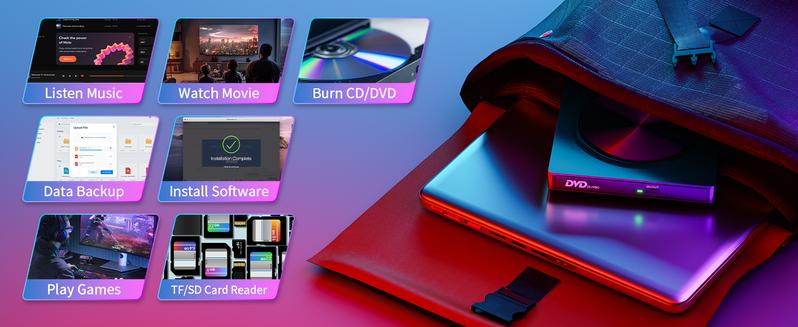
·【Effortless Plug & Play】: Our external CD/DVD drive for laptop is designed for hassle-free operation with plug-and-play functionality. No driver installation is required; simply connect the USB or USB-C port to your laptop/desktop, and the external DVD drive will be recognized instantly. Enjoy seamless access to watching videos, burning files, installing software, or creating backup CDs for all your burning and playback needs
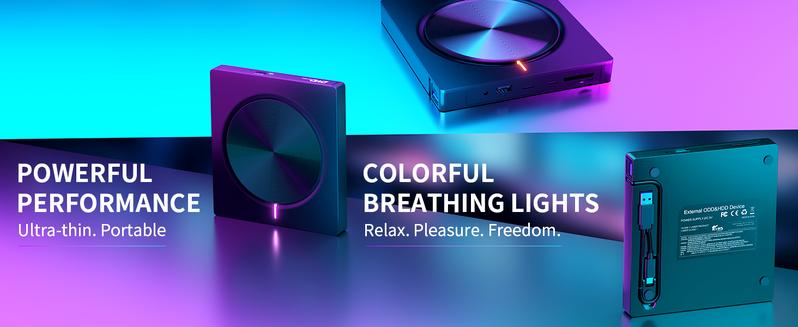
·【Versatile Connectivity】: Equipped with high-speed USB 3.0 and Type-C interfaces, our DVD player for laptop ensures lightning-fast data transfer speeds of up to 5 Gbps. Enjoy stable performance without subsequent latency, whether you're burning discs or playing music and movies. Additionally, the drive features independent SD/TF card slots, 2 USB-A ports (2.0/3.0), and 2 USB-C ports (5 Gbps), offering versatile connectivity options for enhanced functionality
·【Advanced Burning Technology】: Experience advanced burning technology with our external CD drive, supporting various disc formats including DVD+R, DVD, CD-ROM, DVD-ROM, CD-R, and CD-RW. Enjoy maximum DVD-ROM read/write speeds of 8x and CD-ROM read/write speeds of 24x, ensuring efficient disc burning without the risk of disc breakage. Plus, benefit from stable error correction when reading CD/DVD discs for reliable performance
·【Compact and Portable Design】: Our external CD/DVD player boasts a compact and portable design, making it perfect for on-the-go use. Whether you're traveling or working from home, our drive offers convenience and mobility. With its sleek and ergonomic design, it seamlessly complements your workspace while providing the functionality you need for your burning and playback tasks
·【Wide Compatibility】: Compatible with Windows, MacOS, laptops, and desktops, our CD burner ensures broad compatibility for various devices and operating systems. Whether you're using a PC or a Mac, our drive offers seamless integration and reliable performance for all your burning and playback needs. Enjoy versatility and convenience with our external CD/DVD drive for laptop, the perfect companion for your digital lifestyle
Things should be noted about this usb cd rom external drive
1. Remember to set the DVD Region to United States on the player – Properties – click Hardware Tab – click Properties button – then choose country Region (US is 1) and OK to apply. Remember you can only reset the country 5 times.
2. Please directly connect it to the USB port of the computer. Connection through a USB hub or USB extension cord may affect the device’s functioning. For desktops, please connect it to the back USB port of the motherboard because of potential power issue.
3. For macbook, to eject a disc, you have to use the drop-down "eject" button on your computer under the file tab. Pushing the button on the disc drive won't do anything. Mac OS computers do not display the device icon before placing a disc into disc tray.
4. Computers does not natively support DVD movie playback, so a third-party application, such as VLC, must be downloaded and installed in order to watch DVDs using this cd/dvd player. You could download any one of a plethora of burning software utilities available on the Internet. Or try the following:
No fee playing software: Any Media Player, Any DVD
No fee burning software for Windows OS: InfraRecorder, Ones, Express Disc Burner
No fee burning software for mac OS: Burn for mac
No fee burning software for Linux OS/Unix OS: K3b (KDE Burn Baby Burn)
5. There is a basic DVD burner for Windows 10 that lets you copy files from your computer to a disc. More advanced software allows you to make discs compliant with DVD, Blu-ray, and CD and for more obscure tech like VCD players.
6. Just because you have a series of video files doesn’t mean they are compatible with DVDs. In fact, most computer and phone video formats are not compatible. So you need a third-party software to convert your file format to one that can be shown on discs. It won't work even you burn your file onto discs without converting format.
View more
-35%$3?$4?
Free shipping
【Valentine's Day Gift】Retro Choice-External Laptop DVD Player USB C 3.0 Portable CD Burner - Compatible with Mac, Windows 11/10/8/7, Ideal for Bringing Back Memories,Christmas gift
4.3(277)
4.8K sold
Style:Please select
 8 in 1 hub
Quantity:
Buy now
Coupon center
Log in to check your coupons
View and claim any available offers once you're logged in.
Shipping & returns
Shipping & delivery
Many items qualify for free shipping or become eligible once the order threshold is met.
Returns made easy
Most items are eligible for free returns within 30 days of delivery for a refund. Some items, including ingestibles, hygiene products, and pre-owned goods, are non-returnable. Final sale items cannot be returned or replaced.
About this shop

Mukiya.US

Silver Star Seller
4.4
17.3K Sold
100+ Followers
82%24h response rate
64%Ships within 2 days
83%Positive feedback
Visit
Shop review


Videos for this product
Creator earns commission

cozytoastyy!
132.3K
Creator earns commission
cozytoastyy!
124.7K
Creator earns commission

Amyjackson9213💙
79.5K
Creator earns commission

AlyssaMurr
26.4K
Creator earns commission

heyJimtech
19.1K
Creator earns commission

MajorLeeg | Dad | Big Dawg
18.7K
Creator earns commission

Court's Co-Op
15.8K
Creator earns commission

Laura [WB]
15.2K
Creator earns commission

Bullet Tech
7.1K
Creator earns commission
Laura [WB]
6.0K
Creator earns commission
Laura [WB]
5.3K
Creator earns commission

Xandi🌻
4.2K
Creator earns commission

Dz Watts
4.0K
Creator earns commission

pleb
3.8K
Creator earns commission

PNW Dad
3.7K
Creator earns commission
Bullet Tech
3.7K
Creator earns commission

G-OUSSVE
3.7K
Creator earns commission

Ashley Turner
3.3K
Explore more from Mukiya.US


You may also like
![Laptop External CD DVD Drive, [7 in 1] Type-C CD/DVD Player USB 3.0, Portable CD/DVD ROM Burner with TF/SD Card Slot for Desktop Windows 11/10/8/7 Linux Mac OS (Black)](https://p16-oec-general-useast5.ttcdn-us.com/tos-useast5-i-omjb5zjo8w-tx/2e062c7cab7f468ca3451cc50cbc09c4~tplv-fhlh96nyum-crop-webp:300:300.webp?dr=12190&t=555f072d&ps=933b5bde&shp=8dbd94bf&shcp=607f11de&idc=useast5&from=2378011839 "Laptop External CD DVD Drive, [7 in 1] Type-C CD/DVD Player USB 3.0, Portable CD/DVD ROM Burner with TF/SD Card Slot for Desktop Windows 11/10/8/7 Linux Mac OS (Black)")