- TikTok Shop
- Automotive & Motorcycle
- Car Electronics
- Car Audio
- 【YURNLV】2026 Mini Wireless CarPlay Adapter, compatible with iPhone/Android phones, plug and play, wired to wireless, automatic connection, hands-free calling.


4
1 global reviews
5
0
4
1
3
0
2
0
1
0
Sort by
Recommended
Filter by
All
Displaying 1 of 1 reviews
Reset filters

c**m
·
Verified purchase
US
Smaller than I thought it would be. The lay flat design is a definite plus compared to the one that stands up.
Con I have a Jeep Cherokee 2019 and I can not use the steering wheel functions for phone. Have to use the touch screen to make calls
Item:
Default2025-04-04
About this product

Product description
*********************************************
·ATTENTION
**********************************************
Wireless CarPlay and Android Auto Adapter
Say goodbye to wired cable! With the Apple carPlay & Android Auto wireless adapter, you can convert your existing wired to wireless without any hassle.
·More stable
A stable connection enhances your driving experience by ensuring reliable communication and seamless connectivity.
·Faster
A quick connection ensures that your CarPlay & Android Auto serves you better.
·Easier to use
No need to worry about not knowing how to use it, as it automatically connects to your CarPlay or Android Auto.
Smart Experience
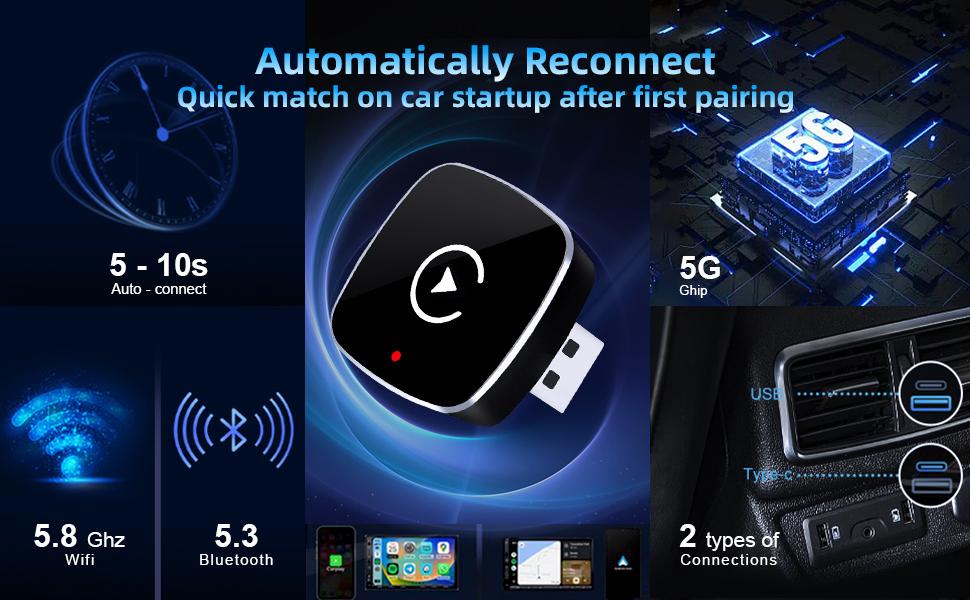
·2-in-1 wireless carplay adapter features a small and compact design that makes the wireless carplay dongle perfectly integrated into the interior of the car,built-in 2.4/5GHz WIFI, 5.0 Bluetooth with upgraded smart chip. Startup is lightning fast with no delays.
·The connection is stable and reliable, with few delays and connectivity issues during connection. The 2-in-1 wireless carplay & android auto adapter maintains a strong signal even in situations that may interfere with the signal, such as underground parking lots or crowded metropolitan environments.
Plug and play, say goodbye to cumbersome cables
·Which can turn the original wired Carplay/Android Auto into a wireless connection, so that you can get rid of the trouble of the cable, no longer need to unplug and plug the phone frequently, so that the phone is no longer worn out
·With a plug-and-play design that connects successfully in just three steps, you can enjoy the benefits of wireless connectivity.
·After the first successful connection, this wireless car adapter automatically activates the wireless Android car/CarPlay connection when the car starts.
·With Wireless CarPlay Adapter & Android Auto Wireless Adapter, connecting your Android Auto wirelessly is a breeze.
·This carplay wireless adapter supports all of the car's original control modes such as Siri voice control, steering wheel controls, knob and touch screen controls. Create a clean and tidy driving environment with this wireless-enabled carplay adapter.
·With seamless wireless connectivity, reliable performance, superior sound quality and elegant design, it is a must-have accessory for all drivers.
·wide compatibility of wireless carplay adapter and android auto wireless adapter
The Wireless CarPlay Adapter and Android Auto Wireless Adapter work perfectly with iPhone 6+ (running iOS 10+) and Android phones (running Android 11+). And it's compatible with more than 800 vehicle models
Package includes:
1*Outer packaging box size: 110*80*30mm
1*Product size:22*22*14mm
1*USB Type-C Wire
1*USB Wire
If you cannot answer calls while driving after using the product, please do the following:
·1. If the issue is caused by a phone upgrade, please restore your network settings.
·2. Check if your phone's driving mode is enabled. If so, please disable it.
·To disable Car Driving Mode: Set Focus Mode: Upgrade to iOS 18 or later. In iOS settings, find Focus Mode and edit Driving Mode. Set notifications to "Allow the following notifications," freely add contacts, change the phone number to "Contacts Only," and enable "Allow repeat calls." At the bottom of the Driving Focus Mode menu, in the Automatic Opening section, enable "Automatically activate when connected to CarPlay."
【 FAQs & Troubleshooting 】
·Q1: The adapter disconnects frequently or overheats?
·A: Please check the output current of your car’s USB port. Ensure it provides no less than 1A (1000mA). Low current output is the most common cause of performance issues.
·Q2: Why is there lag, audio distortion, or frequent disconnection?
·A: Please update the adapter’s firmware via OTA (Over-the-Air) to the latest version.
·Q3: My phone is not listed in the compatible models.
·A: Compatibility is determined by the phone’s system version, not the specific model. Please ensure your iPhone is on iOS 10.0+ or Android device on Android 11.0+.
·Q4: Connection fails during first-time pairing?
·A: Follow this quick troubleshooting checklist:
·Q5: How to switch back to wired CarPlay?
·A: Simply unplug the adapter from the USB port—your car will automatically revert to the factory wired CarPlay/Android Auto interface. No extra steps needed.
View more
-47%$22.90$43.50
Free shipping
【YURNLV】2026 Mini Wireless CarPlay Adapter, compatible with iPhone/Android phones, plug and play, wired to wireless, automatic connection, hands-free calling.
4(1)
3 sold
Color:Black
 Orange
 ColorfulBlack
Quantity:
Coupon center
Log in to check your coupons
View and claim any available offers once you're logged in.
Shipping & returns
Shipping & delivery
Many items qualify for free shipping or become eligible once the order threshold is met.
Returns made easy
Most items are eligible for free returns within 30 days of delivery for a refund. Some items, including ingestibles, hygiene products, and pre-owned goods, are non-returnable. Final sale items cannot be returned or replaced. Please log in to view this item's specific return policy.
About this shop

HICARS
3.7
472.8K Sold
14.7K+ Followers
99%24h response rate
83%Ships within 2 days
66%Positive feedback
Visit
Shop review


Explore more from HICARS

3.7
6.3K sold
-42%$24.34$42.30


You may also like



Wyze
4.8
2.0K sold
-5%$32.86$34.59


People also searched for