- TikTok Shop
- Home Supplies
- Home Decor
- Hanging Decor
- 2-in-1 Card Reader, Lightning & USB-C SD/TF Card Adapter, Dual Slot Multi-Card Reader, Plug & Play for iPhone Samsung Xiaomi


About this product



Product description
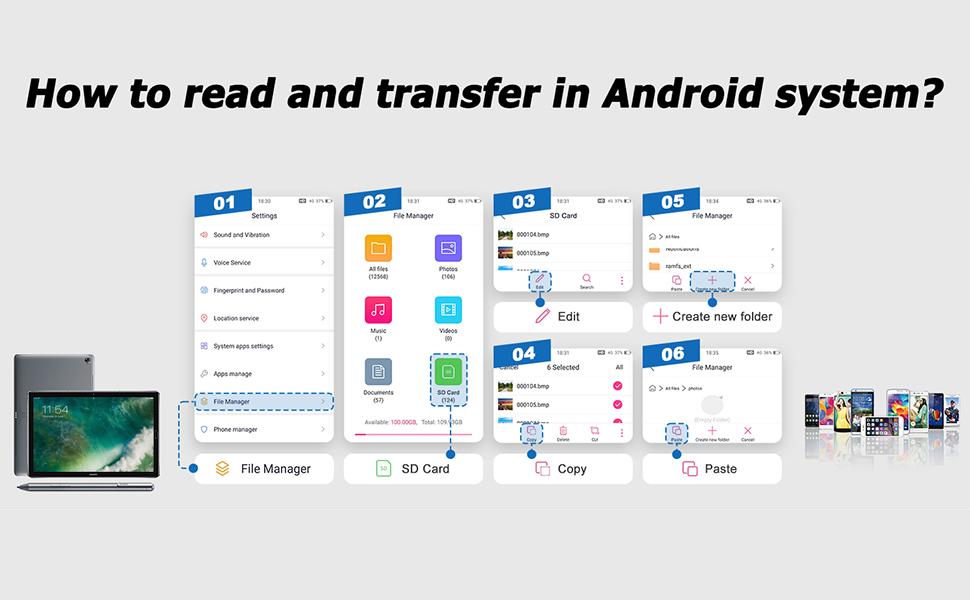
No Need for a Third-Party App, No Need for an Internet Connection
SD&TF Dual Card Slots Card Reader for iPhone iPad
● Insert the memory card in the SD/Micro SD card reader and connect it to the iPhone.Click on the 'Photos' application and find 'Import', plug and play.
● With our memory card adapter, you can read SD card or Micro SD card taken by digital camera, Dash Cam or Trail Camera.
● You can also share photos or videos anytime and anywhere, having fun with friends or family in the wild.
Ideal Photography Accessories
● Data Transfer in Seconds: With 40MB/s~60MB/s data transfer speed, you can share photos or videos to social media quickly and easily.
● Up to 2 TB Capacity: Enough storage space for our Micro SD card adapter to meet your daily needs, no longer have the trouble of insufficient capacity!
Dual Connector (Lightening&USB-C) Memory SD Card Adapter
Two interface methods for our SD card reader for iPhone iPad, that not only work with iPhone with lightening ports but also with iPhone iPad/Macbook/iMac and Android devices with USB-C ports.
● Supports iPhone 5 to 14 series with Lightening connector.
● Support for iPhone 16 series, iPhone 15 series, iPad or Macbook and others with USB-C ports.
● Support for Android phones/tablets/laptops with USB-C ports.
The inclusion of both a lᎥghtnᎥng cord card reader and a USB-C adaptor, ensuring compatibility with almost all your gadgets, from iPhone to your USB-C iPad and laptop.
For iPhone 5 to iPhone 16 users.
You just need to:
1.Turn on iPhone and plug the sd reader to the lᎥghtnᎥng port.
2.Open iOS built-in "Files" app.You can view/edit/copy any files in your memory card.
For USB-C iPhone 15,16, iPad or Mac users.
You just need to:
1.Plug the USB-C end of the adapter into the USB-C connector on your iPhone, iPad or Mac, then connect this LᎥghtnᎥng SD Card Reader.
2. Browse photos videos or any files of your memory card just like on your computer.
View more
$7.37
$15.62 shipping on this order
2-in-1 Card Reader, Lightning & USB-C SD/TF Card Adapter, Dual Slot Multi-Card Reader, Plug & Play for iPhone Samsung Xiaomi
0 sold
Specification:Default
DefaultQuantity:
Coupon center
Log in to check your coupons
View and claim any available offers once you're logged in.
Shipping & returns
Shipping & delivery
Many items qualify for free shipping or become eligible once the order threshold is met.
Returns made easy
Most items are eligible for free returns within 30 days of delivery for a refund. Some items, including ingestibles, hygiene products, and pre-owned goods, are non-returnable. Final sale items cannot be returned or replaced. Please log in to view this item's specific return policy.
About this shop

CozyNest Supplies
Visit
Explore more from CozyNest Supplies


You may also like




dot. cards
4.5
43.3K sold
-30%$22.41$32.00


dot. cards
4.5
31.0K sold
-30%$23.09$33.00
dot. cards
4.4
6.9K sold
-30%$23.09$33.00
dot. cards
4.5
7.4K sold
-26%$40.69$55.00


