- TikTok Shop
- Home Supplies
- Home Decor
- Posters & Prints
- Custom UV DTF Transfers Gang Sheet (Print Your Designs) - TikTok


About this product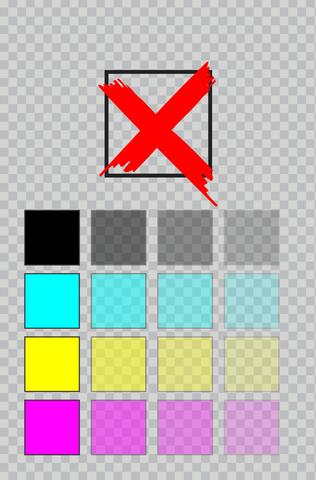

Product description
UV DTF Transfers Gang Sheet (Print Your Designs) - TikTok
Kingdom Transfers® by Kingdom DTF®, the DTF Transfers are vibrant, durable, stretchy, and READY TO PRESS!
Tiktok Shop
1. Choose gang size
2. Order your gang sheet today
3. Send your designs to sales@kingdomdtf.com with subject: Tiktok - order number (example: Tiktok - order 12345678910111213)
PLEASE READ THE ARTWORK SPECIFICATIONS BELOW.
● Suitable for hard surfaces such as glass, ceramic, acrylic, wood, metal, and hard plastics.
● Perfect for mugs, tumblers, cups, phone cases, laptops, keychains, and more.
● Strong adhesion, UV protection, scratch-resistant, waterproof.
IMPORTANT NOTES:
IF YOU PURCHASE THROUGH SHOP APP, THE DESIGN STUDIO IS NOT AVAILABLE. YOU NEED TO E-MAIL YOUR DESIGN FILE READY ON A GANG SHEET WITH THE SIZE WE OFFER.
Regular Orders: (NO WEEKENDS)
Current production time and ship out: 2 DAYS
Rush or Emergency Orders: (NO WEEKENDS)
1. Cut time is 1 PM (ET time / Florida). Orders after 1 PM are not guaranteed to be printed the same day.
2. A $25 fee applies for Rush Print (not refundable)
A $100 fee applies for Emergency Print (not refundable)
This does not count for shipping. If you need Next Day Air that is an extra cost that needs to be calculated at checkout. LARGE ORDERS MAY NOT QUALIFY. PLEASE CONTACT US IF YOUR ORDER IS ABOVE $500.
3. Need to be sure that ALL your designs meet the requirement to be printed, 300dpi and transparent background. Any design that has any issue will be pushed back until is fixed by the customer even if the Rush fee was paid.
Artwork Specifications
1. Prepare your design at 300 DPI on the template provided with the design or gang designs you want.
2. We print your design the same way you send it and we do not fix or edit designs! Make sure your design is 300 DPI resolution for the best quality.
3. DO NOT mirror your artwork.
4. Design needs to be a PNG file with transparent background.
5. Don't use transparency since the software may not be also to see. View the pictures above for a sample of not good vs good.
6. Outline all fonts.
7. Convert strokes to objects.
8. Export as PNG file with transparent background.
9. Files work best in RGB, CMYK, or Pantone (PMS color library codes only).
DTF Transfers renders incredible detail with crisp, clean edges in over a million vivid colors and gradients. Here’s how to optimize your files for perfect reproduction.
Design with Transparent Pixels = NOT GOOD
Design with Solid Pixels Colors = GOOD
If you have any questions please email us at info@kingdomdtf.com
Instructions for applying UV DTF Transfers
1. Apply at Room temperature.
2. Ready the surface: Clean surface with alcohol and let dry (tumbler, glass, plastic, etc.)
3. Peeling: Peel clear or white backing off the transfer slowly.
4. Placement: Place design onto the surface you want.
5. Press: Apply with finger to secure non-movement, then use squeegee to apply firm pressure over the design.
6. Final peel: Slowly peel off the top film.
Notes: For hard surfaces only (not for fabric). Strong adhesion, UV protection, scratch-resistant, waterproof.
Tool Needed: Squeegee or firm pressure such as fingers or credit card. Squeegee for best results.
View more
$28.00
$10.94 shipping on this order
Custom UV DTF Transfers Gang Sheet (Print Your Designs) - TikTok
0 sold
Size:22 in x 24 in (2 feet)
22 in x 24 in (2 feet)
22 in x 48 in (4 feet)
22 in x 60 in (5 feet)
22 in x 120 in (10 feet)
22 in x 180 in (15 feet)
22 in x 240 in (20 feet)
Quantity:
Coupon center
Log in to check your coupons
View and claim any available offers once you're logged in.
Shipping & returns
Shipping & delivery
Many items qualify for free shipping or become eligible once the order threshold is met.
Returns made easy
Most items are eligible for free returns within 30 days of delivery for a refund. Some items, including ingestibles, hygiene products, and pre-owned goods, are non-returnable. Final sale items cannot be returned or replaced. Please log in to view this item's specific return policy.
About this shop

Kingdom DTF
5.0
18 Sold
44.4K+ Followers
Visit
Shop review

Explore more from Kingdom DTF


You may also like







CGK Linens
4.6
3.0K sold
-11%$31.00$34.78
Clean Skin Club Shop
4.9
53.9K sold
-14%$19.00$22.00
Grabie
4.4
3.9K sold
$13.89


Luvmehair
4.4
1.3K sold
-50%$106.00$211.00

4.8
2.0K sold
-35%$23.54$36.39