Results for "terabyte for xbox series s"
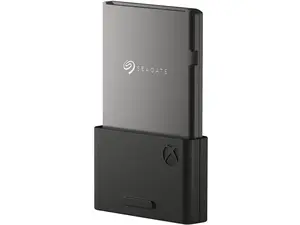
A terabyte (TB) is a unit of digital information storage equal to 1,024 gigabytes (GB). For Xbox Series S users, having a terabyte of storage can significantly enhance gaming experiences by allowing more games, downloadable content, and updates to be stored.


Newegg, Inc.

4.7
190 sold
-5%$189.99$199.99


Newegg, Inc.
5.0
94 sold
-8%$274.99$299.99


5.0
2 sold
-50%$13.99$27.98


Related Searches
Related Categories
Introduction
When it comes to gaming on the Xbox Series S, storage capacity is a crucial consideration. The Xbox Series S comes with a built-in storage of 512GB, which can fill up quickly with modern games and downloadable content. That's where a terabyte (TB) of storage becomes invaluable for gamers. With a terabyte, you can store approximately double the number of games, ensuring you have your favorites readily available without needing to delete others.
Here are some key benefits of having a terabyte for your Xbox Series S:
Here are some key benefits of having a terabyte for your Xbox Series S:
- Enhanced Game Library: A terabyte allows you to download and store a wider variety of games, including large titles that require significant space.
- Future-Proofing: As games become more complex and demanding in terms of storage, having a terabyte ensures you won't run out of space anytime soon.
- Convenience: No more hassle of uninstalling and reinstalling games; you can keep all your favorites at your fingertips.
- Faster Load Times: Using a high-speed external drive can improve load times, enhancing your gaming experience.