Results for "sync jbl speakers"
Syncing JBL speakers refers to the process of connecting multiple JBL speakers together to play audio simultaneously, enhancing the listening experience.


JLab

5.0
44 sold
-22%$279.99$359.97

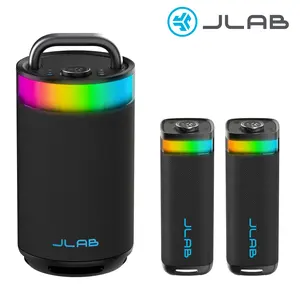
![[LIVE Exclusive] JLab JBuds Party Portable Bluetooth Speaker 30W 12H Playtime RGB Lighting IP56 Waterproof Stereo Pairing LabSync Up to 100 Speakers, USB-C](https://p19-oec-general-useast5.ttcdn-us.com/tos-useast5-i-omjb5zjo8w-tx/489f7fbcf1b34cd1a09b5965010a132a~tplv-fhlh96nyum-crop-webp:300:300.webp?dr=12190&t=555f072d&ps=933b5bde&shp=8dbd94bf&shcp=a6e80448&idc=useast5&from=2378011839 "[LIVE Exclusive] JLab JBuds Party Portable Bluetooth Speaker 30W 12H Playtime RGB Lighting IP56 Waterproof Stereo Pairing LabSync Up to 100 Speakers, USB-C")

JLab
4.7
278 sold
-37%$99.99$159.98


![[LIVE Exclusive] JLab Epic Party Portable 100W Bluetooth Speaker with 4 Drivers 16+ HR Playtime RGB Lighting IP56 Waterproof Lab Sync 3.5mm AUX USB-C Charging Audio Cable Handle](https://p16-oec-general-useast8.ttcdn-us.com/tos-useast8-i-rt0ujvrtvp-tx2/c96c7a95ecbc434c86b46f5d056fa2bf~tplv-fhlh96nyum-crop-webp:300:300.webp?dr=12190&t=555f072d&ps=933b5bde&shp=8dbd94bf&shcp=a6e80448&idc=useast5&from=2378011839 "[LIVE Exclusive] JLab Epic Party Portable 100W Bluetooth Speaker with 4 Drivers 16+ HR Playtime RGB Lighting IP56 Waterproof Lab Sync 3.5mm AUX USB-C Charging Audio Cable Handle")


![2-IN-1 Wireless Speaker Bluetooth, Multifunctional wireless speaker, Twist and Split to 2 Speaker, FM Radio, Magnetic audio system, For Home/Outdoor/Beach/Party, [Stromberg] [TWIN-2] Stereo Audio](https://p16-oec-general-useast5.ttcdn-us.com/tos-useast5-i-omjb5zjo8w-tx/842f0730803d4f31a56050f1f0d95d98~tplv-fhlh96nyum-crop-webp:300:300.webp?dr=12190&t=555f072d&ps=933b5bde&shp=8dbd94bf&shcp=a6e80448&idc=useast5&from=2378011839 "2-IN-1 Wireless Speaker Bluetooth, Multifunctional wireless speaker, Twist and Split to 2 Speaker, FM Radio, Magnetic audio system, For Home/Outdoor/Beach/Party, [Stromberg] [TWIN-2] Stereo Audio")




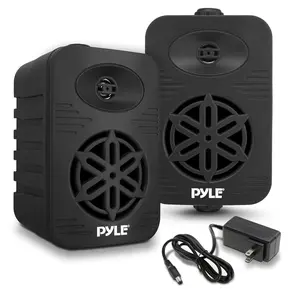
![[LIVE Exclusive] JLab Pop Party Ultra-Portable Bluetooth Speaker 5W Driver 8+ Hours Playtime RGB Lighting IPX5 Splashproof Audio & USB-C Charging with Detachable Loop Handle](https://p16-oec-general-useast5.ttcdn-us.com/tos-useast5-i-omjb5zjo8w-tx/0cc2d7aaa34e4345abea62f5a97939fb~tplv-fhlh96nyum-crop-webp:300:300.webp?dr=12190&t=555f072d&ps=933b5bde&shp=8dbd94bf&shcp=a6e80448&idc=useast5&from=2378011839 "[LIVE Exclusive] JLab Pop Party Ultra-Portable Bluetooth Speaker 5W Driver 8+ Hours Playtime RGB Lighting IPX5 Splashproof Audio & USB-C Charging with Detachable Loop Handle")


Newegg, Inc.
-8%$43.49$47.49


Related Searches
Related Categories
Introduction
Syncing JBL speakers is a great way to amplify your audio experience, whether you're hosting a party, enjoying a movie night, or just relaxing at home. By connecting multiple JBL speakers, you can create a surround sound environment or fill a larger space with rich, high-quality sound.
To sync your JBL speakers, you typically need to use the JBL Connect app or the built-in Bluetooth functionality available on many JBL models. This process allows you to connect various JBL speakers, such as the JBL Flip, Charge, or Xtreme series, ensuring they all play the same audio track simultaneously. Here’s a quick guide on how to sync your JBL speakers:
Remember, syncing JBL speakers not only enhances sound quality but also provides a more immersive audio experience. Many users appreciate the versatility of being able to connect multiple speakers, allowing for a customizable sound setup that suits their needs. With proven quality and customer-approved performance, JBL speakers are trusted by thousands for their reliability and sound excellence.
Whether you're using them for music, movies, or gaming, syncing JBL speakers can elevate your audio experience to new heights.
To sync your JBL speakers, you typically need to use the JBL Connect app or the built-in Bluetooth functionality available on many JBL models. This process allows you to connect various JBL speakers, such as the JBL Flip, Charge, or Xtreme series, ensuring they all play the same audio track simultaneously. Here’s a quick guide on how to sync your JBL speakers:
- Ensure all speakers are charged and powered on.
- Activate Bluetooth on your device.
- Open the JBL Connect app or use the Bluetooth pairing button on your speakers.
- Select the speakers you want to connect and follow the prompts.
Remember, syncing JBL speakers not only enhances sound quality but also provides a more immersive audio experience. Many users appreciate the versatility of being able to connect multiple speakers, allowing for a customizable sound setup that suits their needs. With proven quality and customer-approved performance, JBL speakers are trusted by thousands for their reliability and sound excellence.
Whether you're using them for music, movies, or gaming, syncing JBL speakers can elevate your audio experience to new heights.