Results for "rpcs3 xbox controller"
RPCS3 is an open-source PlayStation 3 emulator that allows users to play PS3 games on their PCs. An Xbox controller can be used to enhance the gaming experience on RPCS3, providing a familiar and comfortable control scheme for many gamers.


GameSir

4.4
7.0K sold
$29.99

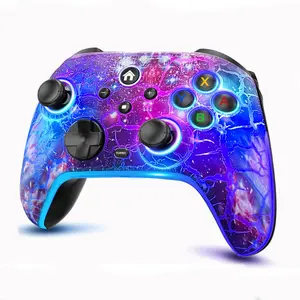
![[TT Exclusive] GameSir T7 Pro Floral Wired Controller for Xbox](https://p16-oec-general-useast5.ttcdn-us.com/tos-useast5-i-omjb5zjo8w-tx/b9dd058be905452197f81661e20f68bf~tplv-fhlh96nyum-crop-webp:300:300.webp?dr=12190&t=555f072d&ps=933b5bde&shp=8dbd94bf&shcp=a6e80448&idc=useast5&from=2378011839 "[TT Exclusive] GameSir T7 Pro Floral Wired Controller for Xbox")




Related Searches
Related Categories
Introduction
Using an Xbox controller with RPCS3 can significantly enhance your gaming experience. Many gamers prefer the ergonomic design and layout of the Xbox controller, making it a popular choice for playing PlayStation 3 games on this emulator. When setting up RPCS3, you can easily configure your Xbox controller to ensure that all buttons and analog sticks function correctly, allowing for smooth and responsive gameplay.
Here are some tips to get the most out of your Xbox controller with RPCS3:
Many users have reported that using an Xbox controller feels more intuitive, especially for action and adventure games that require quick reflexes. With proven quality and customer-approved performance, integrating an Xbox controller into your RPCS3 setup can provide a seamless gaming experience. Regular updates to RPCS3 also ensure that compatibility and performance continue to improve. Whether you're revisiting classic PS3 titles or exploring new ones, an Xbox controller can be a valuable addition to your gaming arsenal.
Here are some tips to get the most out of your Xbox controller with RPCS3:
- Ensure your controller is updated and compatible with your PC.
- Use the RPCS3 configuration settings to map the controller buttons to your preferred layout.
- Test the controller in the emulator to make sure all inputs are recognized.
Many users have reported that using an Xbox controller feels more intuitive, especially for action and adventure games that require quick reflexes. With proven quality and customer-approved performance, integrating an Xbox controller into your RPCS3 setup can provide a seamless gaming experience. Regular updates to RPCS3 also ensure that compatibility and performance continue to improve. Whether you're revisiting classic PS3 titles or exploring new ones, an Xbox controller can be a valuable addition to your gaming arsenal.