Results for "redragon keyboard k552 color change"
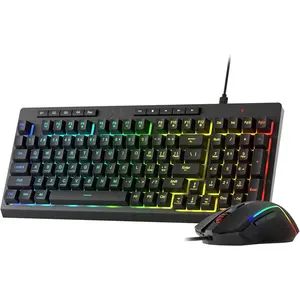
The Redragon K552 is a mechanical gaming keyboard known for its customizable RGB lighting features, allowing users to change the colors to suit their preferences.


REDRAGON

4.8
192 sold
-24%$38.69$50.91


REDRAGON
4.8
660 sold
-10%$32.92$36.58


REDRAGON
4.7
104 sold
-12%$73.18$83.16


Related Searches
Related Categories
Introduction
The Redragon K552 is a popular choice among gamers and typists alike, thanks to its robust build quality and customizable features. One of the standout aspects of this keyboard is its color-changing capabilities, which enhance both aesthetics and functionality. Users can easily switch between various RGB lighting modes, creating a personalized gaming atmosphere or a more subdued look for everyday use.
With the Redragon K552, changing colors is straightforward. You can cycle through different lighting effects and adjust the brightness to match your mood or gaming environment. Whether you prefer a static color, a breathing effect, or a wave pattern, this keyboard offers a variety of options to choose from.
Here are some key features of the Redragon K552 that make it an excellent choice:
The Redragon K552 has proven quality and is trusted by thousands of gamers worldwide. Its color-changing feature not only enhances your setup's visual appeal but also allows for an immersive gaming experience. Regular updates from the manufacturer ensure that users can enjoy the latest lighting effects and features. Whether you're gaming, working, or just browsing, the Redragon K552 is designed to meet your needs.
With the Redragon K552, changing colors is straightforward. You can cycle through different lighting effects and adjust the brightness to match your mood or gaming environment. Whether you prefer a static color, a breathing effect, or a wave pattern, this keyboard offers a variety of options to choose from.
Here are some key features of the Redragon K552 that make it an excellent choice:
- Mechanical switches for responsive typing and gaming.
- Multiple RGB lighting modes for customization.
- Durable construction designed for long-lasting use.
- Compact size, making it ideal for smaller desks.
- Anti-ghosting technology for simultaneous key presses.
The Redragon K552 has proven quality and is trusted by thousands of gamers worldwide. Its color-changing feature not only enhances your setup's visual appeal but also allows for an immersive gaming experience. Regular updates from the manufacturer ensure that users can enjoy the latest lighting effects and features. Whether you're gaming, working, or just browsing, the Redragon K552 is designed to meet your needs.