Results for "motherboard jfp1"
JFP1 refers to the front panel connector on a motherboard, which connects the power switch, reset switch, power LED, and HDD LED from the computer case to the motherboard.


Newegg, Inc.

5.0
28 sold
-14%$204.26$236.34
Newegg, Inc.
5.0
5 sold
-28%$314.42$439.54

-26%$278.00$375.00

![12V/24V Diesel Air Heater Parking Heater Controller Board Motherboard For 2KW [TS1]](https://p16-oec-general-useast5.ttcdn-us.com/tos-useast5-i-omjb5zjo8w-tx/01fa7f588e60489e93411df0e47a3316~tplv-fhlh96nyum-crop-webp:300:300.webp?dr=12190&t=555f072d&ps=933b5bde&shp=8dbd94bf&shcp=a6e80448&idc=useast5&from=2378011839 "12V/24V Diesel Air Heater Parking Heater Controller Board Motherboard For 2KW [TS1]")

Newegg, Inc.
1.0
2 sold
-23%$186.64$241.53

Newegg, Inc.
-25%$193.03$257.19


Newegg, Inc.
5.0
8 sold
-19%$139.97$172.91

Newegg, Inc.
-25%$193.03$257.19


Newegg, Inc.
-34%$340.08$516.54




Newegg, Inc.
4.2
142 sold
-11%$90.90$101.59
Newegg, Inc.
5.0
46 sold
-29%$79.67$111.75


Newegg, Inc.
5.0
14 sold
-18%$145.46$178.40

Newegg, Inc.
5.0
10 sold
-9%$116.37$127.35
Newegg, Inc.
5.0
9 sold
-30%$128.45$183.34
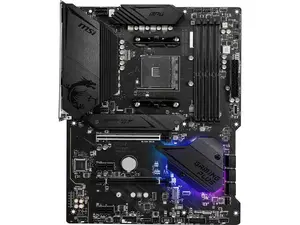

Newegg, Inc.
5.0
3 sold
-15%$186.64$219.57


Newegg, Inc.
-12%$163.03$184.99

$16.00


Related Searches
Related Categories
Introduction
The JFP1 connector is an essential component found on most motherboards, serving as the interface between your computer case's front panel and the motherboard itself. This connector is crucial for connecting vital components like the power switch, reset switch, power LED, and HDD LED. Understanding how to properly connect these components to the JFP1 can enhance your PC building experience and ensure that your system operates smoothly.
When assembling your computer, ensuring that the JFP1 connections are correctly made is vital. Here are some key points to consider:
When assembling your computer, ensuring that the JFP1 connections are correctly made is vital. Here are some key points to consider:
- Identifying JFP1: The JFP1 connector is typically located near the bottom right corner of the motherboard, marked clearly on the motherboard layout.
- Wiring: Each wire from the front panel connectors has a specific pin it should connect to, so refer to your motherboard manual for the exact pin layout.
- Common Mistakes: One of the most common errors is reversing the polarity of the power and reset switches, which can prevent your system from turning on.
- Compatibility: Most modern motherboards have a JFP1 connector, but the pin configuration can vary, so always check the specifics for your model.
- Proven Quality: Using quality components and following the JFP1 connection guidelines can lead to a more reliable system.