Results for "logitech mx mechanical mini for mac"
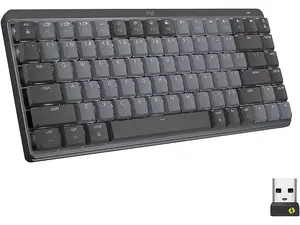
The Logitech MX Mechanical Mini for Mac is a compact, wireless mechanical keyboard designed specifically for Mac users, offering a blend of performance and aesthetics.




Related Searches
Related Categories
Introduction
The Logitech MX Mechanical Mini for Mac is an innovative keyboard that enhances your typing experience while seamlessly integrating with your Mac setup. This compact keyboard features low-profile mechanical switches that provide tactile feedback, making it perfect for both casual and professional use. The design is not only sleek but also optimized for comfort, allowing for long hours of typing without fatigue.
With its wireless connectivity, the MX Mechanical Mini allows you to declutter your workspace while maintaining a reliable connection. It can connect to multiple devices, enabling you to switch between your Mac, iPad, or iPhone effortlessly. The backlit keys are adjustable, ensuring you can work in any lighting condition, whether it's bright daylight or a dimly lit room.
Key features include:
With its wireless connectivity, the MX Mechanical Mini allows you to declutter your workspace while maintaining a reliable connection. It can connect to multiple devices, enabling you to switch between your Mac, iPad, or iPhone effortlessly. The backlit keys are adjustable, ensuring you can work in any lighting condition, whether it's bright daylight or a dimly lit room.
Key features include:
- Compact layout that saves desk space
- Low-profile mechanical switches for a satisfying typing experience
- Multi-device connectivity for seamless switching
- Customizable backlighting for enhanced visibility
- Long-lasting battery life to keep you productive