Results for "logitech mouse m185"
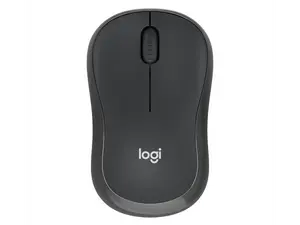
The Logitech Mouse M185 is a wireless optical mouse designed for ease of use and comfort. It features a compact design, reliable wireless connectivity, and a long battery life, making it a popular choice for both home and office environments.





Newegg, Inc.

5.0
18 sold
-12%$42.49$48.49


Newegg, Inc.
5.0
12 sold
$29.99


Related Searches
Related Categories
Introduction
The Logitech Mouse M185 is an essential accessory for anyone looking to enhance their computing experience. This wireless mouse is designed with user comfort in mind, featuring a compact and ergonomic shape that fits comfortably in your hand. With its reliable wireless technology, you can enjoy a clutter-free workspace, allowing you to move freely without the constraints of a cord. The M185 offers a long battery life, ensuring that you can use it for extended periods without worrying about frequent replacements.
Here are some key features of the Logitech Mouse M185:
Whether you're working from home, in the office, or on the go, the Logitech Mouse M185 delivers proven quality and customer-approved performance. It's trusted by thousands of users for its reliability and functionality. By incorporating the M185 into your setup, you can enjoy a smooth and precise cursor control experience, enhancing your productivity and overall computing efficiency. Regularly updating your peripherals, like the M185, ensures that you stay competitive in today’s fast-paced digital environment.
Here are some key features of the Logitech Mouse M185:
- Wireless connectivity for hassle-free usage.
- Compact design suitable for travel.
- Long-lasting battery life.
- Compatible with various operating systems.
- Easy plug-and-play setup.
Whether you're working from home, in the office, or on the go, the Logitech Mouse M185 delivers proven quality and customer-approved performance. It's trusted by thousands of users for its reliability and functionality. By incorporating the M185 into your setup, you can enjoy a smooth and precise cursor control experience, enhancing your productivity and overall computing efficiency. Regularly updating your peripherals, like the M185, ensures that you stay competitive in today’s fast-paced digital environment.