Results for "logitech meetup remote"
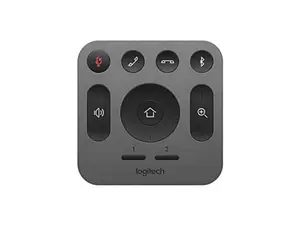
The Logitech Meetup Remote is a specialized remote control designed for use with the Logitech Meetup video conferencing camera. It allows users to easily manage video calls and presentations from a distance, enhancing the overall meeting experience.


Newegg, Inc.

-9%$69.78$77.00


3.6
52 sold
-11%$8.13$9.13


5.0
81 sold
-53%$10.73$22.66



![[US warehouse] Magcubic IR Remote Control Accessory for Projector | Portable Infrared Controller Compatible with Magcubic HY300Pro/HY300Pro+/HY320/HY320Mini (NO Battery Included)](https://p16-oec-general-useast5.ttcdn-us.com/tos-useast5-i-omjb5zjo8w-tx/6b3c89030b2843debc4b73e5c70b4678~tplv-fhlh96nyum-crop-webp:300:300.webp?dr=12190&t=555f072d&ps=933b5bde&shp=8dbd94bf&shcp=a6e80448&idc=useast5&from=2378011839 "[US warehouse] Magcubic IR Remote Control Accessory for Projector | Portable Infrared Controller Compatible with Magcubic HY300Pro/HY300Pro+/HY320/HY320Mini (NO Battery Included)")
![[WeeklyDeals] [Power Outage Survival]5000mAh Magnetic Power Bank MagSafe Wireless Fast Charger for iPhone 12–17 Pro/Pro Max, Compact Portable Battery Pack](https://p16-oec-general-useast5.ttcdn-us.com/tos-useast5-i-omjb5zjo8w-tx/4913c71ddd7f4e96924bf8164fdaa7c9~tplv-fhlh96nyum-crop-webp:300:300.webp?dr=12190&t=555f072d&ps=933b5bde&shp=8dbd94bf&shcp=a6e80448&idc=useast5&from=2378011839 "[WeeklyDeals] [Power Outage Survival]5000mAh Magnetic Power Bank MagSafe Wireless Fast Charger for iPhone 12–17 Pro/Pro Max, Compact Portable Battery Pack")

Newegg, Inc.

5.0
8 sold
-24%$377.96$496.82







Related Searches
Related Categories
Introduction
The Logitech Meetup Remote is an essential tool for anyone utilizing the Logitech Meetup for video conferencing. This remote enhances your meeting experience by providing seamless control over your video calls. With its user-friendly design, you can easily manage functions like mute, volume control, and camera settings without having to be near your computer. This is especially beneficial in larger conference rooms where distance can be an issue.
Key features of the Logitech Meetup Remote include:
Customers have praised the Logitech Meetup Remote for its proven quality and reliability, making it a trusted accessory for video conferencing. Whether you're leading a presentation or participating in a group call, this remote ensures you have complete control at your fingertips. Regular updates to the firmware and compatibility with various platforms make it a versatile choice for modern meeting environments. Stay ahead in your meetings with the Logitech Meetup Remote, trusted by thousands of professionals for its efficiency and ease of use.
Key features of the Logitech Meetup Remote include:
- Wireless connectivity for hassle-free operation.
- Dedicated buttons for quick access to essential functions.
- Compact design that fits comfortably in your hand.
- Long battery life to keep you connected during extended meetings.
Customers have praised the Logitech Meetup Remote for its proven quality and reliability, making it a trusted accessory for video conferencing. Whether you're leading a presentation or participating in a group call, this remote ensures you have complete control at your fingertips. Regular updates to the firmware and compatibility with various platforms make it a versatile choice for modern meeting environments. Stay ahead in your meetings with the Logitech Meetup Remote, trusted by thousands of professionals for its efficiency and ease of use.