Results for "iphone remote scroll"
iPhone remote scroll refers to a feature or accessory that allows users to control scrolling on their iPhone remotely, enhancing the usability of the device during presentations or media viewing.


![[NEW COLOR] Xring Scrolling Ring Remote Control Scroller Page Turner,Bluetooth Selfie & Video Recording Remote,Music Control for iPhone,iPad,Android,Smartphone](https://p19-oec-general-useast5.ttcdn-us.com/tos-useast5-i-omjb5zjo8w-tx/ac6510344faf4fcbbea7394f45095b47~tplv-fhlh96nyum-crop-webp:300:300.webp?dr=12190&t=555f072d&ps=933b5bde&shp=8dbd94bf&shcp=a6e80448&idc=useast5&from=2378011839 "[NEW COLOR] Xring Scrolling Ring Remote Control Scroller Page Turner,Bluetooth Selfie & Video Recording Remote,Music Control for iPhone,iPad,Android,Smartphone")


4.0
17 sold
-14%$13.78$16.08


![[NEW COLOR] Bluetooth Scrolling Ring Remote Control Scroller Page Turner, selfie Video Recording Remote,Music Control, for iPhone ,iPad ,iOS,Android,Pink Accessories Selfie Devices,dealsforyoudays](https://p16-oec-general-useast5.ttcdn-us.com/tos-useast5-i-omjb5zjo8w-tx/0cf05636c3944f8bb34dea3f7a2e539b~tplv-fhlh96nyum-crop-webp:300:300.webp?dr=12190&t=555f072d&ps=933b5bde&shp=8dbd94bf&shcp=a6e80448&idc=useast5&from=2378011839 "[NEW COLOR] Bluetooth Scrolling Ring Remote Control Scroller Page Turner, selfie Video Recording Remote,Music Control, for iPhone ,iPad ,iOS,Android,Pink Accessories Selfie Devices,dealsforyoudays")


Related Searches
Related Categories
Introduction
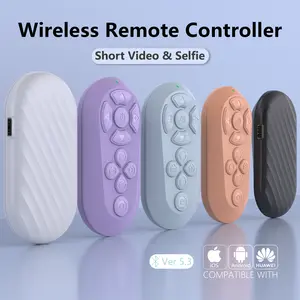
The iPhone remote scroll is an innovative accessory designed to enhance your iPhone experience, particularly when it comes to navigating through content. Whether you're giving a presentation, watching videos, or browsing photos, having the ability to scroll remotely can significantly improve your convenience and efficiency. With the iPhone remote scroll, you can easily control the scrolling action from a distance, making it perfect for various scenarios such as:
- Presentations: Seamlessly navigate through slides without being tethered to your device.
- Media Viewing: Enjoy movies or slideshows while comfortably seated without needing to reach for your phone.
- Group Photos: Take group selfies and control the camera remotely for perfectly timed shots.