Results for "iphone 14 lockscreen"
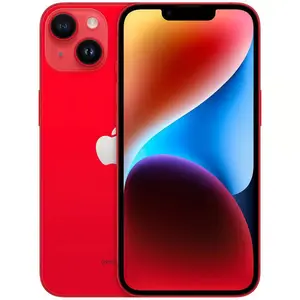
The iPhone 14 lockscreen is the interface that appears when your iPhone is locked, allowing you to view notifications, access the camera, and see the time without unlocking your device.



![Lightning Bolt Design Gloss MagSafe Compatible Shockproof Protective Cover with Precision Magnet Ring for [iPhone 14] 952](https://p16-oec-general-useast5.ttcdn-us.com/tos-useast5-i-omjb5zjo8w-tx/21b2abc362c4484b98009e953b1596d3~tplv-fhlh96nyum-crop-webp:300:300.webp?dr=12190&t=555f072d&ps=933b5bde&shp=8dbd94bf&shcp=a6e80448&idc=useast5&from=2378011839 "Lightning Bolt Design Gloss MagSafe Compatible Shockproof Protective Cover with Precision Magnet Ring for [iPhone 14] 952")


![Lightning Bolt Design Gloss MagSafe Compatible Shockproof Protective Cover with Precision Magnet Ring for [iPhone 14 Pro] 952](https://p16-oec-general-useast5.ttcdn-us.com/tos-useast5-i-omjb5zjo8w-tx/def5e0d4b671463dae7f9cef1b71fbba~tplv-fhlh96nyum-crop-webp:300:300.webp?dr=12190&t=555f072d&ps=933b5bde&shp=8dbd94bf&shcp=a6e80448&idc=useast5&from=2378011839 "Lightning Bolt Design Gloss MagSafe Compatible Shockproof Protective Cover with Precision Magnet Ring for [iPhone 14 Pro] 952")

![Suitable for [iPhone 14] Brand new premium phone case, Free four-leaf clover lanyard,drop-proof and fingerprint-resistant,simple and elegant design,multiple colors available YM99](https://p16-oec-general-useast5.ttcdn-us.com/tos-useast5-i-omjb5zjo8w-tx/47a1f8ff8b7c474abd8b2ef2505aed41~tplv-fhlh96nyum-crop-webp:300:300.webp?dr=12190&t=555f072d&ps=933b5bde&shp=8dbd94bf&shcp=a6e80448&idc=useast5&from=2378011839 "Suitable for [iPhone 14] Brand new premium phone case, Free four-leaf clover lanyard,drop-proof and fingerprint-resistant,simple and elegant design,multiple colors available YM99")
![OTOFLY for iPhone 14 Case, Shockproof Accessories Upgraded Liquid Silicone with [Camera Protection][2 Screen Protectors], Soft Anti-Scratch Microfiber Lining Phone Smartphone Case iPhone 14 Devices, 6.1 inch, Cellphone Protective Cover Casing](https://p16-oec-general-useast5.ttcdn-us.com/tos-useast5-i-omjb5zjo8w-tx/03f9f8bcbbff46d4a4346648e651485b~tplv-fhlh96nyum-crop-webp:300:300.webp?dr=12190&t=555f072d&ps=933b5bde&shp=8dbd94bf&shcp=a6e80448&idc=useast5&from=2378011839 "OTOFLY for iPhone 14 Case, Shockproof Accessories Upgraded Liquid Silicone with [Camera Protection][2 Screen Protectors], Soft Anti-Scratch Microfiber Lining Phone Smartphone Case iPhone 14 Devices, 6.1 inch, Cellphone Protective Cover Casing")

![Suitable for [iPhone 14] Brand new premium phone case, drop-proof and fingerprint-resistant,sophisticated and minimalist design, with 26 English letters to choose from YM99](https://p16-oec-general-useast5.ttcdn-us.com/tos-useast5-i-omjb5zjo8w-tx/96325d962a064e8c99615f00099324e1~tplv-fhlh96nyum-crop-webp:300:300.webp?dr=12190&t=555f072d&ps=933b5bde&shp=8dbd94bf&shcp=a6e80448&idc=useast5&from=2378011839 "Suitable for [iPhone 14] Brand new premium phone case, drop-proof and fingerprint-resistant,sophisticated and minimalist design, with 26 English letters to choose from YM99")


![[ShieldVibe 14] Urban Chic Collages Y2K Baddie Aesthetics Tough Case for iPhone 17 16 15 14 13 12 11 Pro Max Plus XR XS 8 7 SE Dramatic Leopard Glam Dual Layer Shockproof Protective Cover](https://p16-oec-general-useast5.ttcdn-us.com/tos-useast5-i-omjb5zjo8w-tx/9c56ac0f98954f1c96f8b94efac0e294~tplv-fhlh96nyum-crop-webp:300:300.webp?dr=12190&t=555f072d&ps=933b5bde&shp=8dbd94bf&shcp=a6e80448&idc=useast5&from=2378011839 "[ShieldVibe 14] Urban Chic Collages Y2K Baddie Aesthetics Tough Case for iPhone 17 16 15 14 13 12 11 Pro Max Plus XR XS 8 7 SE Dramatic Leopard Glam Dual Layer Shockproof Protective Cover")
![[ShieldVibe 14] Dragonflys Whimsicals Cutes Y2K Tough Case for iPhone 17 16 15 14 13 12 11 Pro Max Plus SE Elegants Grunges Aesthetics Dual Layer Shockproof Protective Cover](https://p19-oec-general-useast5.ttcdn-us.com/tos-useast5-i-omjb5zjo8w-tx/a7a9585bd357451a9600cf385c731f77~tplv-fhlh96nyum-crop-webp:300:300.webp?dr=12190&t=555f072d&ps=933b5bde&shp=8dbd94bf&shcp=a6e80448&idc=useast5&from=2378011839 "[ShieldVibe 14] Dragonflys Whimsicals Cutes Y2K Tough Case for iPhone 17 16 15 14 13 12 11 Pro Max Plus SE Elegants Grunges Aesthetics Dual Layer Shockproof Protective Cover")
![[ShieldVibe 14] Y2K Frutiger Aero Retro Tech Tough Case for iPhone 17 16 15 14 13 12 11 Pro Max Plus XR XS 8 7 SE Glossy Aesthetics Dual Layer Shockproof Protective Cover](https://p16-oec-general-useast5.ttcdn-us.com/tos-useast5-i-omjb5zjo8w-tx/10ff4cbea7e643a4bd5b3a9412008aa5~tplv-fhlh96nyum-crop-webp:300:300.webp?dr=12190&t=555f072d&ps=933b5bde&shp=8dbd94bf&shcp=a6e80448&idc=useast5&from=2378011839 "[ShieldVibe 14] Y2K Frutiger Aero Retro Tech Tough Case for iPhone 17 16 15 14 13 12 11 Pro Max Plus XR XS 8 7 SE Glossy Aesthetics Dual Layer Shockproof Protective Cover")
![[ShieldVibe 14] Y2K Bratzs Styles Leopards Prints Tough Case for iPhone 17 16 15 14 13 12 11 Pro Max Plus SE Shinys Retros Trendys Dual Layer Shockproof Protective Cover](https://p16-oec-general-useast5.ttcdn-us.com/tos-useast5-i-omjb5zjo8w-tx/1191b3192da14f41b220d959152500ef~tplv-fhlh96nyum-crop-webp:300:300.webp?dr=12190&t=555f072d&ps=933b5bde&shp=8dbd94bf&shcp=a6e80448&idc=useast5&from=2378011839 "[ShieldVibe 14] Y2K Bratzs Styles Leopards Prints Tough Case for iPhone 17 16 15 14 13 12 11 Pro Max Plus SE Shinys Retros Trendys Dual Layer Shockproof Protective Cover")
![Suitable for [iPhone 14] high-end phone case🤩, high-end patterns,lucky Horse, bringing you good fortune,multiple colors available, drop-resistant and fingerprint-proof YM99](https://p16-oec-general-useast5.ttcdn-us.com/tos-useast5-i-omjb5zjo8w-tx/b64db2da35464ad5ad9403fd90219625~tplv-fhlh96nyum-crop-webp:300:300.webp?dr=12190&t=555f072d&ps=933b5bde&shp=8dbd94bf&shcp=a6e80448&idc=useast5&from=2378011839 "Suitable for [iPhone 14] high-end phone case🤩, high-end patterns,lucky Horse, bringing you good fortune,multiple colors available, drop-resistant and fingerprint-proof YM99")
Related Searches
Related Categories
Introduction
The iPhone 14 lockscreen is an essential feature that enhances user experience and security. It serves as the first point of interaction with your device, providing quick access to vital information without needing to unlock the phone. With the iPhone 14, Apple has introduced several customizable options that allow users to personalize their lockscreen with various widgets, wallpapers, and notification styles. This means you can tailor your lockscreen to display the information that matters most to you, such as weather updates, calendar events, and more.
Here are some key features of the iPhone 14 lockscreen:
Here are some key features of the iPhone 14 lockscreen:
- Customizable Wallpapers: Choose from a variety of wallpapers or set your favorite images as backgrounds.
- Widgets: Add widgets for quick access to information like battery status, music controls, and more.
- Notifications: View and manage notifications directly on your lockscreen, keeping you informed without unlocking your device.
- Camera Access: Quickly access the camera to capture moments on the go.