Results for "headphone jack not working on iphone"
The headphone jack not working on iPhone refers to issues where the audio output through the headphone port fails, preventing users from hearing sound through their wired headphones.


![2Pack iPhone Headphone Adapter, [Apple MFi Certified] Lightning to 3.5mm Headphone/Earphone Audio Aux Jack Adapter iPhone Aux Adapter Dongle for iPhone 14 13 12 11 Pro Max Plus Mini XR XS 8 iPad iPod](https://p16-oec-general-useast5.ttcdn-us.com/tos-useast5-i-omjb5zjo8w-tx/1d21aad57b3742dea91d868ff1737c62~tplv-fhlh96nyum-crop-webp:300:300.webp?dr=12190&t=555f072d&ps=933b5bde&shp=8dbd94bf&shcp=a6e80448&idc=useast5&from=2378011839 "2Pack iPhone Headphone Adapter, [Apple MFi Certified] Lightning to 3.5mm Headphone/Earphone Audio Aux Jack Adapter iPhone Aux Adapter Dongle for iPhone 14 13 12 11 Pro Max Plus Mini XR XS 8 iPad iPod")

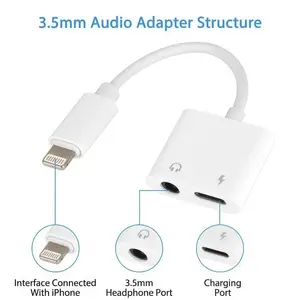


![[Apple Mfi Certified] 2 Pack Lightning to 3.5 Mm Headphone Jack Adapter, Iphone Aux Adapter Converter Dongle Audio Cable Compatible with Iphone 14 13 12 11 X XS 8 7 Seulliya](https://p16-oec-general-useast5.ttcdn-us.com/tos-useast5-i-omjb5zjo8w-tx/af71c24305a345d4b9cab4bce8d560e7~tplv-fhlh96nyum-crop-webp:263:300.webp?dr=12190&t=555f072d&ps=933b5bde&shp=8dbd94bf&shcp=a6e80448&idc=useast5&from=2378011839 "[Apple Mfi Certified] 2 Pack Lightning to 3.5 Mm Headphone Jack Adapter, Iphone Aux Adapter Converter Dongle Audio Cable Compatible with Iphone 14 13 12 11 X XS 8 7 Seulliya")


Skullcandy

4.3
99 sold
-20%$13.17$16.47
![[Apple MFi Certified] iPhone Headphone Adapter 2 Pack, 2 in 1 Lightning to 3.5 mm Headphone Jack Adapter Aux Audio & Charger Splitter Cable for iPhone 14 13 12 11 XS XR X 8 7 6 iPad, Support iOS 16](https://p16-oec-general-useast5.ttcdn-us.com/tos-useast5-i-omjb5zjo8w-tx/1b9905417cca410dbe069c3d91615261~tplv-fhlh96nyum-crop-webp:300:300.webp?dr=12190&t=555f072d&ps=933b5bde&shp=8dbd94bf&shcp=a6e80448&idc=useast5&from=2378011839 "[Apple MFi Certified] iPhone Headphone Adapter 2 Pack, 2 in 1 Lightning to 3.5 mm Headphone Jack Adapter Aux Audio & Charger Splitter Cable for iPhone 14 13 12 11 XS XR X 8 7 6 iPad, Support iOS 16")


Related Searches
Related Categories
Introduction
Experiencing a headphone jack not working on iPhone can be frustrating, especially for those who rely on wired headphones for music, calls, or gaming. This issue may arise due to various reasons, including dirt or debris in the headphone port, software glitches, or hardware malfunctions. If you find yourself in this situation, here are some steps you can take to troubleshoot the problem.
1. **Clean the headphone jack**: Use a soft, dry brush or a toothpick to gently remove any dust or lint that may be obstructing the connection.
2. **Check the headphones**: Test your headphones on another device to confirm they are functioning properly.
3. **Restart your iPhone**: Sometimes, a simple restart can resolve temporary software issues.
4. **Update your software**: Ensure your iPhone is running the latest version of iOS, as updates can fix bugs that affect headphone functionality.
5. **Reset settings**: If the problem persists, consider resetting your iPhone's settings to factory defaults, which can clear any software conflicts.
Understanding the potential causes of a headphone jack not working on iPhone can help you take the right steps towards resolution. Remember, if these solutions do not work, it may be time to consult with a professional technician or visit an Apple Store for further assistance.
1. **Clean the headphone jack**: Use a soft, dry brush or a toothpick to gently remove any dust or lint that may be obstructing the connection.
2. **Check the headphones**: Test your headphones on another device to confirm they are functioning properly.
3. **Restart your iPhone**: Sometimes, a simple restart can resolve temporary software issues.
4. **Update your software**: Ensure your iPhone is running the latest version of iOS, as updates can fix bugs that affect headphone functionality.
5. **Reset settings**: If the problem persists, consider resetting your iPhone's settings to factory defaults, which can clear any software conflicts.
Understanding the potential causes of a headphone jack not working on iPhone can help you take the right steps towards resolution. Remember, if these solutions do not work, it may be time to consult with a professional technician or visit an Apple Store for further assistance.