Results for "computer thunderbolt port"
A Thunderbolt port is a high-speed interface found on computers that allows for data transfer, video output, and power delivery through a single cable. It is commonly used for connecting peripherals such as monitors, external storage devices, and docking stations.


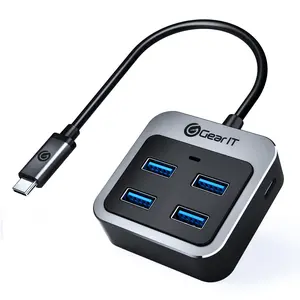
GEARit Official

5.0
5 sold
-31%$10.30$14.88






![80Gbps DisplayPort 2.1 6.6FT [VESA Certified], [8K@240Hz, 4K@540Hz 360Hz 240Hz] DP 2.1 16K, DP80 HDR DSC Display Port Cord Compatible FreeSync Gaming 5090 7900XTX, S1334](https://p16-oec-general-useast5.ttcdn-us.com/tos-useast5-i-omjb5zjo8w-tx/55ddc2ff9b194fc9addddb72db255d2f~tplv-fhlh96nyum-crop-webp:300:300.webp?dr=12190&t=555f072d&ps=933b5bde&shp=8dbd94bf&shcp=a6e80448&idc=useast5&from=2378011839 "80Gbps DisplayPort 2.1 6.6FT [VESA Certified], [8K@240Hz, 4K@540Hz 360Hz 240Hz] DP 2.1 16K, DP80 HDR DSC Display Port Cord Compatible FreeSync Gaming 5090 7900XTX, S1334")
![USB C to HDMI Cable, [4K, High-Speed] USB Type C to HDMI Cable for Home Office, [Thunderbolt 3/4 Compatible] for MacBook Pro/Air 2020, iPad Air 4, iPad Pro 2021, iMac, S23, XPS 17, and More-6ft Grey](https://p16-oec-general-useast5.ttcdn-us.com/tos-useast5-i-omjb5zjo8w-tx/873dd03a574b42419b573b097387de5b~tplv-fhlh96nyum-crop-webp:300:300.webp?dr=12190&t=555f072d&ps=933b5bde&shp=8dbd94bf&shcp=a6e80448&idc=useast5&from=2378011839 "USB C to HDMI Cable, [4K, High-Speed] USB Type C to HDMI Cable for Home Office, [Thunderbolt 3/4 Compatible] for MacBook Pro/Air 2020, iPad Air 4, iPad Pro 2021, iMac, S23, XPS 17, and More-6ft Grey")


Related Searches
Related Categories
Introduction
The Thunderbolt port is revolutionizing the way we connect devices to our computers. With its impressive speed and versatility, the Thunderbolt port can transfer data at lightning-fast rates, making it an essential feature for professionals and everyday users alike. Whether you are a creative professional looking to connect multiple high-resolution displays or a gamer wanting to reduce lag times, the Thunderbolt port offers a seamless experience.
Here are some key benefits of using a Thunderbolt port:
Here are some key benefits of using a Thunderbolt port:
- High-Speed Data Transfer: Enjoy data transfer rates of up to 40 Gbps, allowing for quick file transfers and efficient workflows.
- Versatile Connectivity: Connect a wide range of devices including monitors, storage devices, and docks with just one cable.
- Power Delivery: Charge your devices while transferring data, reducing cable clutter.
- Multiple Device Support: Daisy-chain multiple Thunderbolt devices, maximizing your workspace.