Results for "bluetooth device driver"
A Bluetooth device driver is a software component that enables communication between a Bluetooth device and a computer or other devices. It allows the operating system to recognize and interact with Bluetooth hardware, ensuring proper functionality.


![[Upgraded] UDFINE Bluetooth Receiver, HiFi Wireless Audio Adapter, Bluetooth 5.3 Receiver with 3D Surround aptX HD aptX Adaptive for Home Music Streaming Stereo System conversion plug](https://p16-oec-general-useast5.ttcdn-us.com/tos-useast5-i-omjb5zjo8w-tx/e012b67a99464348b4c4ebb195771811~tplv-fhlh96nyum-crop-webp:300:300.webp?dr=12190&t=555f072d&ps=933b5bde&shp=8dbd94bf&shcp=a6e80448&idc=useast5&from=2378011839 "[Upgraded] UDFINE Bluetooth Receiver, HiFi Wireless Audio Adapter, Bluetooth 5.3 Receiver with 3D Surround aptX HD aptX Adaptive for Home Music Streaming Stereo System conversion plug")


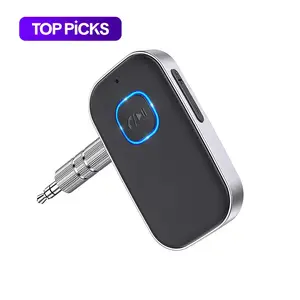
4.6
19.0K sold
-69%$5.60$17.98


![Bluetooth 5.3 FM Transmitter for Car, [2026 Upgraded] Wireless Car Bluetooth Adapter with LED Backlit Ambient Light, PD 30W & QC 3.0 Fast Charging Car Charger, Hands-free Calling, Bass Boost, No Static](https://p16-oec-general-useast8.ttcdn-us.com/tos-useast8-i-rt0ujvrtvp-tx2/ae0e5ba728304939b4856f39bf57c84e~tplv-fhlh96nyum-crop-webp:300:300.webp?dr=12190&t=555f072d&ps=933b5bde&shp=8dbd94bf&shcp=a6e80448&idc=useast5&from=2378011839 "Bluetooth 5.3 FM Transmitter for Car, [2026 Upgraded] Wireless Car Bluetooth Adapter with LED Backlit Ambient Light, PD 30W & QC 3.0 Fast Charging Car Charger, Hands-free Calling, Bass Boost, No Static")


4.4
113.3K sold
-75%$5.46$21.95
Related Searches
Related Categories
Introduction
Bluetooth device drivers play a crucial role in enhancing the connectivity of receivers. When you want to connect your receiver to various Bluetooth-enabled devices, having the right Bluetooth device driver installed is essential. These drivers facilitate seamless communication, enabling you to stream audio wirelessly from smartphones, tablets, and computers to your receiver.
Here’s why having a proper Bluetooth device driver is important:
Here’s why having a proper Bluetooth device driver is important:
- Improved Connectivity: A reliable driver ensures that your receiver can easily pair with Bluetooth devices, providing a hassle-free experience.
- Enhanced Audio Quality: With the right driver, you can enjoy high-quality sound without interruptions or latency issues.
- Wide Compatibility: Updated drivers often provide compatibility with a broader range of Bluetooth devices, making your receiver more versatile.
- Regular Updates: Manufacturers frequently release updates to improve performance and fix bugs, ensuring your receiver remains functional with new devices.