- TikTok Shop
- Automotive & Motorcycle
- Car Electronics
- Car Video Players
- Wireless CarPlay & Android Auto Adapter Dongle, Wired to Wi-Fi Conversion for 2016+ Factory CarPlay Cars, Vehicle & Auto Accessories with USB Type A, Compatible with iPhone (Not for BMW/Tesla), Vehicle Accessories, Wireless Carplay Adapter


3.7
9189 global reviews
5
5288
4
720
3
584
2
429
1
2168
Photos from reviews


🇭** I**1 🇭**

🇭** I**1 🇭**

🇭** I**1 🇭**

🇭** I**1 🇭**


d**x

d**x

d**x

d**x

d**x

d**x

J**n

J**n
Sort by
Recommended
Filter by
All
Displaying 9189 of 9189 reviews
Reset filters
🇭** I**1 🇭**
·
Verified purchase
US
It works perfectly once it was paired it connected instantly.
Item:
Default2025-12-28

t**d
·
Verified purchase
US
My phone no longer connect to the item. I only had it Hooked upfor about two days. It makes my Apple CarPlay freeze and it is very defective! Cost way too much to not work!


Item:
Silver CarPlay2025-12-26

c**8
·
Verified purchase
US
It does not sync well there is a delay when changing song


Item:
Default2025-12-11
d**x
·
Verified purchase
US
It’s an ok product, it does what it supposed to do… on the add it is said that it does overheat but it does… compared to my old one which is smaller , both do the same thing
Item:
Default2025-12-09
J**n
·
Verified purchase
US
Llegó retrasado y lo voy a ensayar más tarde


Item:
Default2025-12-05

F**k G**o
·
Verified purchase
US
No me sirve cuando quiere reproduce la música


Item:
Default2026-01-11

C**n
·
Verified purchase
US
This device works about 25% of the time & when it does connect it lags & car’s touchscreen no longer works. I bought this as a Christmas gift for myself because my new iPhone 17+ will not connect to my 7 yrs old Genesis G80. I guess I’ll buy a phone mount to use GPS & use this device for calls only.


Item:
Default2026-02-11

T**e
·
Verified purchase
US
I have a 2021 Honda CR-V w/ corded Android Auto/Apple Car and Samsung charger port issues which cant connect. I keep it plugged in and startup is quicker than plugging my phone in the cord. Phone calls are clear on both ends and car functions work perfectly. Couldn't ask for anything more! So happy!


Item:
Orange CarPlay2026-01-30

A**y H**s
·
Verified purchase
US
Was really looking forward to using this. But unfortunately it doesn’t fit my GLA correctly.

Item:
Silver CarPlay2026-01-28

S**e
·
Verified purchase
US
I love this wireless CarPlay adapter! No more plugging in my phone CarPlay connects automatically as soon as I start the car. I can use navigation, music, calls, and messages while keeping my phone on my holder charger. It keeps my setup organized, clutter-free, and convenient

Item:
Orange CarPlay2026-01-21

I** D**💛
·
Verified purchase
US
Works as it should. There’s a couple seconds delay when changing songs but it’s ok. Also make sure you turn off the Bluetooth connection from your car to allow it to work. I have a 2019 Honda Passport.

Item:
Default2025-12-18
➖**➖
·
Verified purchase
US
I bought two for both my vehicles and I'm very disappointed in this product. I really had high hopes on this. Mind you I read every review and didn't think this would happen to me definitely not buying again and returning this item asappp!!! -_-

Item:
Default2025-12-13

B**c
·
Verified purchase
US
I honestly thought this wasn’t gonna work, but boy am I happy about this. This saves the headache of a slow phone charger with the wired CarPlay in my vehicle. Thank you very much, I recommend to all wired CarPlay owners.
Quality of work: 10/10
System performance: 9/10, little slow but could be just my system being 4+ years old.
Material: Aluminum or something similar.
Assembly: Plug into wired CarPlay (or port), connect to your phone, and you should be good to go.
Top favorite car accessory I’ve bought from TikTok.
(Photos of in my civic hatchback ex of size and where it was plugged in)


Item:
Default2025-12-09

J**y S**s
·
Verified purchase
US
It worked the first couple of days then it doesn’t work at all. Doesn’t connect to the car or phone but the worse part is that the icon don’t disappear from the screen even when I plugged it out Doesn’t let me do anything now I don’t know how to delete from the car


Item:
Default2025-12-15

A**x R**h
·
Verified purchase
US
It doesn't work, the article really loses the connection, it's not stable. Nothing to do with what they propose in the article


Item:
Default2025-12-06

Y**g
·
Verified purchase
US
Por fin logré encontré un aparato que me conecte sin cable y sin problemas q mi carro, compatible con Toyota y iPhone,estoy feliz🥰 me quite eso de enchufar y desenchufar mi teléfono 👏🏻👏🏻👏🏻


Item:
Default2025-12-04

H**h L**e **
·
Verified purchase
US
Great adapter it hooked up very easy to my iPhone 16 max


Item:
Default2025-12-02
R**G
·
Verified purchase
US
It doesn't work on my car because the item is for a 2017 model and my car is a 2016. I want my money back.

Item:
Default2025-12-02

B**3
·
Verified purchase
US
Doesn’t ever connect just blinks “junk”


Item:
Default2025-12-11

l**l
·
Verified purchase
US
Muy bueno producto recomendado

Item:
Default2025-11-27
About this product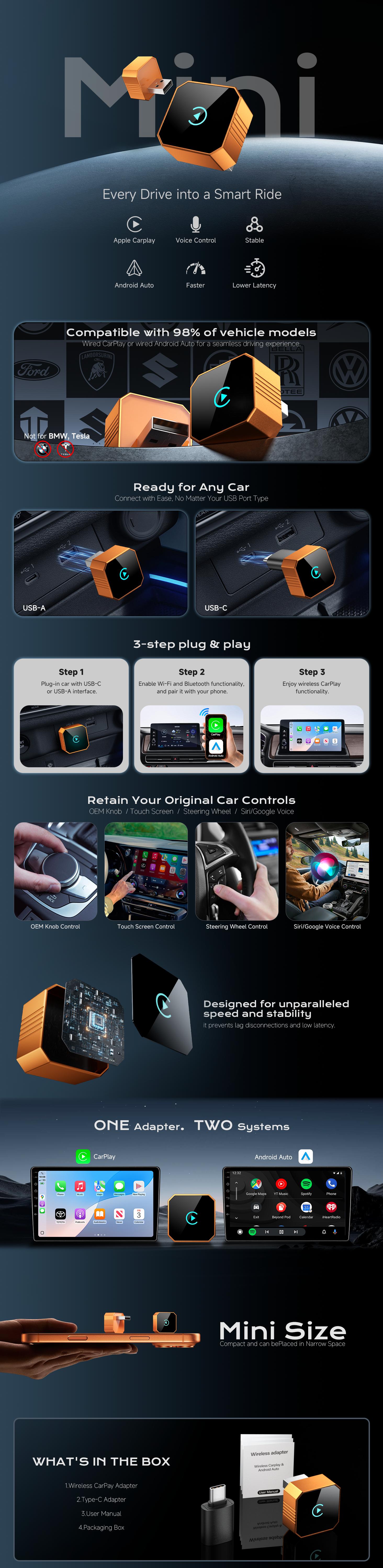
Product description
【Must-read before purchase】
This product is only compatible with vehicles that come factory-equipped with wired CarPlay or wired Android Auto (models from 2016 onwards)
⚠️ Please make sure your vehicle meets the following requirements before placing an order:
The original factory screen of the vehicle supports wired CarPlay or Android Auto (you can test it by connecting your mobile phone with the original data cable).
Your mobile system version: For iPhone, iOS 10 or above is required; for Android phones, Android 11 or above is required.
When using this feature, please ensure that both Bluetooth and Wi-Fi on your mobile phone are turned on and not occupied by other devices.
❌ This product is incompatible with the following vehicle models or scenarios:
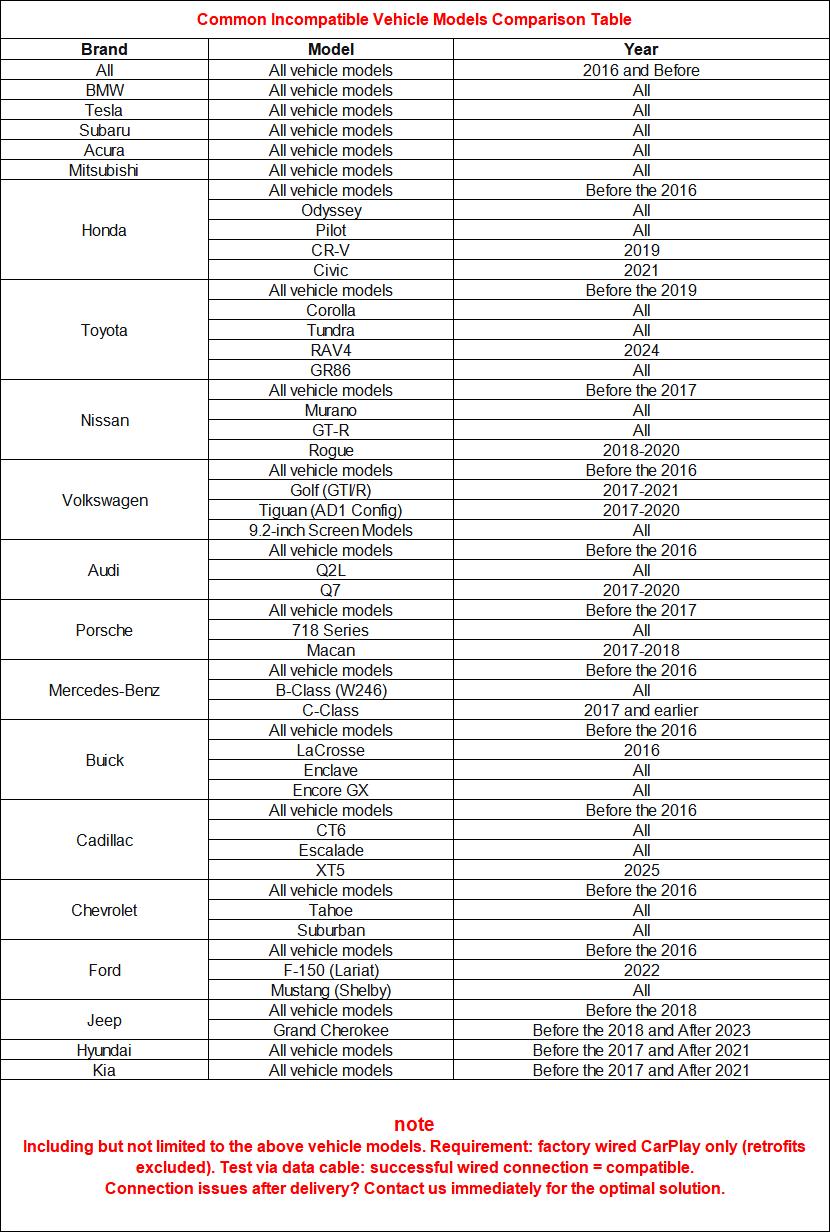
All BMW and Tesla models (factory-equipped with wireless CarPlay, or featuring a proprietary protocol).
Vehicles that only support wireless CarPlay/Android Auto from the original factory.
Vehicles with modified non-original factory infotainment systems, or vehicles whose original factory screens do not support touch control.
Some Mercedes-Benz GLA/GLB/A/B/C Class models, Toyota CHR manufactured before 2017, etc.
⚠️ Special Notice for Android Users:
The compatibility of this product with Android Auto depends on the Google service authorization of the mobile phone and the vehicle protocol. The vehicle connectivity function of some Android phones (such as Samsung) is basic screen casting, which may not support complete vehicle-machine linkage functions such as steering wheel control and voice wake-up.
If you are unsure whether your vehicle model is compatible, please contact our customer service for confirmation before placing an order.
2. Troubleshooting Guide for Connection and Usage Issues (FAQ)
For the second major category, "connection issues", a dedicated FAQ section can be created to provide clear troubleshooting guidelines, which can effectively reduce the pressure on customer service and the rate of negative reviews.
Connection Troubleshooting
Q: What should I do if the phone fails to pair or cannot search for the device signal?
A: 1. Please make sure that both the Bluetooth and Wi-Fi functions of your mobile phone are turned on. 2. For first-time use, please tap "Search" or "Connect New Device" on the vehicle head unit screen, then find "Smart Dongle-xxxx" in the Bluetooth list of your mobile phone to complete pairing. 3. Clear the previous CarPlay pairing records on your mobile phone before trying again.
Q: Frequent disconnections or laggy performance during use?
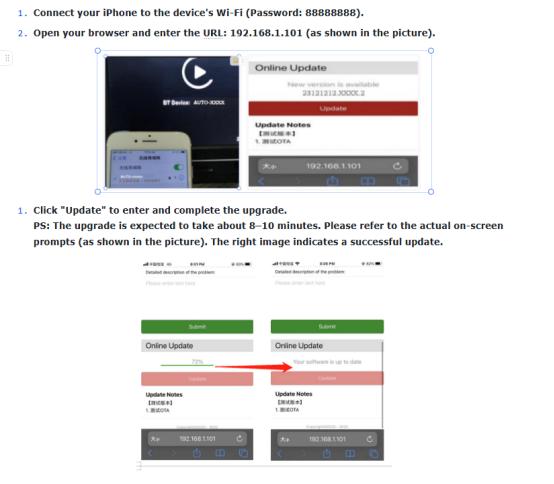
A: 1. Please check whether the power supply of the vehicle's USB port is stable (it is recommended to use a cigarette lighter adapter for power supply). 2. Make sure that the mobile phone's Wi-Fi is only connected to the signal of the converter box, and not connected to other Wi-Fi hotspots in the vehicle. 3. If there is a firmware update prompt, please upgrade via OTA in time.
Q: Why can't I watch videos or use screen mirroring after connecting?
A: The CarPlay and Android Auto modes themselves only support audio and navigation, and do not support video playback.
3. Durability and After-sales Support (Alleviate Concerns)
In response to the feedback of "poor durability" and the pressure from TikTok US's 30-day after-sales warranty period, proactively showcasing the product's heat dissipation design and extended warranty commitment can effectively enhance trust.
Add copy:
Heat dissipation design: The product adopts an optimized heat dissipation structure and materials to ensure stable operation in the high-temperature environment inside the vehicle during summer.
Firmware update: Supports OTA online upgrade, with continuous performance optimization and compatibility issue fixes.
Warranty Commitment: We offer a 45-day hassle-free warranty. If you find any quality issues with the product upon receipt, please contact our customer service immediately and we will handle it for you promptly.
Incompatible Vehicles Reference
Q1: The adapter disconnects frequently or overheats?
A: Please check the output current of your car's USB port. Ensure it provides no less than 1A (1000mA). Low current output is the most common cause of performance issues. If the power supply is insufficient, you can use a Y-cable to draw power from an additional USB port or a cigarette lighter adapter to ensure adequate power.
Q2: Why is there lag, audio distortion, or frequent disconnection?
A: Please update the adapter’s firmware via OTA (Over-the-Air) to the latest version.
Q3: My phone is not listed in the compatible models.
A: Compatibility is determined by the phone’s system version, not the specific model. Please ensure your iPhone is on iOS 10.0+ or Android device on Android 11.0+.
Q4: Connection fails during first-time pairing?
A: Follow this quick troubleshooting checklist:
Q5: How to switch back to wired CarPlay?
A: Simply unplug the adapter from the USB port—your car will automatically revert to the factory wired CarPlay/Android Auto interface. No extra steps needed.
View more
-60%$2*$5*Unlock price
Free shipping
Wireless CarPlay & Android Auto Adapter Dongle, Wired to Wi-Fi Conversion for 2016+ Factory CarPlay Cars, Vehicle & Auto Accessories with USB Type A, Compatible with iPhone (Not for BMW/Tesla), Vehicle Accessories, Wireless Carplay Adapter
3.8(9.2K)
95.6K sold
Color:Orange CarPlay
Orange CarPlay Blue CarPlay
 Silver CarPlay
 Gunmetal CarPlay
Quantity:
Coupon center
Log in to check your coupons
View and claim any available offers once you're logged in.
Shipping & returns
Shipping & delivery
Many items qualify for free shipping or become eligible once the order threshold is met.
Returns made easy
Most items are eligible for free returns within 30 days of delivery for a refund. Some items, including ingestibles, hygiene products, and pre-owned goods, are non-returnable. Final sale items cannot be returned or replaced. Please log in to view this item's specific return policy.
About this shop

AiMoon
3.7
109.2K Sold
5.4K+ Followers
100%24h response rate
0%Ships within 2 days
63%Positive feedback
Visit
Videos for this product
Creator earns commission

Drew
101.5K
Creator earns commission

Dang Deals
77.4K
Creator earns commission

shopdealsbyak
63.1K
Creator earns commission
Dang Deals
56.0K
Creator earns commission

igobychris ★
55.0K
Creator earns commission

E Shami
39.3K
Creator earns commission
Drew
36.5K
Creator earns commission

POV Deals • Friends
45.9K
Creator earns commission
shopdealsbyak
31.6K
Creator earns commission
shopdealsbyak
65.2K
Creator earns commission
E Shami
22.1K
Creator earns commission

TOBIA
15.9K
Creator earns commission

newfindz
15.0K
Creator earns commission

Millie1k
13.2K
Creator earns commission
shopdealsbyak
13.0K
Creator earns commission
shopdealsbyak
12.0K
Creator earns commission

Ryan
12.3K
Creator earns commission
Drew
14.6K
Creator earns commission
Dang Deals
10.9K
Explore more from AiMoon

You may also like


